forked from Gitlink/gitlink_help_center
docker配置修改 #1
|
|
@ -1,25 +0,0 @@
|
|||
{
|
||||
"permissions": {
|
||||
"allow": [
|
||||
"Bash(npm run:*)",
|
||||
"Bash(npm install:*)",
|
||||
"Bash(netstat -ano)",
|
||||
"Bash(powershell -Command \"Get-NetTCPConnection -LocalPort 3000 -ErrorAction SilentlyContinue | Select-Object LocalPort, State\")",
|
||||
"Bash(findstr \":3000\")",
|
||||
"Bash(findstr \"LISTENING\")",
|
||||
"Bash(git config:*)",
|
||||
"Bash(git fetch:*)",
|
||||
"Bash(git add:*)",
|
||||
"Bash(git commit:*)",
|
||||
"Bash(git push:*)",
|
||||
"Bash(start:*)",
|
||||
"Bash(git remote:*)",
|
||||
"Bash(ssh-keygen:*)",
|
||||
"Bash(ssh -T git@gitlink.org.cn)",
|
||||
"Bash(git branch:*)",
|
||||
"Bash(timeout 5 curl -s http://localhost:3000)",
|
||||
"Bash(timeout 8 curl -s http://localhost:3000)",
|
||||
"Bash(curl -s http://localhost:3000)"
|
||||
]
|
||||
}
|
||||
}
|
||||
|
|
@ -1,238 +0,0 @@
|
|||
version: 2
|
||||
name: gitlink-cli-autodeploy
|
||||
description: "每次push到master时自动在服务器上构建并部署gitlink-cli"
|
||||
global:
|
||||
concurrent: 1
|
||||
|
||||
trigger:
|
||||
webhook: gitlink@1.0.0
|
||||
event:
|
||||
- ref: push
|
||||
ruleset-operator: AND
|
||||
condition:
|
||||
param: ref
|
||||
operator: include_regex
|
||||
value: "^refs/heads/master$"
|
||||
|
||||
workflow:
|
||||
- ref: start
|
||||
name: 开始
|
||||
task: start
|
||||
|
||||
# 1. 准备服务器环境
|
||||
- ref: prepare_server_0
|
||||
name: 准备服务器环境
|
||||
task: ssh_cmd@1.1.1
|
||||
input:
|
||||
ssh_ip: '"121.41.222.0"'
|
||||
ssh_port: '"22"'
|
||||
ssh_user: '"root"'
|
||||
ssh_private_key: ((gitlink_cli.gitlink_cli_deploy_key))
|
||||
ssh_cmd: |
|
||||
echo "===================="
|
||||
echo "准备服务器环境"
|
||||
echo "===================="
|
||||
|
||||
# 创建工作目录
|
||||
mkdir -p /opt/gitlink-build
|
||||
mkdir -p /opt/gitlink-cli
|
||||
mkdir -p /opt/gitlink-cli/backups
|
||||
mkdir -p /opt/gitlink-deploy
|
||||
|
||||
# 检查并安装 Go 环境
|
||||
if ! command -v go &> /dev/null; then
|
||||
echo "安装 Go 1.22..."
|
||||
cd /tmp
|
||||
wget -q https://go.dev/dl/go1.22.0.linux-amd64.tar.gz
|
||||
tar -C /usr/local -xzf go1.22.0.linux-amd64.tar.gz
|
||||
export PATH=$PATH:/usr/local/go/bin
|
||||
echo 'export PATH=$PATH:/usr/local/go/bin' >> /root/.bashrc
|
||||
rm -f go1.22.0.linux-amd64.tar.gz
|
||||
else
|
||||
echo "Go 已安装: $(go version)"
|
||||
fi
|
||||
|
||||
# 设置 PATH
|
||||
export PATH=$PATH:/usr/local/go/bin
|
||||
go version
|
||||
|
||||
echo "服务器环境准备完成"
|
||||
needs:
|
||||
- start
|
||||
|
||||
# 2. 在服务器上克隆代码并构建
|
||||
- ref: build_on_server_0
|
||||
name: 在服务器上构建
|
||||
task: ssh_cmd@1.1.1
|
||||
input:
|
||||
ssh_ip: '"121.41.222.0"'
|
||||
ssh_port: '"22"'
|
||||
ssh_user: '"root"'
|
||||
ssh_private_key: ((gitlink_cli.gitlink_cli_deploy_key))
|
||||
ssh_cmd: |
|
||||
echo "===================="
|
||||
echo "在服务器上构建 gitlink-cli"
|
||||
echo "===================="
|
||||
|
||||
# 设置环境变量
|
||||
export PATH=$PATH:/usr/local/go/bin
|
||||
|
||||
# 克隆代码到服务器
|
||||
cd /opt/gitlink-build
|
||||
echo "1. 克隆代码..."
|
||||
if [ -d "gitlink-cli" ]; then
|
||||
cd gitlink-cli
|
||||
git fetch origin
|
||||
git reset --hard origin/master
|
||||
git clean -fd
|
||||
else
|
||||
git clone https://www.gitlink.org.cn/zzx-coder/gitlink-cli.git
|
||||
cd gitlink-cli
|
||||
fi
|
||||
|
||||
# 获取版本信息
|
||||
VERSION=$(git describe --tags --always --dirty 2>/dev/null || echo "dev")
|
||||
COMMIT=$(git rev-parse --short HEAD)
|
||||
BUILD_TIME=$(date -u '+%Y-%m-%d_%H:%M:%S')
|
||||
|
||||
MODULE="github.com/gitlink-org/gitlink-cli"
|
||||
LDFLAGS="-s -w -X ${MODULE}/cmd.Version=${VERSION} -X ${MODULE}/cmd.Commit=${COMMIT} -X ${MODULE}/cmd.BuildTime=${BUILD_TIME}"
|
||||
|
||||
echo "2. 构建信息:"
|
||||
echo " 版本: ${VERSION}"
|
||||
echo " 提交: ${COMMIT}"
|
||||
echo " 时间: ${BUILD_TIME}"
|
||||
|
||||
# 运行测试
|
||||
echo "3. 运行测试..."
|
||||
go test ./... -v -timeout=5m
|
||||
|
||||
# 代码检查
|
||||
echo "4. 代码检查..."
|
||||
go vet ./...
|
||||
go fmt ./...
|
||||
|
||||
# 构建
|
||||
echo "5. 构建 Linux amd64 版本..."
|
||||
CGO_ENABLED=0 GOOS=linux GOARCH=amd64 go build -ldflags "$LDFLAGS" -o gitlink-cli .
|
||||
|
||||
# 验证构建
|
||||
echo "6. 验证构建:"
|
||||
ls -lh gitlink-cli
|
||||
file gitlink-cli
|
||||
./gitlink-cli version
|
||||
|
||||
echo "构建完成"
|
||||
needs:
|
||||
- prepare_server_0
|
||||
|
||||
# 3. 部署到服务器
|
||||
- ref: deploy_on_server_0
|
||||
name: 部署到服务器
|
||||
task: ssh_cmd@1.1.1
|
||||
input:
|
||||
ssh_ip: '"121.41.222.0"'
|
||||
ssh_port: '"22"'
|
||||
ssh_user: '"root"'
|
||||
ssh_private_key: ((gitlink_cli.gitlink_cli_deploy_key))
|
||||
ssh_cmd: |
|
||||
echo "===================="
|
||||
echo "部署 gitlink-cli"
|
||||
echo "===================="
|
||||
|
||||
DEPLOY_DIR="/opt/gitlink-cli"
|
||||
BUILD_DIR="/opt/gitlink-build/gitlink-cli"
|
||||
BACKUP_DIR="/opt/gitlink-cli/backups"
|
||||
|
||||
# 1. 备份当前版本
|
||||
if [ -f "$DEPLOY_DIR/gitlink-cli" ]; then
|
||||
echo "1. 备份当前版本..."
|
||||
BACKUP_NAME="gitlink-cli.backup.$(date +%Y%m%d_%H%M%S)"
|
||||
cp "$DEPLOY_DIR/gitlink-cli" "$BACKUP_DIR/$BACKUP_NAME"
|
||||
echo " 备份完成: $BACKUP_NAME"
|
||||
else
|
||||
echo "1. 首次安装,无需备份"
|
||||
fi
|
||||
|
||||
# 2. 安装新版本
|
||||
echo "2. 安装新版本..."
|
||||
cp "$BUILD_DIR/gitlink-cli" "$DEPLOY_DIR/gitlink-cli"
|
||||
chmod +x "$DEPLOY_DIR/gitlink-cli"
|
||||
|
||||
# 3. 创建符号链接
|
||||
echo "3. 创建符号链接..."
|
||||
mkdir -p /usr/local/bin
|
||||
ln -sf "$DEPLOY_DIR/gitlink-cli" /usr/local/bin/gitlink-cli
|
||||
|
||||
# 4. 验证安装
|
||||
echo "4. 验证安装..."
|
||||
/usr/local/bin/gitlink-cli version
|
||||
/usr/local/bin/gitlink-cli --help | head -10
|
||||
|
||||
# 5. 清理旧备份(保留最近5个)
|
||||
echo "5. 清理旧备份..."
|
||||
cd "$BACKUP_DIR"
|
||||
ls -t gitlink-cli.backup.* 2>/dev/null | tail -n +6 | xargs -r rm
|
||||
|
||||
# 6. 清理构建目录
|
||||
echo "6. 清理构建目录..."
|
||||
cd /opt/gitlink-build
|
||||
rm -rf gitlink-cli
|
||||
|
||||
echo "===================="
|
||||
echo "部署完成!"
|
||||
echo "===================="
|
||||
|
||||
# 显示最终状态
|
||||
ls -lh /opt/gitlink-cli/gitlink-cli
|
||||
ls -lh /usr/local/bin/gitlink-cli
|
||||
needs:
|
||||
- build_on_server_0
|
||||
|
||||
# 4. 部署后验证
|
||||
- ref: verify_deployment_0
|
||||
name: 验证部署
|
||||
task: ssh_cmd@1.1.1
|
||||
input:
|
||||
ssh_ip: '"121.41.222.0"'
|
||||
ssh_port: '"22"'
|
||||
ssh_user: '"root"'
|
||||
ssh_private_key: ((gitlink_cli.gitlink_cli_deploy_key))
|
||||
ssh_cmd: |
|
||||
echo "===================="
|
||||
echo "最终验证"
|
||||
echo "===================="
|
||||
|
||||
# 验证命令可用
|
||||
echo "1. 测试 gitlink-cli 命令:"
|
||||
which gitlink-cli
|
||||
gitlink-cli version
|
||||
|
||||
# 显示帮助信息
|
||||
echo ""
|
||||
echo "2. 显示帮助信息:"
|
||||
gitlink-cli --help | head -15
|
||||
|
||||
# 显示安装路径
|
||||
echo ""
|
||||
echo "3. 安装路径:"
|
||||
ls -lh /opt/gitlink-cli/gitlink-cli
|
||||
ls -lh /usr/local/bin/gitlink-cli
|
||||
|
||||
# 显示备份文件
|
||||
echo ""
|
||||
echo "4. 最近备份:"
|
||||
ls -lt /opt/gitlink-cli/backups/ | head -5
|
||||
|
||||
echo ""
|
||||
echo "===================="
|
||||
echo "验证通过!部署成功!"
|
||||
echo "===================="
|
||||
needs:
|
||||
- deploy_on_server_0
|
||||
|
||||
- ref: end
|
||||
name: 结束
|
||||
task: end
|
||||
needs:
|
||||
- verify_deployment_0
|
||||
|
|
@ -1,57 +0,0 @@
|
|||
version: 2
|
||||
name: gitlink-help-autodeploy
|
||||
description: ""
|
||||
global:
|
||||
concurrent: 1
|
||||
trigger:
|
||||
webhook: gitlink@1.0.0
|
||||
event:
|
||||
- ref: push
|
||||
ruleset-operator: AND
|
||||
workflow:
|
||||
- ref: start
|
||||
name: 开始
|
||||
task: start
|
||||
- ref: git_clone_0
|
||||
name: git clone
|
||||
task: git_clone@1.2.9
|
||||
input:
|
||||
remote_url: '"https://gitlink.org.cn/zzx-coder/gitlink_help_center.git"'
|
||||
ref: '"refs/heads/master"'
|
||||
commit_id: '""'
|
||||
depth: 1
|
||||
needs:
|
||||
- start
|
||||
- ref: docker_image_build_0
|
||||
name: docker镜像构建
|
||||
task: docker_image_build@1.6.0
|
||||
input:
|
||||
docker_username: ((aliyun.aliyun_username))
|
||||
docker_password: ((aliyun.aliyun_password))
|
||||
image_name: '"crpi-1x701qgqjia2gdeu.cn-chengdu.personal.cr.aliyuncs.com/gitlink-help-center/gitlink-help-center"'
|
||||
image_tag: '"latest"'
|
||||
registry_address: '"crpi-1x701qgqjia2gdeu.cn-chengdu.personal.cr.aliyuncs.com"'
|
||||
docker_file: '"Dockerfile"'
|
||||
docker_build_path: '"."'
|
||||
workspace: ((git_clone_0.git_path))
|
||||
image_push: true
|
||||
build_args: '""'
|
||||
needs:
|
||||
- git_clone_0
|
||||
- ref: ssh_cmd_0
|
||||
name: ssh执行命令
|
||||
task: ssh_cmd@1.1.1
|
||||
input:
|
||||
ssh_private_key: ((gitlink_help_center_ssh_key.gitlink_help_center_ssh_key))
|
||||
ssh_ip: '"121.41.222.0"'
|
||||
ssh_port: '"22"'
|
||||
ssh_user: '"root"'
|
||||
ssh_cmd: '"/opt/gitlink-deploy/deploy.sh"'
|
||||
needs:
|
||||
- docker_image_build_0
|
||||
- ref: end
|
||||
name: 结束
|
||||
task: end
|
||||
needs:
|
||||
- ssh_cmd_0
|
||||
|
||||
|
|
@ -1,54 +0,0 @@
|
|||
version: 2
|
||||
name: gitlink_cli
|
||||
description: ""
|
||||
global:
|
||||
concurrent: 1
|
||||
trigger:
|
||||
webhook: gitlink@1.0.0
|
||||
event:
|
||||
- ref: push
|
||||
ruleset-operator: AND
|
||||
workflow:
|
||||
- ref: start
|
||||
name: 开始
|
||||
task: start
|
||||
- ref: git_clone_0
|
||||
name: git clone
|
||||
task: git_clone@1.2.9
|
||||
input:
|
||||
remote_url: '"https://www.gitlink.org.cn/zzx-coder/gitlink-cli"'
|
||||
ref: '"refs/heads/master"'
|
||||
commit_id: '""'
|
||||
depth: 1
|
||||
needs:
|
||||
- start
|
||||
- ref: end
|
||||
name: 结束
|
||||
task: end
|
||||
needs:
|
||||
- ssh_cmd_0
|
||||
- ref: ssh_cmd_0
|
||||
name: ssh执行命令
|
||||
task: ssh_cmd@1.1.1
|
||||
input:
|
||||
ssh_ip: '""'
|
||||
ssh_port: '"22"'
|
||||
ssh_user: '"root"'
|
||||
ssh_cmd: '""'
|
||||
needs:
|
||||
- docker_image_build_0
|
||||
- ref: docker_image_build_0
|
||||
name: docker镜像构建
|
||||
task: docker_image_build@1.6.0
|
||||
input:
|
||||
image_name: '""'
|
||||
image_tag: '"latest"'
|
||||
registry_address: '""'
|
||||
docker_file: '"Dockerfile"'
|
||||
docker_build_path: '"."'
|
||||
workspace: '"."'
|
||||
image_push: true
|
||||
build_args: '""'
|
||||
needs:
|
||||
- git_clone_0
|
||||
|
||||
34
Dockerfile
34
Dockerfile
|
|
@ -1,34 +0,0 @@
|
|||
FROM crpi-1x701qgqjia2gdeu.cn-chengdu.personal.cr.aliyuncs.com/gitlink-help-center/gitlink-help-center:node-20-alpine
|
||||
LABEL maintainer="yuankaifneg <2894340009@qq.com>"
|
||||
|
||||
# 设置为root用户以安装系统依赖
|
||||
USER root
|
||||
|
||||
# 安装必要的系统依赖
|
||||
RUN yum install -y \
|
||||
git \
|
||||
python3 \
|
||||
make \
|
||||
gcc-c++ \
|
||||
bash && \
|
||||
yum clean all
|
||||
# 设置工作目录
|
||||
WORKDIR /app
|
||||
# 优先复制package.json和package-lock.json以利用Docker缓存
|
||||
COPY package.json package-lock.json ./
|
||||
# 安装依赖(忽略peer依赖冲突)
|
||||
RUN npm install --legacy-peer-deps
|
||||
# 复制项目文件
|
||||
COPY . .
|
||||
# 构建应用
|
||||
RUN npm run build
|
||||
# 暴露端口
|
||||
EXPOSE 3000
|
||||
# 设置环境变量
|
||||
ENV NODE_ENV=production
|
||||
ENV PORT=3000
|
||||
# 健康检查
|
||||
HEALTHCHECK --interval=30s --timeout=3s --start-period=40s --retries=3 \
|
||||
CMD node -e "require('http').get('http://localhost:3000', (r) => {process.exit(r.statusCode === 200 ? 0 : 1)})"
|
||||
# 启动应用
|
||||
CMD ["npm", "run", "serve"]
|
||||
108
README.md
108
README.md
|
|
@ -1,108 +1,2 @@
|
|||
# 确实开源帮助中心
|
||||
|
||||
## 贡献文档方式
|
||||
#### 1.复刻主仓库
|
||||
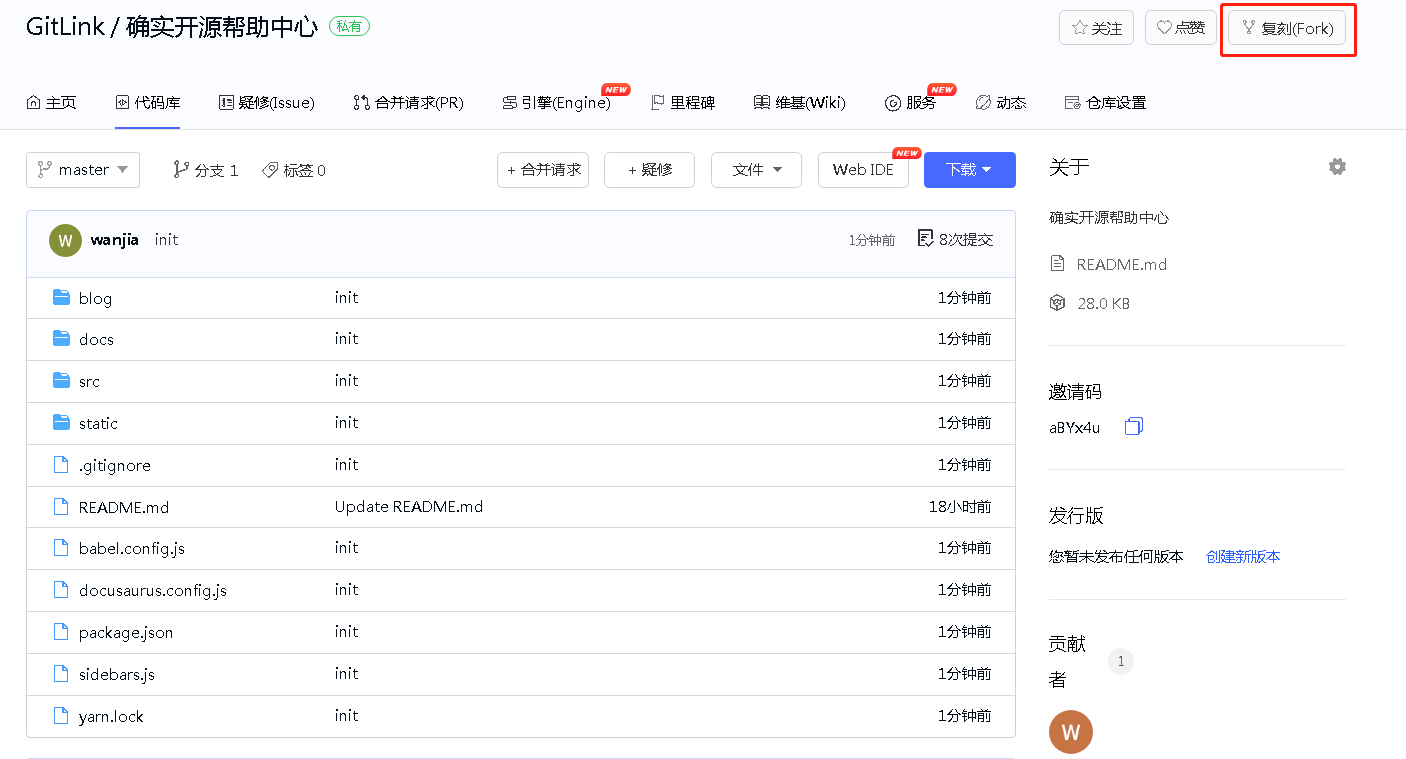
|
||||
<br/>
|
||||
|
||||
#### 2.进入复刻仓库编辑文档
|
||||
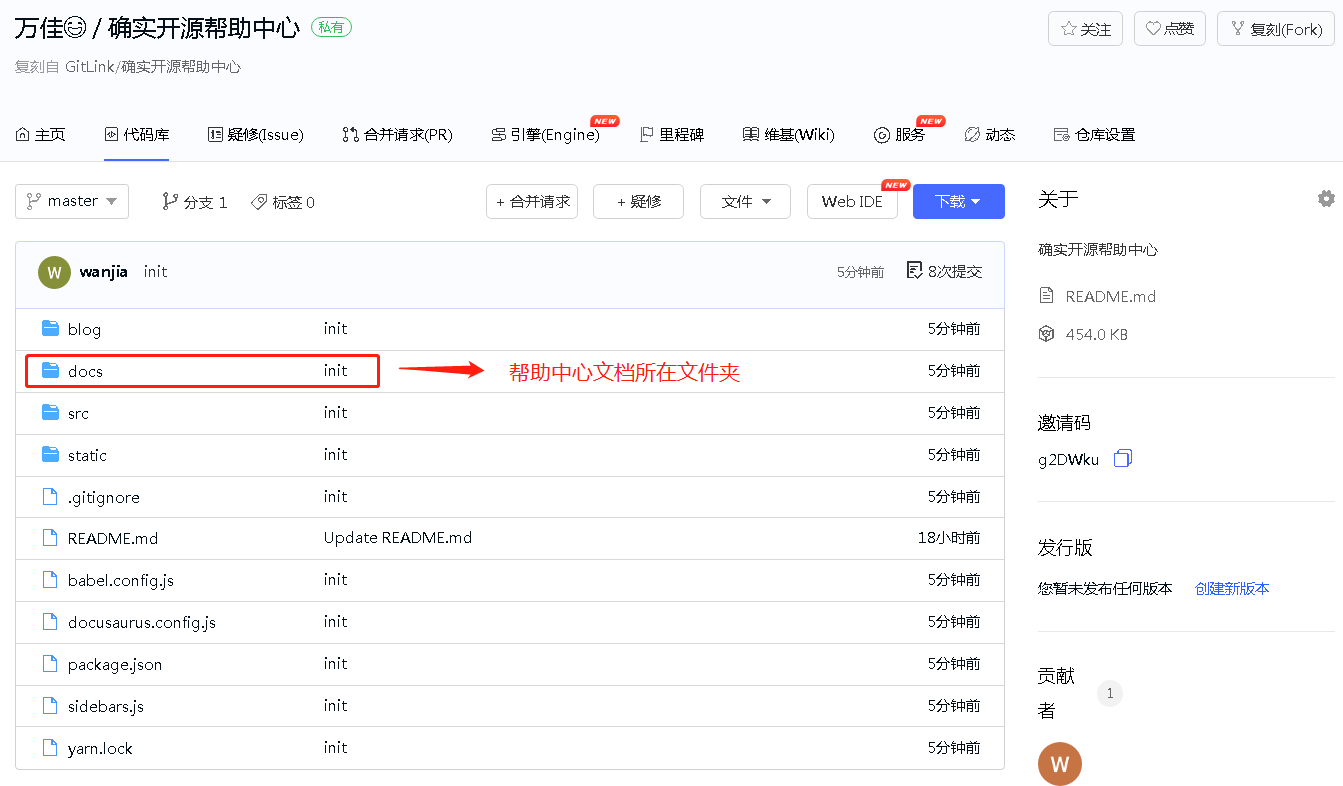
|
||||
|
||||
<br/>
|
||||
|
||||
可采用如下两种方式编辑:
|
||||
* 克隆复刻仓库到本地后,在**gitlink_help_center/docs**文件夹下新建文件夹或markdown文档,依次执行
|
||||
```bash
|
||||
git add <新增文件>
|
||||
git commit <新增文件> -m "提交信息"
|
||||
git push
|
||||
```
|
||||
* 在gitlink代码仓库页面进行编辑,然后点击“提交变更”
|
||||
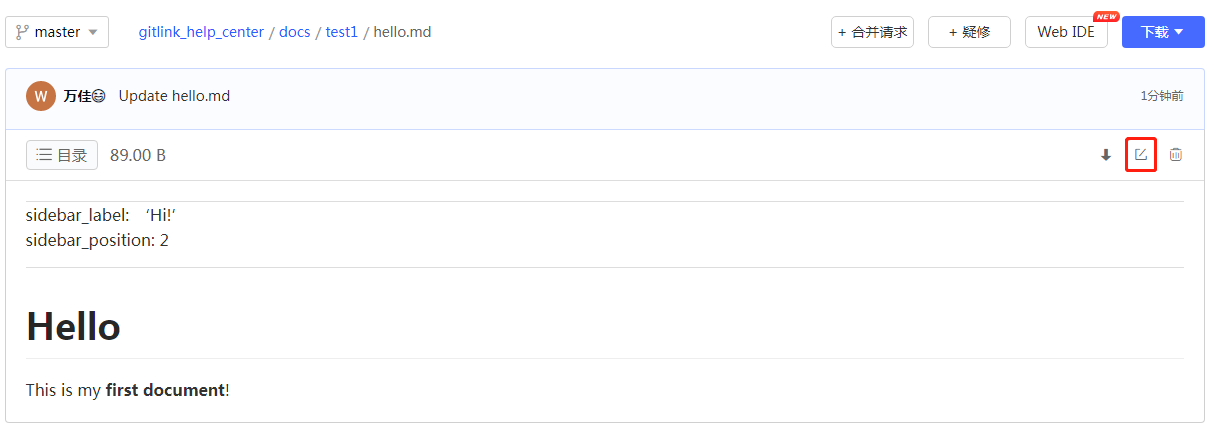
|
||||
|
||||
<br/>
|
||||
|
||||
#### 3.向主仓提交合并请求
|
||||
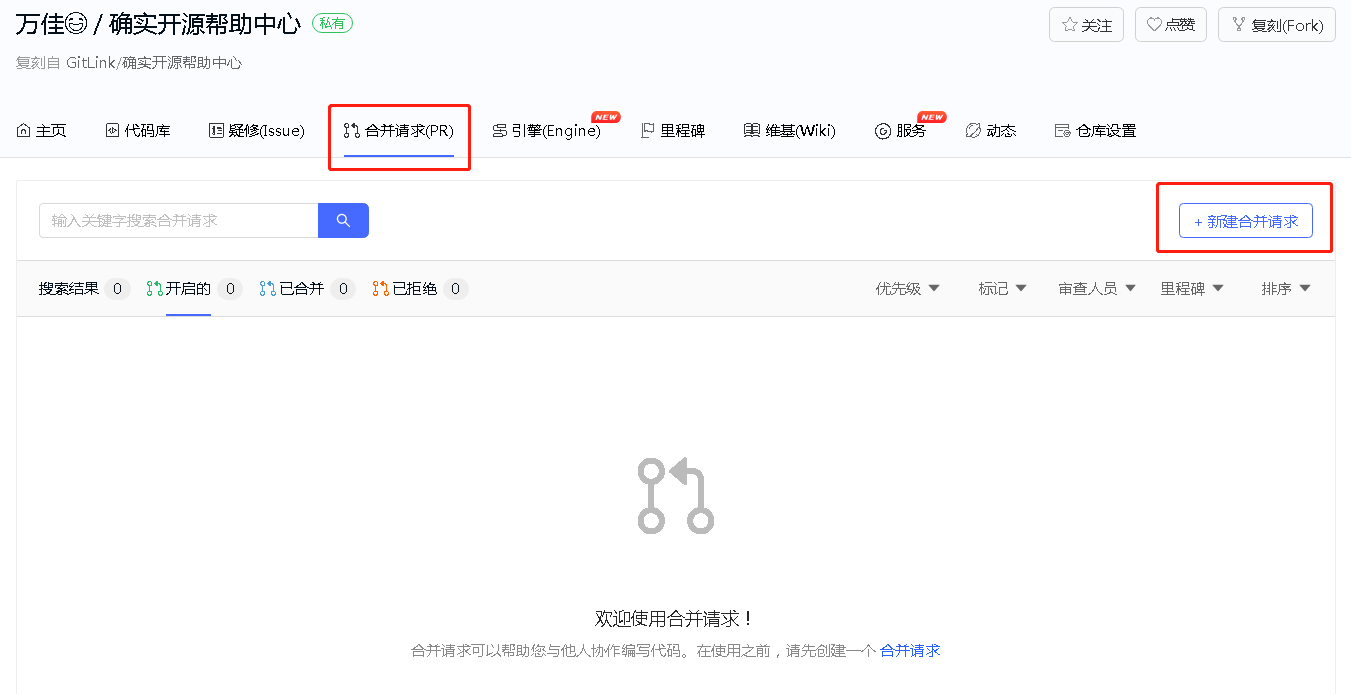
|
||||
|
||||
<br/>
|
||||
|
||||
## 页面目录——仓库目录示意图
|
||||
|
||||
<br/>
|
||||
|
||||
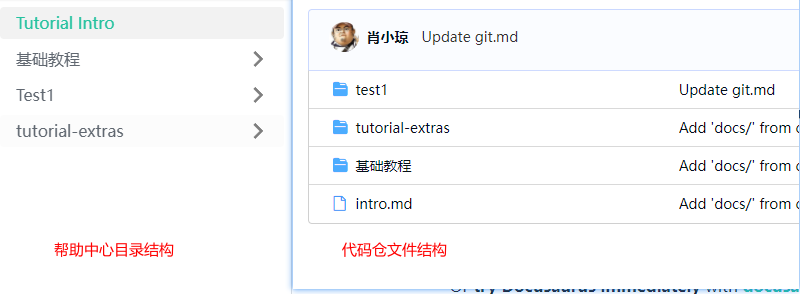
1.如下图左边为帮助中心侧边栏一级目录展示效果,右边为代码仓库文件夹目录:
|
||||
|
||||
|
||||
<br/>
|
||||
|
||||
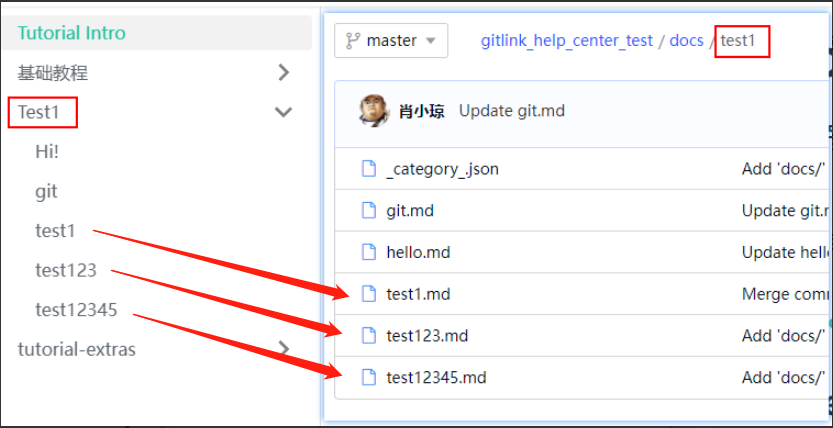
2.如下图左边为帮助中心侧边栏点击一级目录“Test1”后展开效果,右边为点击代码仓库文件夹“test1”后md文件目录:
|
||||
|
||||
|
||||
## 创建markdown文档
|
||||
* 创建第一篇文档
|
||||
在**docs/test1**目录下创建hello.md
|
||||
|
||||
```bash
|
||||
# Hello
|
||||
|
||||
This is my **first document**!
|
||||
```
|
||||
在一级标题中:#与标题内容间需要入空格(# Hello)
|
||||
|
||||
* 配置侧边栏
|
||||
|
||||
```bash
|
||||
---
|
||||
sidebar_label: 'Hi!' <!--定义侧边栏标签名称-->
|
||||
sidebar_position: 3 <!--定义侧边栏层级位置-->
|
||||
---
|
||||
|
||||
# Hello
|
||||
|
||||
This is my **first document**!
|
||||
```
|
||||
|
||||
<br/>
|
||||
|
||||
* 链接
|
||||
|
||||
支持使用 url 路径或相对文件路径的常规 Markdown 链接
|
||||
```bash
|
||||
git操作 [git](/git).
|
||||
```
|
||||
```
|
||||
git操作 [git](./git.md).
|
||||
```
|
||||
|
||||
<br/>
|
||||
|
||||
* 图片
|
||||
|
||||
支持常规markdown图片,在**static/img/gitlink_logo.png**中添加一个图像.png并在Markdown中显示它:
|
||||
```bash
|
||||

|
||||
|
||||
```
|
||||
初始化项目
|
||||
node v20.x npm install --force
|
||||
## 前端build成中文 (i18n中可编辑对应中文内容)
|
||||
```
|
||||
npm run build -- --locale zh-CN
|
||||
```
|
||||
启动
|
||||
```
|
||||
npm run serve
|
||||
```
|
||||
|
||||
|
||||
### 开发模式
|
||||
启动
|
||||
```
|
||||
npm run dev
|
||||
```
|
||||
|
||||
|
||||
|
||||
|
||||
# Evolution_and_Maintenance_GitLink
|
||||
|
||||
|
|
|
|||
|
|
@ -1,12 +0,0 @@
|
|||
---
|
||||
sidebar_label: '平台公告'
|
||||
sidebar_position: 1
|
||||
---
|
||||
|
||||
# 平台公告
|
||||
|
||||
GitLink帮助中心致力于帮助开发者快速熟悉平台功能,掌握开源协作的正确方法。在这里,您可以找到从账号注册到项目管理的完整指南,也可以通过实际使用中发现平台存在的问题并提出改进建议。我们希望通过文档与社区的共同努力,让GitLink成为更好的开源创新服务平台。如果您在使用过程中遇到任何问题,欢迎在平台中提交疑修(Issue)获得帮助。
|
||||
|
||||
帮助中心项目地址是:https://gitlink.org.cn/Gitlink/gitlink_help_center/
|
||||
|
||||
开发者可以先复刻帮助中心项目,然后在本地进行开发。
|
||||
|
|
@ -1,18 +0,0 @@
|
|||
---
|
||||
sidebar_label: '通知设置'
|
||||
sidebar_position: 2
|
||||
---
|
||||
|
||||
# 通知设置
|
||||
#### 1.进入通知设置界面
|
||||
通过点击首页的通知按钮进入通知设置界面
|
||||

|
||||
<br/>
|
||||
或在头像下拉列表中选择设置可以进入消息通知设置界面
|
||||
|
||||

|
||||
|
||||
#### 2.进行通知设置
|
||||
通过**通知管理**可以对接受通知的方式进行设置,默认所有通知都是通过站内信的方式接受,可以通过勾选为重要的通知类型增加邮件接受方式。
|
||||
|
||||

|
||||
|
|
@ -1 +0,0 @@
|
|||
Subproject commit 293675001acfe7c74caa0bcf78765ec29034c715
|
||||
|
|
@ -0,0 +1,25 @@
|
|||
FROM node:18-alpine
|
||||
LABEL maintainer="zzx-coder <zzx-coder@example.com>"
|
||||
|
||||
WORKDIR /gitlink_help_center
|
||||
|
||||
# 设置npm镜像源(解决网络问题)
|
||||
RUN npm config set registry https://registry.npmmirror.com
|
||||
|
||||
# 先复制package文件
|
||||
COPY package*.json ./
|
||||
|
||||
# 安装依赖(使用--legacy-peer-deps解决冲突)
|
||||
RUN npm install --legacy-peer-deps --force
|
||||
|
||||
# 复制项目文件
|
||||
COPY . .
|
||||
|
||||
# 构建项目
|
||||
RUN npm run build -- --locale zh-CN
|
||||
|
||||
# 暴露端口
|
||||
EXPOSE 3000
|
||||
|
||||
# 启动服务
|
||||
CMD ["npm", "run", "serve"]
|
||||
|
|
@ -0,0 +1,108 @@
|
|||
# 确实开源帮助中心
|
||||
|
||||
## 贡献文档方式
|
||||
#### 1.复刻主仓库
|
||||

|
||||
<br/>
|
||||
|
||||
#### 2.进入复刻仓库编辑文档
|
||||

|
||||
|
||||
<br/>
|
||||
|
||||
可采用如下两种方式编辑:
|
||||
* 克隆复刻仓库到本地后,在**gitlink_help_center/docs**文件夹下新建文件夹或markdown文档,依次执行
|
||||
```bash
|
||||
git add <新增文件>
|
||||
git commit <新增文件> -m "提交信息"
|
||||
git push
|
||||
```
|
||||
* 在gitlink代码仓库页面进行编辑,然后点击“提交变更”
|
||||

|
||||
|
||||
<br/>
|
||||
|
||||
#### 3.向主仓提交合并请求
|
||||

|
||||
|
||||
<br/>
|
||||
|
||||
## 页面目录——仓库目录示意图
|
||||
|
||||
<br/>
|
||||
|
||||
1.如下图左边为帮助中心侧边栏一级目录展示效果,右边为代码仓库文件夹目录:
|
||||

|
||||
|
||||
<br/>
|
||||
|
||||
2.如下图左边为帮助中心侧边栏点击一级目录“Test1”后展开效果,右边为点击代码仓库文件夹“test1”后md文件目录:
|
||||

|
||||
|
||||
## 创建markdown文档
|
||||
* 创建第一篇文档
|
||||
在**docs/test1**目录下创建hello.md
|
||||
|
||||
```bash
|
||||
# Hello
|
||||
|
||||
This is my **first document**!
|
||||
```
|
||||
在一级标题中:#与标题内容间需要入空格(# Hello)
|
||||
|
||||
* 配置侧边栏
|
||||
|
||||
```bash
|
||||
---
|
||||
sidebar_label: 'Hi!' <!--定义侧边栏标签名称-->
|
||||
sidebar_position: 3 <!--定义侧边栏层级位置-->
|
||||
---
|
||||
|
||||
# Hello
|
||||
|
||||
This is my **first document**!
|
||||
```
|
||||
|
||||
<br/>
|
||||
|
||||
* 链接
|
||||
|
||||
支持使用 url 路径或相对文件路径的常规 Markdown 链接
|
||||
```bash
|
||||
git操作 [git](/git).
|
||||
```
|
||||
```
|
||||
git操作 [git](./git.md).
|
||||
```
|
||||
|
||||
<br/>
|
||||
|
||||
* 图片
|
||||
|
||||
支持常规markdown图片,在**static/img/gitlink_logo.png**中添加一个图像.png并在Markdown中显示它:
|
||||
```bash
|
||||

|
||||
|
||||
```
|
||||
初始化项目
|
||||
node v20.x npm install --force
|
||||
## 前端build成中文 (i18n中可编辑对应中文内容)
|
||||
```
|
||||
npm run build -- --locale zh-CN
|
||||
```
|
||||
启动
|
||||
```
|
||||
npm run serve
|
||||
```
|
||||
|
||||
|
||||
### 开发模式
|
||||
启动
|
||||
```
|
||||
npm run dev
|
||||
```
|
||||
|
||||
|
||||
|
||||
|
||||
|
||||
|
|
@ -1,6 +1,6 @@
|
|||
---
|
||||
sidebar_label: 'bot安装'
|
||||
sidebar_position: 2
|
||||
sidebar_position: 1
|
||||
---
|
||||
import MyButton from './mybutton';
|
||||
|
||||
|
|
@ -1,6 +1,6 @@
|
|||
---
|
||||
sidebar_label: 'bot市场介绍'
|
||||
sidebar_position: 1
|
||||
sidebar_label: 'bot市场'
|
||||
sidebar_position: 4
|
||||
---
|
||||
import MyButton from './mybutton';
|
||||
|
||||
|
|
@ -1,6 +1,6 @@
|
|||
---
|
||||
sidebar_label: 'bot开发'
|
||||
sidebar_position: 4
|
||||
sidebar_label: 'bot开发'
|
||||
sidebar_position: 3
|
||||
---
|
||||
import MyButton from './mybutton';
|
||||
|
||||
|
|
@ -1,6 +1,6 @@
|
|||
---
|
||||
sidebar_label: 'bot配置'
|
||||
sidebar_position: 3
|
||||
sidebar_label: 'bot配置'
|
||||
sidebar_position: 2
|
||||
---
|
||||
import MyButton from './mybutton';
|
||||
|
||||
|
|
@ -21,27 +21,6 @@ GitLink(确实开源)是CCF官方指定的开源创新服务平台,旨在
|
|||
# 帮助文档
|
||||
帮助文档有助于您全面了解GitLink平台,让我们一起为开源创新贡献力量!
|
||||
|
||||
<div class="progress-notice">
|
||||
<div class="progress-card">
|
||||
<div class="progress-header">
|
||||
<h3>📚 学习进度</h3>
|
||||
</div>
|
||||
<div class="progress-content">
|
||||
<p>开始阅读文档后,这里会显示您的学习进度</p>
|
||||
<div class="progress-bar">
|
||||
<div class="progress-fill"></div>
|
||||
</div>
|
||||
<div class="progress-stats">
|
||||
<div class="progress-stat">
|
||||
<span>已阅读: <strong>0</strong></span>
|
||||
</div>
|
||||
<div class="progress-stat">
|
||||
<span>文档总数: <strong>0</strong></span>
|
||||
</div>
|
||||
</div>
|
||||
</div>
|
||||
</div>
|
||||
</div>
|
||||
<div class="row">
|
||||
<div class="col col--12">
|
||||
<section class="row list">
|
||||
|
|
@ -81,7 +60,7 @@ GitLink(确实开源)是CCF官方指定的开源创新服务平台,旨在
|
|||
<p>维基(Wiki)使用及设置[2个文档]</p>
|
||||
</a></article>
|
||||
<article class="col col--6 margin-bottom--lg">
|
||||
<a class="card padding--lg cardContainer" href="/Bot市场/bot市场介绍">
|
||||
<a class="card padding--lg cardContainer" href="/Bot市场/bot安装">
|
||||
<h2 class="text--truncate cardTitle" title="Bot市场">Bot市场</h2>
|
||||
<p>Bot市场使用及设置[4个文档]</p>
|
||||
</a></article>
|
||||
|
|
@ -8,39 +8,39 @@ sidebar_position: 1
|
|||
|
||||

|
||||
|
||||
点击左侧面板中 个人建站 - 我的站点
|
||||
点击左测面板中 个人建站 - 我的站点
|
||||
|
||||

|
||||
|
||||
### 创建站点
|
||||
|
||||
在**我的站点**界面点击**新建站点**按钮,进入新建站点界面
|
||||
在我的站点界面点击 新建站点 按钮,进入新建站点界面
|
||||
|
||||
在新建站点界面输入站点名称,此名称将在**我的站点**的**站点列表**中展示
|
||||
在新建站点界面输入站点名称,此名称将在我的站点列表中展示
|
||||
|
||||
并且选择对应的建站工具与主题,我们为您提供了3种不同的工具,每个工具10种主题,一共30种供您挑选
|
||||
|
||||

|
||||
|
||||
填写完毕后,点击页面下方蓝色按钮**创建站点**
|
||||
填写完毕后,点击页面下方蓝色按钮: 创建站点
|
||||
|
||||

|
||||
|
||||
这样您就拥有了一个网站,并且有了一个代码仓库。
|
||||
|
||||
在仓库的**服务**一栏中**个人建站**服务的操作界面,这里您可以查看一些您的站点状态、站点名称、网站地址、建站工具、建站时间。
|
||||
在仓库的 服务 一栏中 个人建站服务的操作界面,这里您可以查看一些您的站点状态、站点名称、网站地址、建站工具、建站时间
|
||||
|
||||
### 部署站点
|
||||
|
||||

|
||||
|
||||
点击**去部署**按钮,选择想要部署的分支后点击**确定**
|
||||
点击去部署按钮,选择想要部署的分支后点击确定
|
||||
|
||||

|
||||
|
||||
等待程序运行一会儿后,会返回一些服务器部署信息给您,部署成功后您就可以访问站点了。
|
||||
等待程序运行一会儿后,会返回一些服务器部署信息给您
|
||||
|
||||
点击网站地址就可以跳转
|
||||
部署成功后您就可以访问站点了。点击网站地址就可以跳转
|
||||
|
||||

|
||||
|
||||
|
|
@ -3,15 +3,15 @@ sidebar_label: '成员管理'
|
|||
sidebar_position: 7
|
||||
---
|
||||
### **1. 成员管理入口**
|
||||
在仓库主页,点击**仓库设置**按键,再点击**成员管理**按键,即可进入成员管理模块,如下图所示。
|
||||
在仓库主页,点击“仓库设置”按键,再点击”成员管理“按键,即可进入成员管理模块,如下图所示。
|
||||
<br/>
|
||||
|
||||
### **2. 筛选、搜索项目成员**
|
||||
进入成员管理模块后,可以通过**角色筛选**按键来筛选项目成员类型,通过**搜索**按键可以检索具体的项目成员,如下图所示。
|
||||
进入成员管理模块后,可以通过”角色筛选“按键来筛选项目成员类型,通过”搜索“按键可以检索具体的项目成员,如下图所示。
|
||||
<br/>
|
||||
|
||||
### **3. 添加成员**
|
||||
进入成员管理模块后,可以通过**添加成员**按键来添加项目成员,左侧搜索框检索到具体用户并选中后,单击**添加成员**按键即可成功添加项目成员。
|
||||
### **3. 筛选、搜索项目成员**
|
||||
进入成员管理模块后,可以通过”添加成员“按键来添加项目成员,左侧搜索框检索到具体用户并选中后,单击”添加成员“按键即可成功添加项目成员。
|
||||
<br/>
|
||||
|
||||
### **4. 项目成员权限管理**
|
||||
|
|
@ -19,5 +19,5 @@ sidebar_position: 7
|
|||
<br/>
|
||||
|
||||
### **5. 删除项目成员**
|
||||
进入成员管理模块后,单击项目成员右侧的**删除**按键,可以删除改名项目成员,如下图所示。
|
||||
进入成员管理模块后,单击项目成员右侧的”删除“按键,可以删除改名项目成员,如下图所示。
|
||||
<br/>
|
||||
|
|
@ -5,7 +5,7 @@ sidebar_position: 3
|
|||
|
||||
# 代码评审
|
||||
### **1. 进入代码评审**
|
||||
|
||||
如下图所示,点击“代码评审”按钮可以进入代码评审
|
||||
<br/>
|
||||
|
||||
### **2. 代码评审界面**
|
||||
|
|
@ -33,7 +33,7 @@ Gitee配置方式为:个人头像→设置→私人令牌→生成新令牌→
|
|||

|
||||
|
||||
|
||||
②访问“点击前往”按钮前往目标仓库webhook页新建一个webhook,以github为例
|
||||
②访问点击前往按钮前往目标仓库webhook页新建一个webhook,以github为例
|
||||
|
||||

|
||||
|
||||
|
|
@ -2,9 +2,9 @@
|
|||
sidebar_label: '组织成员管理'
|
||||
sidebar_position: 4
|
||||
---
|
||||
# 成员管理
|
||||
# 成员管理(Members Management)
|
||||
|
||||
在个人所管理的项目当中的**仓库设置**当中的**成员管理**可以进入成员管理界面
|
||||
在 个人所管理的项目当中的**仓库设置**当中的**成员管理**可以进入成员管理界面
|
||||
|
||||

|
||||
|
||||
|
|
@ -3,7 +3,9 @@ sidebar_label: '模板导入及导出'
|
|||
sidebar_position: 2
|
||||
---
|
||||
|
||||
# 模板导入及导出
|
||||
# 确实开源帮助中心
|
||||
|
||||
## 模板的导入及导出管理
|
||||
#### 1.模板导入
|
||||
通过点击wiki界面的**导入模板**按钮即可导入本地的txt,markdown等格式文件进行Wiki文档的创建,当前平台此项功能尚在开发测试环节
|
||||
[](/img/wiki/img4.png)
|
||||
|
|
@ -4,21 +4,20 @@ sidebar_position: 1
|
|||
---
|
||||
|
||||
|
||||
# 维基页面管理
|
||||
# 确实开源帮助中心
|
||||
|
||||
## 维基界面管理
|
||||
#### 1.维基界面
|
||||
GitLink项目安排了专门的**维基(Wiki)界面**来展示项目的一些情况。
|
||||

|
||||
GitLink项目安排了专门的**维基(Wiki)界面**来展示项目的一些情况
|
||||
[](/img/wiki/img1.png)
|
||||
|
||||
#### 2.创建维基内容
|
||||
在初始化的维基界面当中点击**创建Wiki文档**或者**导入模板**即可进行Wiki文档的编辑。
|
||||
在初始化的维基界面当中点击**创建Wiki文档**或者**导入模板**即可进行Wiki文档的编辑
|
||||
<br/>
|
||||

|
||||
|
||||
|
||||
#### 3.进行Wiki文档的编辑
|
||||
点击**创建Wiki文档**后即跳转到编辑界面,初始内容为空白的文档
|
||||

|
||||
也可以通过勾选**添加模板**来进行模板的导入,平台提供的模板包括*周报*和*月报*的格式
|
||||

|
||||
完成编辑后点击左下角的的**保存**即可
|
||||
[](/img/wiki/img3.png)
|
||||
也可以通过勾选*添加模板*来进行模板的导入,平台提供的模板包括*周报*和*月报*的格式
|
||||
[](/img/wiki/img2.png)
|
||||
完成编辑后点击左下角的的保存即可
|
||||
|
|
@ -0,0 +1,21 @@
|
|||
---
|
||||
sidebar_label: '通知设置'
|
||||
sidebar_position: 2
|
||||
---
|
||||
|
||||
|
||||
# 确实开源帮助中心
|
||||
|
||||
## 通知设置
|
||||
#### 1.进入通知设置界面
|
||||
通过点击首页的通知按钮进入通知设置界面;
|
||||

|
||||
<br/>
|
||||
或在头像下拉列表中选择设置可以进入消息通知设置界面;
|
||||
|
||||

|
||||
|
||||
#### 2.进行通知设置
|
||||
通过“通知管理”可以对接受通知的方式进行设置,默认所有通知都是通过站内信的方式接受,可以通过勾选为重要的通知类型增加邮件接受方式。
|
||||
|
||||

|
||||
|
|
@ -3,6 +3,7 @@ const darkCodeTheme = require('prism-react-renderer/themes/dracula');
|
|||
//Docusaurus v3写法
|
||||
// const { themes } = require('prism-react-renderer');
|
||||
// import { themes } from 'prism-react-renderer';
|
||||
import("@easyops-cn/docusaurus-search-local").PluginOptions;
|
||||
|
||||
/** @type {import('@docusaurus/types').DocusaurusConfig} */
|
||||
module.exports = {
|
||||
|
|
@ -15,13 +16,7 @@ module.exports = {
|
|||
favicon: 'img/icon.ico',
|
||||
organizationName: 'luffyZh', // Usually your GitHub org/user name.
|
||||
projectName: 'docusaurus-luffyzh-website', // Usually your repo name.
|
||||
scripts: [
|
||||
{
|
||||
src: '/js/reading-progress.js',
|
||||
async: true,
|
||||
defer: true,
|
||||
},
|
||||
],
|
||||
scripts: [],
|
||||
// stylesheets: ['styles/dark-mode.css'],
|
||||
themeConfig: {
|
||||
docs:{
|
||||
|
|
@ -178,7 +173,7 @@ module.exports = {
|
|||
'@docusaurus/preset-classic',
|
||||
{
|
||||
docs: {
|
||||
sidebarPath: require.resolve('./sidebars.js'),
|
||||
// sidebarPath: require.resolve('./sidebars.js'),
|
||||
editUrl:'https://www.gitlink.org.cn/Gitlink/gitlink_help_center/tree/master/',
|
||||
routeBasePath: "/",
|
||||
},
|
||||
|
|
@ -198,6 +193,7 @@ module.exports = {
|
|||
hashed: true,
|
||||
language: ["en", "zh"],
|
||||
highlightSearchTermsOnTargetPage: true,
|
||||
blogRouteBasePath: "/",
|
||||
explicitSearchResultPath: true,
|
||||
// For Docs using Chinese, The `language` is recommended to set to:
|
||||
// ```
|
||||

|
Before Width: | Height: | Size: 135 KiB After Width: | Height: | Size: 135 KiB |
|
|
@ -1,12 +1,12 @@
|
|||
{
|
||||
"name": "docusaurus",
|
||||
"version": "3.0.0",
|
||||
"version": "0.0.0",
|
||||
"lockfileVersion": 3,
|
||||
"requires": true,
|
||||
"packages": {
|
||||
"": {
|
||||
"name": "docusaurus",
|
||||
"version": "3.0.0",
|
||||
"version": "0.0.0",
|
||||
"dependencies": {
|
||||
"@cmfcmf/docusaurus-search-local": "1.1.0",
|
||||
"@docusaurus/core": "3.9.2",
|
||||
|
|
@ -26,7 +26,7 @@
|
|||
"react-modal": "3.16.1"
|
||||
},
|
||||
"engines": {
|
||||
"node": ">=18.x"
|
||||
"node": ">=14.18.1 <=18.x"
|
||||
}
|
||||
},
|
||||
"node_modules/@algolia/abtesting": {
|
||||
|
|
@ -19901,6 +19901,13 @@
|
|||
"url": "https://opencollective.com/webpack"
|
||||
}
|
||||
},
|
||||
"node_modules/search-insights": {
|
||||
"version": "2.17.3",
|
||||
"resolved": "https://registry.npmjs.org/search-insights/-/search-insights-2.17.3.tgz",
|
||||
"integrity": "sha512-RQPdCYTa8A68uM2jwxoY842xDhvx3E5LFL1LxvxCNMev4o5mLuokczhzjAgGwUZBAmOKZknArSxLKmXtIi2AxQ==",
|
||||
"license": "MIT",
|
||||
"peer": true
|
||||
},
|
||||
"node_modules/section-matter": {
|
||||
"version": "1.0.0",
|
||||
"resolved": "https://registry.npmjs.org/section-matter/-/section-matter-1.0.0.tgz",
|
||||
|
|
@ -20987,6 +20994,20 @@
|
|||
"is-typedarray": "^1.0.0"
|
||||
}
|
||||
},
|
||||
"node_modules/typescript": {
|
||||
"version": "5.9.3",
|
||||
"resolved": "https://registry.npmjs.org/typescript/-/typescript-5.9.3.tgz",
|
||||
"integrity": "sha512-jl1vZzPDinLr9eUt3J/t7V6FgNEw9QjvBPdysz9KfQDD41fQrC2Y4vKQdiaUpFT4bXlb1RHhLpp8wtm6M5TgSw==",
|
||||
"license": "Apache-2.0",
|
||||
"peer": true,
|
||||
"bin": {
|
||||
"tsc": "bin/tsc",
|
||||
"tsserver": "bin/tsserver"
|
||||
},
|
||||
"engines": {
|
||||
"node": ">=14.17"
|
||||
}
|
||||
},
|
||||
"node_modules/undici": {
|
||||
"version": "7.22.0",
|
||||
"resolved": "https://registry.npmjs.org/undici/-/undici-7.22.0.tgz",
|
||||
|
|
@ -14,7 +14,6 @@
|
|||
"write-heading-ids": "docusaurus write-heading-ids"
|
||||
},
|
||||
"dependencies": {
|
||||
"@cmfcmf/docusaurus-search-local": "1.1.0",
|
||||
"@docusaurus/core": "3.9.2",
|
||||
"@docusaurus/plugin-client-redirects": "3.9.2",
|
||||
"@docusaurus/preset-classic": "3.9.2",
|
||||
|
|
@ -0,0 +1,9 @@
|
|||
module.exports = {
|
||||
DocsSidebar: [
|
||||
{
|
||||
type: 'doc',
|
||||
id: 'index',
|
||||
label: 'Docs',
|
||||
}
|
||||
],
|
||||
};
|
||||
|
|
@ -0,0 +1,151 @@
|
|||
/* stylelint-disable docusaurus/copyright-header */
|
||||
/**
|
||||
* Any CSS included here will be global. The classic template
|
||||
* bundles Infima by default. Infima is a CSS framework designed to
|
||||
* work well for content-centric websites.
|
||||
*/
|
||||
|
||||
/* You can override the default Infima variables here. */
|
||||
:root {
|
||||
--ifm-color-primary: #466aff;
|
||||
--ifm-color-primary-dark: rgb(33, 175, 144);
|
||||
--ifm-color-primary-darker: rgb(31, 165, 136);
|
||||
--ifm-color-primary-darkest: rgb(26, 136, 112);
|
||||
--ifm-color-primary-light: rgb(70, 203, 174);
|
||||
--ifm-color-primary-lighter: rgb(102, 212, 189);
|
||||
--ifm-color-primary-lightest: rgb(146, 224, 208);
|
||||
--ifm-code-font-size: 95%;
|
||||
--search-local-modal-background:#1b2440;
|
||||
}
|
||||
.navbar{
|
||||
background-color: rgba(27, 36, 64, 1);
|
||||
}
|
||||
.navbar__link--active,a:hover,.menu__link--active{
|
||||
color: rgba(70, 106, 255, 1)!important;
|
||||
}
|
||||
.navbar__link{
|
||||
color: #fff;
|
||||
}
|
||||
.table-of-contents__link--active{
|
||||
color: #466aff;
|
||||
}
|
||||
html[data-theme=light] .menu{
|
||||
background-image:linear-gradient(180deg,#f3f5f8 0%,#ffffff 100%);
|
||||
box-shadow:8px 6px 18px rgba(171, 202, 255, 0.24) inset;
|
||||
margin-bottom: 0px!important;
|
||||
}
|
||||
.docusaurus-highlight-code-line {
|
||||
background-color: rgba(0, 0, 0, 0.1);
|
||||
display: block;
|
||||
margin: 0 calc(-1 * var(--ifm-pre-padding));
|
||||
padding: 0 var(--ifm-pre-padding);
|
||||
}
|
||||
|
||||
html[data-theme='dark'] .docusaurus-highlight-code-line {
|
||||
background-color: rgba(0, 0, 0, 0.3);
|
||||
}
|
||||
.navbar__search span[role='listbox']{
|
||||
background-color: #33416b;
|
||||
}
|
||||
.footer{
|
||||
height:450px;
|
||||
position: relative;
|
||||
background: #1e1e1e;
|
||||
padding:0px;
|
||||
}
|
||||
.container{
|
||||
height: 100%;
|
||||
display: flex;
|
||||
flex-direction: column;
|
||||
}
|
||||
.footer__bottom .margin-bottom--sm{
|
||||
position: absolute;
|
||||
margin-top: -150px;
|
||||
top:50%
|
||||
}
|
||||
.footer__links .footer__title{
|
||||
height: 25px;
|
||||
font-size: 18px;
|
||||
font-weight: 600;
|
||||
color: #fff;
|
||||
line-height: 25px;
|
||||
margin-bottom: 20px;
|
||||
}
|
||||
.footer__links .footer__col:last-child .footer__items:last-child{
|
||||
display: flex;
|
||||
flex-wrap: wrap;
|
||||
}
|
||||
.footer__links .footer__col:last-child .footer__items:last-child .footer__item{
|
||||
width: 50%;
|
||||
}
|
||||
.footer__links .footer__col:last-child .footer__items:last-child .footer__item:nth-child(2){
|
||||
background-image: url(../../static/img/gitlink-qq.png);
|
||||
background-size: 100% 100%;
|
||||
height: 90px;
|
||||
width: 90px;
|
||||
background-color: #fff;
|
||||
border-radius: 4px;
|
||||
position: relative;
|
||||
}
|
||||
.footer__links .footer__col:last-child .footer__items:last-child .footer__item:nth-child(3){
|
||||
background-image: url(../../static/img/gongzhong.png);
|
||||
background-size: 100% 100%;
|
||||
height: 90px;
|
||||
width: 90px;
|
||||
background-color: #fff;
|
||||
border-radius: 4px;
|
||||
position: relative;
|
||||
margin-left: 34px;
|
||||
}
|
||||
.footer__links .footer__col:last-child .footer__items:last-child .footer__item:nth-child(2) a,
|
||||
.footer__links .footer__col:last-child .footer__items:last-child .footer__item:nth-child(3) a{
|
||||
position: absolute;
|
||||
top: 95px;
|
||||
left: 50%;
|
||||
margin-left: -17px;
|
||||
}
|
||||
.footer__links .footer__col:last-child .footer__items:last-child .footer__item:first-child{
|
||||
width: 100%;
|
||||
}
|
||||
.container .footer__links{
|
||||
margin-left: 420px;
|
||||
margin-top: 4rem;
|
||||
}
|
||||
.container .footer__logo{
|
||||
margin-top: 5rem!important;
|
||||
}
|
||||
.container .footer__links .footer__col .footer__item{
|
||||
color: #bdc2d1;
|
||||
font-size: 14px;
|
||||
font-weight: 400;
|
||||
line-height: 20px;
|
||||
height: 20px;
|
||||
margin-bottom: 15px;
|
||||
}
|
||||
.footer__bottom .margin-bottom--sm img{
|
||||
width: 300px;
|
||||
max-width: unset;
|
||||
}
|
||||
.container .footer__copyright{
|
||||
position: absolute;
|
||||
width: 100%;
|
||||
left: 0px;
|
||||
font-size: 12px;
|
||||
font-weight: 400;
|
||||
color: #bdc2d1;
|
||||
line-height: 28px;
|
||||
padding: 15px 0;
|
||||
text-align: center;
|
||||
background-color: #1b212c;
|
||||
}
|
||||
.container .footer__copyright p{
|
||||
margin-bottom: 0px!important;
|
||||
}
|
||||
.aa-Form{
|
||||
width: unset;
|
||||
flex:1;
|
||||
}
|
||||
.widget{
|
||||
display: none!important;
|
||||
opacity: 0;
|
||||
}
|
||||
Some files were not shown because too many files have changed in this diff Show More
Loading…
Reference in New Issue