7.1 KiB
Install OpenVINO™ Runtime on Linux From YUM Repository
@sphinxdirective
With the OpenVINO™ 2022.3 release, you can install OpenVINO Runtime on Linux using the YUM repository.
OpenVINO™ Development Tools can be installed via PyPI only. See
Installing Additional Components <#step-3-optional-install-additional-components>__ for more information.
See the Release Notes <https://www.intel.com/content/www/us/en/developer/articles/release-notes/openvino-2022-3-lts-relnotes.html>_ for more information on updates in the latest release.
Installing OpenVINO Runtime from YUM is recommended for C++ developers. If you are working with Python, the PyPI package has everything needed for Python development and deployment on CPU and GPUs. Visit the :doc:Install OpenVINO from PyPI <openvino_docs_install_guides_installing_openvino_pip> page for instructions on how to install OpenVINO Runtime for Python using PyPI.
.. warning::
By downloading and using this container and the included software, you agree to the terms and conditions of the software license agreements <https://software.intel.com/content/dam/develop/external/us/en/documents/intel-openvino-license-agreements.pdf>_.
@endsphinxdirective
Prerequisites
@sphinxdirective .. tab:: System Requirements
| Full requirement listing is available in:
| System Requirements Page <https://www.intel.com/content/www/us/en/developer/tools/openvino-toolkit/system-requirements.html>_
.. note::
Installing OpenVINO from YUM is only supported on RHEL 8.2 and higher versions. CentOS 7 is not supported for this installation method.
.. tab:: Processor Notes
Processor graphics are not included in all processors.
See Product Specifications_ for information about your processor.
.. _Product Specifications: https://ark.intel.com/
.. tab:: Software
CMake 3.13 or higher, 64-bit <https://cmake.org/download/>_- GCC 8.2.0
Python 3.7 - 3.10, 64-bit <https://www.python.org/downloads/>_
Install OpenVINO Runtime ########################
Step 1: Set Up the Repository +++++++++++++++++++++++++++++
-
Create a YUM repository file (
openvino-2022.repo) in the/tmpdirectory as a normal user:.. code-block:: sh
tee > /tmp/openvino-2022.repo << EOF [OpenVINO] name=Intel(R) Distribution of OpenVINO 2022 baseurl=https://yum.repos.intel.com/openvino/2022 enabled=1 gpgcheck=1 repo_gpgcheck=1 gpgkey=https://yum.repos.intel.com/intel-gpg-keys/GPG-PUB-KEY-INTEL-SW-PRODUCTS.PUB EOF
-
Move the new
openvino-2022.repofile to the YUM configuration directory, i.e./etc/yum.repos.d:.. code-block:: sh
sudo mv /tmp/openvino-2022.repo /etc/yum.repos.d
-
Verify that the new repository is set up properly.
.. code-block:: sh
yum repolist | grep -i openvino
You will see the available list of packages.
To list available OpenVINO packages, use the following command:
.. code-block:: sh
yum list 'openvino*'
Step 2: Install OpenVINO Runtime Using the YUM Package Manager ++++++++++++++++++++++++++++++++++++++++++++++++++++++++++++++
Install OpenVINO Runtime
.. tab:: The Latest Version
Run the following command:
.. code-block:: sh
sudo yum install openvino
.. tab:: A Specific Version
Run the following command:
.. code-block:: sh
sudo yum install openvino-<VERSION>.<UPDATE>.<PATCH>
For example:
.. code-block:: sh
sudo yum install openvino-2022.3.0
Check for Installed Packages and Version
Run the following command:
.. code-block:: sh
yum list installed 'openvino*'
.. _intall additional components yum:
Step 3 (Optional): Install Additional Components +++++++++++++++++++++++++++++++++++++++++++++++++
OpenVINO Development Tools is a set of utilities for working with OpenVINO and OpenVINO models. It provides tools like Model Optimizer, Benchmark Tool, Post-Training Optimization Tool, and Open Model Zoo Downloader. If you installed OpenVINO Runtime using YUM, OpenVINO Development Tools must be installed separately.
See For C++ Developers section on the :doc:Install OpenVINO Development Tools <openvino_docs_install_guides_install_dev_tools> page for instructions.
Step 4 (Optional): Configure Inference on Non-CPU Devices ++++++++++++++++++++++++++++++++++++++++++++++++++++++++++
To enable the toolkit components to use processor graphics (GPU) on your system, follow the steps in [GPU Setup Guide](@ref openvino_docs_install_guides_configurations_for_intel_gpu).
Step 5: Build Samples ++++++++++++++++++++++
To build the C++ or C sample applications for Linux, run the build_samples.sh script:
.. tab:: C++
.. code-block:: sh
/usr/share/openvino/samples/cpp/build_samples.sh
.. tab:: C
.. code-block:: sh
/usr/share/openvino/samples/c/build_samples.sh
For more information, refer to :doc:Build the Sample Applications on Linux <openvino_docs_OV_UG_Samples_Overview>.
Uninstalling OpenVINO Runtime ##############################
To uninstall OpenVINO Runtime via YUM, run the following command based on your needs:
.. tab:: The Latest Version
.. code-block:: sh
sudo yum autoremove openvino
.. tab:: A Specific Version
.. code-block:: sh
sudo yum autoremove openvino-<VERSION>.<UPDATE>.<PATCH>
For example:
.. code-block:: sh
sudo yum autoremove openvino-2022.3.0
What's Next? #############
Now that you've installed OpenVINO Runtime, you're ready to run your own machine learning applications! Learn more about how to integrate a model in OpenVINO applications by trying out the following tutorials:
-
Try the
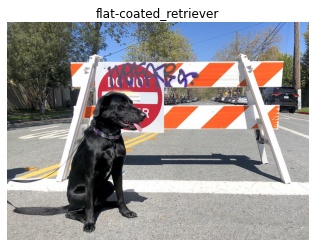
C++ Quick Start Example <openvino_docs_get_started_get_started_demos.html>_ for step-by-step instructions on building and running a basic image classification C++ application... image:: https://user-images.githubusercontent.com/36741649/127170593-86976dc3-e5e4-40be-b0a6-206379cd7df5.jpg :width: 400
-
Visit the :ref:
Samples <code samples>page for other C++ example applications to get you started with OpenVINO, such as:Basic object detection with the Hello Reshape SSD C++ sample <openvino_inference_engine_samples_hello_reshape_ssd_README.html>_Automatic speech recognition C++ sample <openvino_inference_engine_samples_speech_sample_README.html>_
You can also try the following things:
- Learn more about :doc:
OpenVINO Workflow <openvino_workflow>. - To prepare your models for working with OpenVINO, see :doc:
Model Preparation <openvino_docs_model_processing_introduction>. - See pre-trained deep learning models in our :doc:
Open Model Zoo <model_zoo>. - Learn more about :doc:
Inference with OpenVINO Runtime <openvino_docs_OV_UG_OV_Runtime_User_Guide>. - See sample applications in :doc:
OpenVINO toolkit Samples Overview <openvino_docs_OV_UG_Samples_Overview>. - Take a glance at the OpenVINO product home page: https://software.intel.com/en-us/openvino-toolkit.
@endsphinxdirective