123 lines
9.9 KiB
Markdown
123 lines
9.9 KiB
Markdown
Dolphin Scheduler Official Website
|
||
[dolphinscheduler.apache.org](https://dolphinscheduler.apache.org)
|
||
==================================================================
|
||
|
||
[](https://www.apache.org/licenses/LICENSE-2.0.html)
|
||
[](https://codecov.io/gh/apache/dolphinscheduler/branch/dev)
|
||
[](https://sonarcloud.io/dashboard?id=apache-dolphinscheduler)
|
||
[](https://twitter.com/dolphinschedule)
|
||
[](https://s.apache.org/dolphinscheduler-slack)
|
||
|
||
[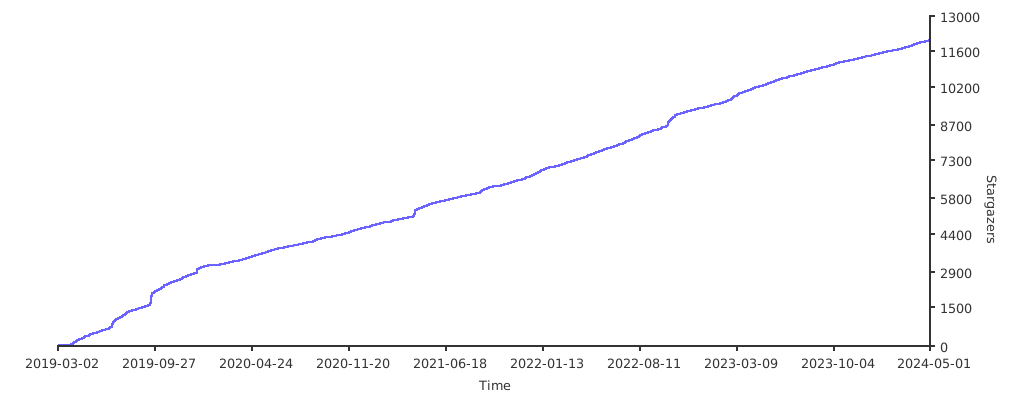](https://starchart.cc/apache/dolphinscheduler)
|
||
|
||
[](README.md)
|
||
[](README_zh_CN.md)
|
||
|
||
## Design Features
|
||
|
||
DolphinScheduler is a distributed and extensible workflow scheduler platform with powerful DAG visual interfaces, dedicated to solving complex job dependencies in the data pipeline and providing various types of jobs available `out of the box`.
|
||
|
||
The key features for DolphinScheduler are as follows:
|
||
- Easy to deploy, we provide 4 ways to deploy, such as Standalone deployment,Cluster deployment,Docker / Kubernetes deployment and Rainbond deployment
|
||
- Easy to use, there are four ways to create workflows:
|
||
- Visually, create tasks by dragging and dropping tasks
|
||
- [PyDolphinScheduler](https://dolphinscheduler.apache.org/python/main/index.html), Creating workflows via Python API, aka workflow-as-code
|
||
- Yaml definition, mapping yaml into workflow(have to install PyDolphinScheduler currently)
|
||
- Open API, Creating workflows
|
||
|
||
- Highly Reliable,
|
||
DolphinScheduler uses a decentralized multi-master and multi-worker architecture, which naturally supports horizontal scaling and high availability
|
||
- High performance, its performance is N times faster than other orchestration platform and it can support tens of millions of tasks per day
|
||
- Supports multi-tenancy
|
||
- Supports various task types: Shell, MR, Spark, SQL (MySQL, PostgreSQL, Hive, Spark SQL), Python, Procedure, Sub_Workflow,
|
||
Http, K8s, Jupyter, MLflow, SageMaker, DVC, Pytorch, Amazon EMR, etc
|
||
- Orchestrating workflows and dependencies, you can pause/stop/recover task any time, failed tasks can be set to automatically retry
|
||
- Visualizing the running state of the task in real-time and seeing the task runtime log
|
||
- What you see is what you get when you edit the task on the UI
|
||
- Backfill can be operated on the UI directly
|
||
- Perfect project, resource, data source-level permission control
|
||
- Displaying workflow history in tree/Gantt chart, as well as statistical analysis on the task status & process status in each workflow
|
||
- Supports internationalization
|
||
- Cloud Native, DolphinScheduler supports orchestrating multi-cloud/data center workflow, and
|
||
supports custom task type
|
||
- More features waiting for partners to explore
|
||
|
||
| Stability | Accessibility | Features | Scalability |
|
||
|----------------------------------------------------------------------------------------------------------------------------------------------------------------------------------------------------------------------------------|----------------------------------------------------------------------------------------------------------------------------------------------------------------------------------------|--------------------------------------------------------------------------------------------------------------------------------------------------------------------------------|------------------------------------------------------------------------------------------------------------------------------------------------------------------------------------------|
|
||
| Decentralized multi-master and multi-worker | Visualization of workflow key information, such as task status, task type, retry times, task operation machine information, visual variables, and so on at a glance. | Support pause, recover operation | Support customized task types |
|
||
| support HA | Visualization of all workflow operations, dragging tasks to draw DAGs, configuring data sources and resources. At the same time, for third-party systems, provide API mode operations. | Users on DolphinScheduler can achieve many-to-one or one-to-one mapping relationship through tenants and Hadoop users, which is very important for scheduling large data jobs. | The scheduler supports distributed scheduling, and the overall scheduling capability will increase linearly with the scale of the cluster. Master and Worker support dynamic adjustment. |
|
||
| Overload processing: By using the task queue mechanism, the number of schedulable tasks on a single machine can be flexibly configured. Machine jam can be avoided with high tolerance to numbers of tasks cached in task queue. | One-click deployment | Support traditional shell tasks, and big data platform task scheduling: MR, Spark, SQL (MySQL, PostgreSQL, hive, spark SQL), Python, Procedure, Sub_Process | |
|
||
|
||
## User Interface Screenshots
|
||
|
||

|
||

|
||

|
||

|
||

|
||
|
||
## QuickStart in Docker
|
||
|
||
Please refer the official website document: [QuickStart in Docker](https://dolphinscheduler.apache.org/en-us/docs/3.1.2/guide/start/docker)
|
||
|
||
## QuickStart in Kubernetes
|
||
|
||
Please refer to the official website document: [QuickStart in Kubernetes](https://dolphinscheduler.apache.org/en-us/docs/3.1.2/guide/installation/kubernetes)
|
||
|
||
## How to Build
|
||
|
||
```bash
|
||
./mvnw clean install -Prelease
|
||
```
|
||
|
||
### Build with different Zookeeper versions
|
||
|
||
The default Zookeeper Server version supported is 3.8.0.
|
||
```bash
|
||
# Default Zookeeper 3.8.0
|
||
./mvnw clean install -Prelease
|
||
# Support to Zookeeper 3.4.6+
|
||
./mvnw clean install -Prelease -Dzk-3.4
|
||
```
|
||
|
||
Artifact:
|
||
|
||
```
|
||
dolphinscheduler-dist/target/apache-dolphinscheduler-${latest.release.version}-bin.tar.gz: Binary package of DolphinScheduler
|
||
dolphinscheduler-dist/target/apache-dolphinscheduler-${latest.release.version}-src.tar.gz: Source code package of DolphinScheduler
|
||
```
|
||
|
||
## Thanks
|
||
|
||
DolphinScheduler is based on a lot of excellent open-source projects, such as Google guava, grpc, netty, quartz, and many open-source projects of Apache and so on.
|
||
We would like to express our deep gratitude to all the open-source projects used in Dolphin Scheduler. We hope that we are not only the beneficiaries of open-source, but also give back to the community. Besides, we hope everyone who have the same enthusiasm and passion for open source could join in and contribute to the open-source community!
|
||
|
||
## Get Help
|
||
|
||
1. Submit an [issue](https://github.com/apache/dolphinscheduler/issues/new/choose)
|
||
2. [Join our slack](https://s.apache.org/dolphinscheduler-slack) and send your question to channel `#troubleshooting`
|
||
|
||
## Community
|
||
|
||
You are very welcome to communicate with the developers and users of Dolphin Scheduler. There are two ways to find them:
|
||
1. Join the Slack channel [Slack](https://asf-dolphinscheduler.slack.com/).
|
||
2. Follow the [Twitter account of DolphinScheduler](https://twitter.com/dolphinschedule) and get the latest news on time.
|
||
|
||
## How to Contribute
|
||
|
||
The community welcomes everyone to contribute, please refer to this page to find out more: [How to contribute](docs/docs/en/contribute/join/contribute.md).
|
||
|
||
# Landscapes
|
||
|
||
<p align="center">
|
||
<br/><br/>
|
||
<img src="https://landscape.cncf.io/images/left-logo.svg" width="150"/> <img src="https://landscape.cncf.io/images/right-logo.svg" width="200"/>
|
||
<br/><br/>
|
||
DolphinScheduler enriches the <a href="https://landscape.cncf.io/?landscape=observability-and-analysis&license=apache-license-2-0">CNCF CLOUD NATIVE Landscape.</a >
|
||
|
||
</p >
|
||
|
||
## License
|
||
|
||
Please refer to the [LICENSE](https://github.com/apache/dolphinscheduler/blob/dev/LICENSE) file.
|