解决issue #70
|
|
@ -70,6 +70,12 @@ module.exports = {
|
|||
position: 'left',
|
||||
dropdownActiveClassDisabled: true
|
||||
},
|
||||
// 收藏按钮已移除
|
||||
// {
|
||||
// type: 'html',
|
||||
// position: 'right',
|
||||
// value: '<span id="favorite-btn-placeholder"></span>',
|
||||
// },
|
||||
// {
|
||||
// href: 'https://github.com/boxyhq',
|
||||
// position: 'right',
|
||||
|
|
@ -167,21 +173,26 @@ module.exports = {
|
|||
require.resolve("@easyops-cn/docusaurus-search-local"),
|
||||
{
|
||||
// ... Your options.
|
||||
// `hashed` is recommended as long-term-cache of index file is possible.
|
||||
hashed: true,
|
||||
language: ["en", "zh"],
|
||||
highlightSearchTermsOnTargetPage: true,
|
||||
blogRouteBasePath: "/",
|
||||
explicitSearchResultPath: true,
|
||||
// For Docs using Chinese, The `language` is recommended to set to:
|
||||
// ```
|
||||
// language: ["en", "zh"],
|
||||
// ```
|
||||
},
|
||||
],
|
||||
],
|
||||
i18n: {
|
||||
defaultLocale: 'zh-cn',
|
||||
locales: ['zh-cn'],
|
||||
locales: ['zh-cn', 'en'],
|
||||
localeConfigs: {
|
||||
'zh-cn': {
|
||||
label: '简体中文',
|
||||
direction: 'ltr',
|
||||
},
|
||||
en: {
|
||||
label: 'English',
|
||||
direction: 'ltr',
|
||||
},
|
||||
},
|
||||
},
|
||||
};
|
||||
|
|
|
|||
|
|
@ -0,0 +1 @@
|
|||
Subproject commit 5a1a2a3d79a17d53d396f2264b2c9c23cda7eb43
|
||||
|
|
@ -0,0 +1,308 @@
|
|||
{
|
||||
"theme.ErrorPageContent.title": {
|
||||
"message": "This page crashed.",
|
||||
"description": "The title of the fallback page when the page crashed"
|
||||
},
|
||||
"theme.NotFound.title": {
|
||||
"message": "Page Not Found",
|
||||
"description": "The title of the 404 page"
|
||||
},
|
||||
"theme.NotFound.p1": {
|
||||
"message": "We could not find what you were looking for.",
|
||||
"description": "The first paragraph of the 404 page"
|
||||
},
|
||||
"theme.NotFound.p2": {
|
||||
"message": "Please contact the owner of the site that linked you to the original URL and let them know their link is broken.",
|
||||
"description": "The 2nd paragraph of the 404 page"
|
||||
},
|
||||
"theme.admonition.note": {
|
||||
"message": "note",
|
||||
"description": "The default label used for the Note admonition (:::note)"
|
||||
},
|
||||
"theme.admonition.tip": {
|
||||
"message": "tip",
|
||||
"description": "The default label used for the Tip admonition (:::tip)"
|
||||
},
|
||||
"theme.admonition.danger": {
|
||||
"message": "danger",
|
||||
"description": "The default label used for the Danger admonition (:::danger)"
|
||||
},
|
||||
"theme.admonition.info": {
|
||||
"message": "info",
|
||||
"description": "The default label used for the Info admonition (:::info)"
|
||||
},
|
||||
"theme.admonition.caution": {
|
||||
"message": "caution",
|
||||
"description": "The default label used for the Caution admonition (:::caution)"
|
||||
},
|
||||
"theme.blog.archive.title": {
|
||||
"message": "Archive",
|
||||
"description": "The page & hero title of the blog archive page"
|
||||
},
|
||||
"theme.blog.archive.description": {
|
||||
"message": "Archive",
|
||||
"description": "The page & hero description of the blog archive page"
|
||||
},
|
||||
"theme.BackToTopButton.buttonAriaLabel": {
|
||||
"message": "Scroll back to top",
|
||||
"description": "The ARIA label for the back to top button"
|
||||
},
|
||||
"theme.blog.paginator.navAriaLabel": {
|
||||
"message": "Blog list page navigation",
|
||||
"description": "The ARIA label for the blog pagination"
|
||||
},
|
||||
"theme.blog.paginator.newerEntries": {
|
||||
"message": "Newer Entries",
|
||||
"description": "The label used to navigate to the newer blog posts page (previous page)"
|
||||
},
|
||||
"theme.blog.paginator.olderEntries": {
|
||||
"message": "Older Entries",
|
||||
"description": "The label used to navigate to the older blog posts page (next page)"
|
||||
},
|
||||
"theme.blog.post.paginator.navAriaLabel": {
|
||||
"message": "Blog post page navigation",
|
||||
"description": "The ARIA label for the blog posts pagination"
|
||||
},
|
||||
"theme.blog.post.paginator.newerPost": {
|
||||
"message": "Newer Post",
|
||||
"description": "The blog post button label to navigate to the newer/previous post"
|
||||
},
|
||||
"theme.blog.post.paginator.olderPost": {
|
||||
"message": "Older Post",
|
||||
"description": "The blog post button label to navigate to the older/next post"
|
||||
},
|
||||
"theme.blog.post.plurals": {
|
||||
"message": "One post|{count} posts",
|
||||
"description": "Pluralized label for \"{count} posts\". Use as much plural forms (separated by \"|\") as your language support (see https://www.unicode.org/cldr/cldr-aux/charts/34/supplemental/language_plural_rules.html)"
|
||||
},
|
||||
"theme.blog.tagTitle": {
|
||||
"message": "{nPosts} tagged with \"{tagName}\"",
|
||||
"description": "The title of the page for a blog tag"
|
||||
},
|
||||
"theme.tags.tagsPageLink": {
|
||||
"message": "View All Tags",
|
||||
"description": "The label of the link targeting the tag list page"
|
||||
},
|
||||
"theme.colorToggle.ariaLabel": {
|
||||
"message": "Switch between dark and light mode (currently {mode})",
|
||||
"description": "The ARIA label for the navbar color mode toggle"
|
||||
},
|
||||
"theme.colorToggle.ariaLabel.mode.dark": {
|
||||
"message": "dark mode",
|
||||
"description": "The name for the dark color mode"
|
||||
},
|
||||
"theme.colorToggle.ariaLabel.mode.light": {
|
||||
"message": "light mode",
|
||||
"description": "The name for the light color mode"
|
||||
},
|
||||
"theme.docs.breadcrumbs.navAriaLabel": {
|
||||
"message": "Breadcrumbs",
|
||||
"description": "The ARIA label for the breadcrumbs"
|
||||
},
|
||||
"theme.docs.DocCard.categoryDescription": {
|
||||
"message": "{count} items",
|
||||
"description": "The default description for a category card in the generated index about how many items this category includes"
|
||||
},
|
||||
"theme.docs.paginator.navAriaLabel": {
|
||||
"message": "Docs pages",
|
||||
"description": "The ARIA label for the docs pagination"
|
||||
},
|
||||
"theme.docs.paginator.previous": {
|
||||
"message": "Previous",
|
||||
"description": "The label used to navigate to the previous doc"
|
||||
},
|
||||
"theme.docs.paginator.next": {
|
||||
"message": "Next",
|
||||
"description": "The label used to navigate to the next doc"
|
||||
},
|
||||
"theme.docs.tagDocListPageTitle.nDocsTagged": {
|
||||
"message": "One doc tagged|{count} docs tagged",
|
||||
"description": "Pluralized label for \"{count} docs tagged\". Use as much plural forms (separated by \"|\") as your language support (see https://www.unicode.org/cldr/cldr-aux/charts/34/supplemental/language_plural_rules.html)"
|
||||
},
|
||||
"theme.docs.tagDocListPageTitle": {
|
||||
"message": "{nDocsTagged} with \"{tagName}\"",
|
||||
"description": "The title of the page for a docs tag"
|
||||
},
|
||||
"theme.docs.versionBadge.label": {
|
||||
"message": "Version: {versionLabel}"
|
||||
},
|
||||
"theme.docs.versions.unreleasedVersionLabel": {
|
||||
"message": "This is unreleased documentation for {siteTitle} {versionLabel} version.",
|
||||
"description": "The label used to tell the user that he's browsing an unreleased doc version"
|
||||
},
|
||||
"theme.docs.versions.unmaintainedVersionLabel": {
|
||||
"message": "This is documentation for {siteTitle} {versionLabel}, which is no longer actively maintained.",
|
||||
"description": "The label used to tell the user that he's browsing an unmaintained doc version"
|
||||
},
|
||||
"theme.docs.versions.latestVersionSuggestionLabel": {
|
||||
"message": "For up-to-date documentation, see the {latestVersionLink} ({versionLabel}).",
|
||||
"description": "The label used to tell the user to check the latest version"
|
||||
},
|
||||
"theme.docs.versions.latestVersionLinkLabel": {
|
||||
"message": "latest version",
|
||||
"description": "The label used for the latest version suggestion link label"
|
||||
},
|
||||
"theme.common.editThisPage": {
|
||||
"message": "Edit this page",
|
||||
"description": "The link label to edit the current page"
|
||||
},
|
||||
"theme.common.headingLinkTitle": {
|
||||
"message": "Direct link to {heading}",
|
||||
"description": "Title for link to heading"
|
||||
},
|
||||
"theme.lastUpdated.atDate": {
|
||||
"message": " on {date}",
|
||||
"description": "The words used to describe on which date a page has been last updated"
|
||||
},
|
||||
"theme.lastUpdated.byUser": {
|
||||
"message": " by {user}",
|
||||
"description": "The words used to describe by who the page has been last updated"
|
||||
},
|
||||
"theme.lastUpdated.lastUpdatedAtBy": {
|
||||
"message": "Last updated{atDate}{byUser}",
|
||||
"description": "The sentence used to display when a page has been last updated, and by who"
|
||||
},
|
||||
"theme.navbar.mobileVersionsDropdown.label": {
|
||||
"message": "Versions",
|
||||
"description": "The label for the navbar versions dropdown on mobile view"
|
||||
},
|
||||
"theme.tags.tagsListLabel": {
|
||||
"message": "Tags:",
|
||||
"description": "The label alongside a tag list"
|
||||
},
|
||||
"theme.AnnouncementBar.closeButtonAriaLabel": {
|
||||
"message": "Close",
|
||||
"description": "The ARIA label for close button of announcement bar"
|
||||
},
|
||||
"theme.blog.sidebar.navAriaLabel": {
|
||||
"message": "Blog recent posts navigation",
|
||||
"description": "The ARIA label for recent posts in the blog sidebar"
|
||||
},
|
||||
"theme.CodeBlock.copied": {
|
||||
"message": "Copied",
|
||||
"description": "The copied button label on code blocks"
|
||||
},
|
||||
"theme.CodeBlock.copyButtonAriaLabel": {
|
||||
"message": "Copy code to clipboard",
|
||||
"description": "The ARIA label for copy code blocks button"
|
||||
},
|
||||
"theme.CodeBlock.copy": {
|
||||
"message": "Copy",
|
||||
"description": "The copy button label on code blocks"
|
||||
},
|
||||
"theme.CodeBlock.wordWrapToggle": {
|
||||
"message": "Toggle word wrap",
|
||||
"description": "The title attribute for toggle word wrapping button of code block lines"
|
||||
},
|
||||
"theme.DocSidebarItem.toggleCollapsedCategoryAriaLabel": {
|
||||
"message": "Toggle the collapsible sidebar category '{label}'",
|
||||
"description": "The ARIA label to toggle the collapsible sidebar category"
|
||||
},
|
||||
"theme.NavBar.navAriaLabel": {
|
||||
"message": "Main",
|
||||
"description": "The ARIA label for the main navigation"
|
||||
},
|
||||
"theme.navbar.mobileLanguageDropdown.label": {
|
||||
"message": "Languages",
|
||||
"description": "The label for the mobile language switcher dropdown"
|
||||
},
|
||||
"theme.TOCCollapsible.toggleButtonLabel": {
|
||||
"message": "On this page",
|
||||
"description": "The label used by the button on the collapsible TOC component"
|
||||
},
|
||||
"theme.blog.post.readMore": {
|
||||
"message": "Read More",
|
||||
"description": "The label used in blog post item excerpts to link to full blog posts"
|
||||
},
|
||||
"theme.blog.post.readMoreLabel": {
|
||||
"message": "Read more about {title}",
|
||||
"description": "The ARIA label for the link to full blog posts from excerpts"
|
||||
},
|
||||
"theme.docs.breadcrumbs.home": {
|
||||
"message": "Home page",
|
||||
"description": "The ARIA label for the home page in the breadcrumbs"
|
||||
},
|
||||
"theme.blog.post.readingTime.plurals": {
|
||||
"message": "One min read|{readingTime} min read",
|
||||
"description": "Pluralized label for \"{readingTime} min read\". Use as much plural forms (separated by \"|\") as your language support (see https://www.unicode.org/cldr/cldr-aux/charts/34/supplemental/language_plural_rules.html)"
|
||||
},
|
||||
"theme.docs.sidebar.collapseButtonTitle": {
|
||||
"message": "Collapse sidebar",
|
||||
"description": "The title attribute for collapse button of doc sidebar"
|
||||
},
|
||||
"theme.docs.sidebar.collapseButtonAriaLabel": {
|
||||
"message": "Collapse sidebar",
|
||||
"description": "The title attribute for collapse button of doc sidebar"
|
||||
},
|
||||
"theme.docs.sidebar.navAriaLabel": {
|
||||
"message": "Docs sidebar",
|
||||
"description": "The ARIA label for the sidebar navigation"
|
||||
},
|
||||
"theme.docs.sidebar.closeSidebarButtonAriaLabel": {
|
||||
"message": "Close navigation bar",
|
||||
"description": "The ARIA label for close button of mobile sidebar"
|
||||
},
|
||||
"theme.docs.sidebar.expandButtonTitle": {
|
||||
"message": "Expand sidebar",
|
||||
"description": "The ARIA label and title attribute for expand button of doc sidebar"
|
||||
},
|
||||
"theme.docs.sidebar.expandButtonAriaLabel": {
|
||||
"message": "Expand sidebar",
|
||||
"description": "The ARIA label and title attribute for expand button of doc sidebar"
|
||||
},
|
||||
"theme.navbar.mobileSidebarSecondaryMenu.backButtonLabel": {
|
||||
"message": "← Back to main menu",
|
||||
"description": "The label of the back button to return to main menu, inside the mobile navbar sidebar secondary menu (notably used to display the docs sidebar)"
|
||||
},
|
||||
"theme.docs.sidebar.toggleSidebarButtonAriaLabel": {
|
||||
"message": "Toggle navigation bar",
|
||||
"description": "The ARIA label for hamburger menu button of mobile navigation"
|
||||
},
|
||||
"theme.SearchBar.noResultsText": {
|
||||
"message": "No results"
|
||||
},
|
||||
"theme.SearchBar.seeAll": {
|
||||
"message": "See all results"
|
||||
},
|
||||
"theme.SearchBar.seeAllOutsideContext": {
|
||||
"message": "See results outside {context}"
|
||||
},
|
||||
"theme.SearchBar.searchInContext": {
|
||||
"message": "See all results in {context}"
|
||||
},
|
||||
"theme.SearchBar.label": {
|
||||
"message": "Search",
|
||||
"description": "The ARIA label and placeholder for search button"
|
||||
},
|
||||
"theme.SearchPage.existingResultsTitle": {
|
||||
"message": "Search results for \"{query}\"",
|
||||
"description": "The search page title for non-empty query"
|
||||
},
|
||||
"theme.SearchPage.emptyResultsTitle": {
|
||||
"message": "Search the documentation",
|
||||
"description": "The search page title for empty query"
|
||||
},
|
||||
"theme.SearchPage.searchContext.everywhere": {
|
||||
"message": "everywhere"
|
||||
},
|
||||
"theme.SearchPage.documentsFound.plurals": {
|
||||
"message": "1 document found|{count} documents found",
|
||||
"description": "Pluralized label for \"{count} documents found\". Use as much plural forms (separated by \"|\") as your language support (see https://www.unicode.org/cldr/cldr-aux/charts/34/supplemental/language_plural_rules.html)"
|
||||
},
|
||||
"theme.SearchPage.noResultsText": {
|
||||
"message": "No documents were found",
|
||||
"description": "The paragraph for empty search result"
|
||||
},
|
||||
"theme.ErrorPageContent.tryAgain": {
|
||||
"message": "Try again",
|
||||
"description": "The label of the button to try again rendering when the React error boundary captures an error"
|
||||
},
|
||||
"theme.common.skipToMainContent": {
|
||||
"message": "Skip to main content",
|
||||
"description": "The skip to content label used for accessibility, allowing to rapidly navigate to main content with keyboard tab/enter navigation"
|
||||
},
|
||||
"theme.tags.tagsPageTitle": {
|
||||
"message": "Tags",
|
||||
"description": "The title of the tag list page"
|
||||
}
|
||||
}
|
||||
|
|
@ -0,0 +1,14 @@
|
|||
{
|
||||
"title": {
|
||||
"message": "Blog",
|
||||
"description": "The title for the blog used in SEO"
|
||||
},
|
||||
"description": {
|
||||
"message": "Blog",
|
||||
"description": "The description for the blog used in SEO"
|
||||
},
|
||||
"sidebar.title": {
|
||||
"message": "Recent posts",
|
||||
"description": "The label for the left sidebar"
|
||||
}
|
||||
}
|
||||
|
|
@ -0,0 +1,54 @@
|
|||
{
|
||||
"version.label": {
|
||||
"message": "Next",
|
||||
"description": "The label for version current"
|
||||
},
|
||||
"sidebar.defaultSidebar.category.快速开始": {
|
||||
"message": "快速开始",
|
||||
"description": "The label for category 快速开始 in sidebar defaultSidebar"
|
||||
},
|
||||
"sidebar.defaultSidebar.category.代码库管理": {
|
||||
"message": "代码库管理",
|
||||
"description": "The label for category 代码库管理 in sidebar defaultSidebar"
|
||||
},
|
||||
"sidebar.defaultSidebar.category.组织管理": {
|
||||
"message": "组织管理",
|
||||
"description": "The label for category 组织管理 in sidebar defaultSidebar"
|
||||
},
|
||||
"sidebar.defaultSidebar.category.疑修(Issue)": {
|
||||
"message": "疑修(Issue)",
|
||||
"description": "The label for category 疑修(Issue) in sidebar defaultSidebar"
|
||||
},
|
||||
"sidebar.defaultSidebar.category.合并请求(PR)": {
|
||||
"message": "合并请求(PR)",
|
||||
"description": "The label for category 合并请求(PR) in sidebar defaultSidebar"
|
||||
},
|
||||
"sidebar.defaultSidebar.category.DevOps引擎(Engine)": {
|
||||
"message": "DevOps引擎(Engine)",
|
||||
"description": "The label for category DevOps引擎(Engine) in sidebar defaultSidebar"
|
||||
},
|
||||
"sidebar.defaultSidebar.category.维基(Wiki)": {
|
||||
"message": "维基(Wiki)",
|
||||
"description": "The label for category 维基(Wiki) in sidebar defaultSidebar"
|
||||
},
|
||||
"sidebar.defaultSidebar.category.机器人(Bot)": {
|
||||
"message": "机器人(Bot)",
|
||||
"description": "The label for category 机器人(Bot) in sidebar defaultSidebar"
|
||||
},
|
||||
"sidebar.defaultSidebar.category.第三方服务": {
|
||||
"message": "第三方服务",
|
||||
"description": "The label for category 第三方服务 in sidebar defaultSidebar"
|
||||
},
|
||||
"sidebar.defaultSidebar.category.通知": {
|
||||
"message": "通知",
|
||||
"description": "The label for category 通知 in sidebar defaultSidebar"
|
||||
},
|
||||
"sidebar.defaultSidebar.category.个人主页建站": {
|
||||
"message": "个人主页建站",
|
||||
"description": "The label for category 个人主页建站 in sidebar defaultSidebar"
|
||||
},
|
||||
"sidebar.defaultSidebar.category.服务协议": {
|
||||
"message": "服务协议",
|
||||
"description": "The label for category 服务协议 in sidebar defaultSidebar"
|
||||
}
|
||||
}
|
||||
|
|
@ -0,0 +1,54 @@
|
|||
{
|
||||
"version.label": {
|
||||
"message": "1.1.0",
|
||||
"description": "The label for version 1.1.0"
|
||||
},
|
||||
"sidebar.defaultSidebar.category.快速开始": {
|
||||
"message": "快速开始",
|
||||
"description": "The label for category 快速开始 in sidebar defaultSidebar"
|
||||
},
|
||||
"sidebar.defaultSidebar.category.代码库管理": {
|
||||
"message": "代码库管理",
|
||||
"description": "The label for category 代码库管理 in sidebar defaultSidebar"
|
||||
},
|
||||
"sidebar.defaultSidebar.category.组织管理": {
|
||||
"message": "组织管理",
|
||||
"description": "The label for category 组织管理 in sidebar defaultSidebar"
|
||||
},
|
||||
"sidebar.defaultSidebar.category.疑修(Issue)": {
|
||||
"message": "疑修(Issue)",
|
||||
"description": "The label for category 疑修(Issue) in sidebar defaultSidebar"
|
||||
},
|
||||
"sidebar.defaultSidebar.category.合并请求(PR)": {
|
||||
"message": "合并请求(PR)",
|
||||
"description": "The label for category 合并请求(PR) in sidebar defaultSidebar"
|
||||
},
|
||||
"sidebar.defaultSidebar.category.DevOps引擎(Engine)": {
|
||||
"message": "DevOps引擎(Engine)",
|
||||
"description": "The label for category DevOps引擎(Engine) in sidebar defaultSidebar"
|
||||
},
|
||||
"sidebar.defaultSidebar.category.维基(Wiki)": {
|
||||
"message": "维基(Wiki)",
|
||||
"description": "The label for category 维基(Wiki) in sidebar defaultSidebar"
|
||||
},
|
||||
"sidebar.defaultSidebar.category.机器人(Bot)": {
|
||||
"message": "机器人(Bot)",
|
||||
"description": "The label for category 机器人(Bot) in sidebar defaultSidebar"
|
||||
},
|
||||
"sidebar.defaultSidebar.category.第三方服务": {
|
||||
"message": "第三方服务",
|
||||
"description": "The label for category 第三方服务 in sidebar defaultSidebar"
|
||||
},
|
||||
"sidebar.defaultSidebar.category.通知": {
|
||||
"message": "通知",
|
||||
"description": "The label for category 通知 in sidebar defaultSidebar"
|
||||
},
|
||||
"sidebar.defaultSidebar.category.个人主页建站": {
|
||||
"message": "个人主页建站",
|
||||
"description": "The label for category 个人主页建站 in sidebar defaultSidebar"
|
||||
},
|
||||
"sidebar.defaultSidebar.category.服务协议": {
|
||||
"message": "服务协议",
|
||||
"description": "The label for category 服务协议 in sidebar defaultSidebar"
|
||||
}
|
||||
}
|
||||
|
|
@ -0,0 +1,62 @@
|
|||
{
|
||||
"link.title.社区": {
|
||||
"message": "社区",
|
||||
"description": "The title of the footer links column with title=社区 in the footer"
|
||||
},
|
||||
"link.title.支持与服务": {
|
||||
"message": "支持与服务",
|
||||
"description": "The title of the footer links column with title=支持与服务 in the footer"
|
||||
},
|
||||
"link.title.加入我们": {
|
||||
"message": "加入我们",
|
||||
"description": "The title of the footer links column with title=加入我们 in the footer"
|
||||
},
|
||||
"link.item.label.网站首页": {
|
||||
"message": "网站首页",
|
||||
"description": "The label of footer link with label=网站首页 linking to https://www.gitlink.org.cn"
|
||||
},
|
||||
"link.item.label.关于我们": {
|
||||
"message": "关于我们",
|
||||
"description": "The label of footer link with label=关于我们 linking to https://www.gitlink.org.cn/aboutus"
|
||||
},
|
||||
"link.item.label.教学实践": {
|
||||
"message": "教学实践",
|
||||
"description": "The label of footer link with label=教学实践 linking to https://www.gitlink.org.cn/educoder"
|
||||
},
|
||||
"link.item.label.合作伙伴": {
|
||||
"message": "合作伙伴",
|
||||
"description": "The label of footer link with label=合作伙伴 linking to https://forum.trustie.net/forums/5030/detail"
|
||||
},
|
||||
"link.item.label.API文档": {
|
||||
"message": "API文档",
|
||||
"description": "The label of footer link with label=API文档 linking to https://forgeplus.trustie.net/docs/api"
|
||||
},
|
||||
"link.item.label.Git常用命令": {
|
||||
"message": "Git常用命令",
|
||||
"description": "The label of footer link with label=Git常用命令 linking to https://git-scm.com"
|
||||
},
|
||||
"link.item.label.引擎使用手册": {
|
||||
"message": "引擎使用手册",
|
||||
"description": "The label of footer link with label=引擎使用手册 linking to https://forum.gitlink.org.cn/forums/7487/detail"
|
||||
},
|
||||
"link.item.label.服务协议": {
|
||||
"message": "服务协议",
|
||||
"description": "The label of footer link with label=服务协议 linking to https://forum.trustie.net/forums/5029/detail"
|
||||
},
|
||||
"link.item.label.官网邮箱:gitlink@ccf.org.cn": {
|
||||
"message": "官网邮箱:gitlink@ccf.org.cn",
|
||||
"description": "The label of footer link with label=官网邮箱:gitlink@ccf.org.cn linking to https://www.gitlink.org.cn"
|
||||
},
|
||||
"link.item.label.QQ群": {
|
||||
"message": "QQ群",
|
||||
"description": "The label of footer link with label=QQ群 linking to https://www.gitlink.org.cn"
|
||||
},
|
||||
"link.item.label.公众号": {
|
||||
"message": "公众号",
|
||||
"description": "The label of footer link with label=公众号 linking to https://www.gitlink.org.cn"
|
||||
},
|
||||
"copyright": {
|
||||
"message": "<p>©Copyright 2025 CCF 开源发展委员会</p><p>Powered by Trustie& IntelliDE 京ICP备13000930号</p>",
|
||||
"description": "The footer copyright"
|
||||
}
|
||||
}
|
||||
|
|
@ -0,0 +1,10 @@
|
|||
{
|
||||
"logo.alt": {
|
||||
"message": "gitlink",
|
||||
"description": "The alt text of navbar logo"
|
||||
},
|
||||
"item.label.帮助中心": {
|
||||
"message": "帮助中心",
|
||||
"description": "Navbar item with label 帮助中心"
|
||||
}
|
||||
}
|
||||
|
|
@ -0,0 +1,29 @@
|
|||
import React, { useEffect, useState } from 'react';
|
||||
import Link from '@docusaurus/Link';
|
||||
import styles from './styles.module.css';
|
||||
|
||||
export default function FavoriteDocsFloating() {
|
||||
const [docs, setDocs] = useState([]);
|
||||
useEffect(() => {
|
||||
const favs = JSON.parse(localStorage.getItem('favoriteDocs') || '[]');
|
||||
setDocs(favs);
|
||||
const handler = () => {
|
||||
setDocs(JSON.parse(localStorage.getItem('favoriteDocs') || '[]'));
|
||||
};
|
||||
window.addEventListener('storage', handler);
|
||||
return () => window.removeEventListener('storage', handler);
|
||||
}, []);
|
||||
if (!docs.length) return null;
|
||||
return (
|
||||
<div className={styles.favFloatingBox}>
|
||||
<div className={styles.title}>常用文档</div>
|
||||
<div className={styles.list}>
|
||||
{docs.map(doc => (
|
||||
<Link key={doc.permalink} to={doc.permalink} className={styles.link}>
|
||||
{doc.title}
|
||||
</Link>
|
||||
))}
|
||||
</div>
|
||||
</div>
|
||||
);
|
||||
}
|
||||
|
|
@ -0,0 +1,43 @@
|
|||
.favFloatingBox {
|
||||
position: fixed;
|
||||
right: 20px;
|
||||
bottom: 140px; /* 比反馈按钮高60px */
|
||||
z-index: 1001;
|
||||
min-width: 160px;
|
||||
max-width: 240px;
|
||||
background: #fff;
|
||||
border-radius: 10px;
|
||||
box-shadow: 0 2px 12px rgba(70,106,255,0.13);
|
||||
padding: 12px 16px 10px 16px;
|
||||
font-size: 14px;
|
||||
color: #222;
|
||||
display: flex;
|
||||
flex-direction: column;
|
||||
align-items: flex-start;
|
||||
}
|
||||
|
||||
.title {
|
||||
font-weight: 600;
|
||||
color: #466aff;
|
||||
margin-bottom: 8px;
|
||||
font-size: 15px;
|
||||
}
|
||||
|
||||
.list {
|
||||
display: flex;
|
||||
flex-direction: column;
|
||||
gap: 6px;
|
||||
width: 100%;
|
||||
}
|
||||
|
||||
.link {
|
||||
color: #466aff;
|
||||
text-decoration: underline;
|
||||
cursor: pointer;
|
||||
word-break: break-all;
|
||||
transition: color 0.2s;
|
||||
}
|
||||
|
||||
.link:hover {
|
||||
color: #3355cc;
|
||||
}
|
||||
|
|
@ -0,0 +1,190 @@
|
|||
import React, { useState } from 'react';
|
||||
import styles from './styles.module.css';
|
||||
|
||||
const MAX_LENGTH = 500;
|
||||
const AI_API_ENDPOINT = 'https://api.moonshot.cn/v1/chat/completions';
|
||||
const AI_API_KEY = 'sk-qIIXV0G8hLyXRku8848tL4n2bwx8rf1jrok4LFramQiZQOQ8';
|
||||
|
||||
// 处理文本格式,移除 Markdown 符号
|
||||
const formatText = (text) => {
|
||||
return text
|
||||
.replace(/`/g, '') // 移除所有反引号
|
||||
.replace(/^#+\s*/gm, '') // 移除标题符号
|
||||
.replace(/\*\*(.*?)\*\*/g, '$1') // 移除加粗符号
|
||||
.replace(/\*(.*?)\*/g, '$1') // 移除斜体符号
|
||||
.replace(/\[(.*?)\]\((.*?)\)/g, '$1') // 移除链接符号
|
||||
.replace(/^\s*[-*+]\s*/gm, '• ') // 将列表符号统一为圆点
|
||||
.replace(/^\s*\d+\.\s*/gm, '• ') // 将数字列表转换为圆点
|
||||
.replace(/\n{3,}/g, '\n\n') // 将多个空行替换为两个空行
|
||||
.trim();
|
||||
};
|
||||
|
||||
const FloatingButtons = () => {
|
||||
const [showModal, setShowModal] = useState(false);
|
||||
const [showAIModal, setShowAIModal] = useState(false);
|
||||
const [feedback, setFeedback] = useState('');
|
||||
const [aiQuestion, setAiQuestion] = useState('');
|
||||
const [aiAnswer, setAiAnswer] = useState('');
|
||||
const [isLoading, setIsLoading] = useState(false);
|
||||
|
||||
const handleFeedback = () => {
|
||||
setShowModal(true);
|
||||
};
|
||||
|
||||
const handleCustomerService = () => {
|
||||
setShowAIModal(true);
|
||||
};
|
||||
|
||||
const handleClose = () => {
|
||||
setShowModal(false);
|
||||
setFeedback('');
|
||||
};
|
||||
|
||||
const handleAIClose = () => {
|
||||
setShowAIModal(false);
|
||||
setAiQuestion('');
|
||||
setAiAnswer('');
|
||||
};
|
||||
|
||||
const handleChange = (e) => {
|
||||
if (e.target.value.length <= MAX_LENGTH) {
|
||||
setFeedback(e.target.value);
|
||||
}
|
||||
};
|
||||
|
||||
const handleAIQuestionChange = (e) => {
|
||||
setAiQuestion(e.target.value);
|
||||
};
|
||||
|
||||
const handleAISubmit = async (e) => {
|
||||
e.preventDefault();
|
||||
if (!aiQuestion.trim()) return;
|
||||
|
||||
setIsLoading(true);
|
||||
try {
|
||||
const response = await fetch(AI_API_ENDPOINT, {
|
||||
method: 'POST',
|
||||
headers: {
|
||||
'Content-Type': 'application/json',
|
||||
'Authorization': `Bearer ${AI_API_KEY}`
|
||||
},
|
||||
body: JSON.stringify({
|
||||
model: "moonshot-v1-8k",
|
||||
messages: [
|
||||
{
|
||||
role: "system",
|
||||
content: "你是一个专业的 GitLink 帮助助手。请用简洁专业的语言回答用户的问题,不要使用任何 Markdown 格式符号(如 #、*、` 等)。"
|
||||
},
|
||||
{
|
||||
role: "user",
|
||||
content: aiQuestion
|
||||
}
|
||||
],
|
||||
temperature: 0.7,
|
||||
max_tokens: 2000
|
||||
})
|
||||
});
|
||||
|
||||
if (!response.ok) {
|
||||
const errorData = await response.json();
|
||||
throw new Error(errorData.error?.message || `HTTP error! status: ${response.status}`);
|
||||
}
|
||||
|
||||
const data = await response.json();
|
||||
const answer = data.choices[0].message.content;
|
||||
setAiAnswer(formatText(answer));
|
||||
} catch (error) {
|
||||
console.error('AI 问答出错:', error);
|
||||
setAiAnswer('抱歉,处理您的问题时出现错误,请稍后重试。');
|
||||
} finally {
|
||||
setIsLoading(false);
|
||||
}
|
||||
};
|
||||
|
||||
const handleSubmit = (e) => {
|
||||
e.preventDefault();
|
||||
const feedbacks = JSON.parse(localStorage.getItem('feedbacks') || '[]');
|
||||
feedbacks.push({
|
||||
content: feedback,
|
||||
time: new Date().toISOString()
|
||||
});
|
||||
localStorage.setItem('feedbacks', JSON.stringify(feedbacks));
|
||||
alert('感谢您的反馈!');
|
||||
handleClose();
|
||||
};
|
||||
|
||||
return (
|
||||
<div className={styles.floatingButtons}>
|
||||
<button
|
||||
className={styles.button}
|
||||
onClick={handleFeedback}
|
||||
title="问题反馈"
|
||||
aria-label="问题反馈"
|
||||
>
|
||||
<svg width="24" height="24" viewBox="0 0 24 24" fill="none" xmlns="http://www.w3.org/2000/svg">
|
||||
<path d="M4 19V5a2 2 0 0 1 2-2h12a2 2 0 0 1 2 2v10a2 2 0 0 1-2 2H7l-3 3z" stroke="#666" strokeWidth="2" fill="none" strokeLinecap="round" strokeLinejoin="round"/>
|
||||
</svg>
|
||||
</button>
|
||||
<button
|
||||
className={styles.button}
|
||||
onClick={handleCustomerService}
|
||||
title="AI 助手"
|
||||
aria-label="AI 助手"
|
||||
>
|
||||
<svg width="24" height="24" viewBox="0 0 24 24" fill="none" xmlns="http://www.w3.org/2000/svg">
|
||||
<path d="M12 2C6.48 2 2 6.48 2 12s4.48 10 10 10 10-4.48 10-10S17.52 2 12 2zm0 18c-4.41 0-8-3.59-8-8s3.59-8 8-8 8 3.59 8 8-3.59 8-8 8zm-1-13h2v6h-2zm0 8h2v2h-2z" fill="#666"/>
|
||||
</svg>
|
||||
</button>
|
||||
{showModal && (
|
||||
<div className={styles.modalOverlay}>
|
||||
<div className={styles.modal}>
|
||||
<button className={styles.closeBtn} onClick={handleClose} title="关闭">×</button>
|
||||
<h2 className={styles.modalTitle}>意见反馈</h2>
|
||||
<form onSubmit={handleSubmit} className={styles.form}>
|
||||
<textarea
|
||||
className={styles.textarea}
|
||||
placeholder="请在此处填写您的宝贵意见,若经采纳,我们将通过邮件与您沟通"
|
||||
value={feedback}
|
||||
onChange={handleChange}
|
||||
maxLength={MAX_LENGTH}
|
||||
rows={7}
|
||||
/>
|
||||
<div className={styles.footer}>
|
||||
<span className={styles.counter}>{feedback.length}/{MAX_LENGTH}</span>
|
||||
<button type="submit" className={styles.submitBtn}>提交</button>
|
||||
</div>
|
||||
</form>
|
||||
</div>
|
||||
</div>
|
||||
)}
|
||||
{showAIModal && (
|
||||
<div className={styles.modalOverlay}>
|
||||
<div className={styles.modal}>
|
||||
<button className={styles.closeBtn} onClick={handleAIClose} title="关闭">×</button>
|
||||
<h2 className={styles.modalTitle}>AI 助手</h2>
|
||||
{aiAnswer && (
|
||||
<div className={styles.aiAnswerFixed}>
|
||||
<h3>AI 回答:</h3>
|
||||
<p>{aiAnswer}</p>
|
||||
</div>
|
||||
)}
|
||||
<form onSubmit={handleAISubmit} className={styles.formWithAIFixed}>
|
||||
<textarea
|
||||
className={styles.textarea}
|
||||
placeholder="请输入您的问题,AI 助手将为您解答"
|
||||
value={aiQuestion}
|
||||
onChange={handleAIQuestionChange}
|
||||
rows={4}
|
||||
/>
|
||||
<button type="submit" className={styles.submitBtn} disabled={isLoading}>
|
||||
{isLoading ? '思考中...' : '发送问题'}
|
||||
</button>
|
||||
</form>
|
||||
</div>
|
||||
</div>
|
||||
)}
|
||||
</div>
|
||||
);
|
||||
};
|
||||
|
||||
export default FloatingButtons;
|
||||
|
|
@ -0,0 +1,214 @@
|
|||
.floatingButtons {
|
||||
position: fixed;
|
||||
right: 20px;
|
||||
bottom: 80px;
|
||||
z-index: 1000;
|
||||
display: flex;
|
||||
flex-direction: row;
|
||||
gap: 12px;
|
||||
}
|
||||
|
||||
.button {
|
||||
width: 50px;
|
||||
height: 50px;
|
||||
padding: 0;
|
||||
background-color: #f2f3f5;
|
||||
color: #666;
|
||||
border: none;
|
||||
border-radius: 50%;
|
||||
cursor: pointer;
|
||||
font-size: 14px;
|
||||
transition: all 0.3s ease;
|
||||
box-shadow: 0 2px 5px rgba(0, 0, 0, 0.12);
|
||||
display: flex;
|
||||
align-items: center;
|
||||
justify-content: center;
|
||||
line-height: 1;
|
||||
}
|
||||
|
||||
.button:hover {
|
||||
background-color: #e4e6eb;
|
||||
transform: translateY(-2px);
|
||||
box-shadow: 0 4px 8px rgba(0, 0, 0, 0.16);
|
||||
}
|
||||
|
||||
.button:active {
|
||||
transform: translateY(0);
|
||||
box-shadow: 0 2px 4px rgba(0, 0, 0, 0.12);
|
||||
}
|
||||
|
||||
.modalOverlay {
|
||||
position: fixed;
|
||||
top: 0;
|
||||
left: 0;
|
||||
width: 100vw;
|
||||
height: 100vh;
|
||||
background: rgba(0,0,0,0.18);
|
||||
z-index: 2000;
|
||||
display: flex;
|
||||
align-items: center;
|
||||
justify-content: center;
|
||||
overflow-y: auto;
|
||||
padding: 20px;
|
||||
}
|
||||
|
||||
.modal {
|
||||
background: linear-gradient(180deg, #eaf1fb 0%, #fff 100%);
|
||||
border-radius: 8px;
|
||||
box-shadow: 0 4px 24px rgba(0,0,0,0.13);
|
||||
padding: 32px 24px 24px 24px;
|
||||
min-width: 400px;
|
||||
max-width: 90vw;
|
||||
max-height: 90vh;
|
||||
position: relative;
|
||||
display: flex;
|
||||
flex-direction: column;
|
||||
align-items: stretch;
|
||||
overflow-y: auto;
|
||||
}
|
||||
|
||||
.closeBtn {
|
||||
position: sticky;
|
||||
top: 0;
|
||||
right: 16px;
|
||||
background: none;
|
||||
border: none;
|
||||
font-size: 28px;
|
||||
color: #888;
|
||||
cursor: pointer;
|
||||
line-height: 1;
|
||||
z-index: 100;
|
||||
align-self: flex-end;
|
||||
margin-bottom: -20px;
|
||||
}
|
||||
|
||||
.modalTitle {
|
||||
margin: 0 0 20px;
|
||||
font-size: 20px;
|
||||
color: #333;
|
||||
position: sticky;
|
||||
top: 0;
|
||||
background: white;
|
||||
padding: 10px 0;
|
||||
z-index: 1;
|
||||
}
|
||||
|
||||
.form {
|
||||
display: flex;
|
||||
flex-direction: column;
|
||||
gap: 12px;
|
||||
}
|
||||
|
||||
.textarea {
|
||||
width: 100%;
|
||||
min-height: 120px;
|
||||
resize: vertical;
|
||||
border: 1px solid #dbe2ea;
|
||||
border-radius: 6px;
|
||||
padding: 14px;
|
||||
font-size: 15px;
|
||||
color: #222;
|
||||
background: #fff;
|
||||
outline: none;
|
||||
box-sizing: border-box;
|
||||
}
|
||||
|
||||
.textarea::placeholder {
|
||||
color: #b0b8c7;
|
||||
}
|
||||
|
||||
.footer {
|
||||
display: flex;
|
||||
justify-content: space-between;
|
||||
align-items: center;
|
||||
margin-top: 4px;
|
||||
}
|
||||
|
||||
.counter {
|
||||
color: #888;
|
||||
font-size: 13px;
|
||||
}
|
||||
|
||||
.submitBtn {
|
||||
background: #466aff;
|
||||
color: #fff;
|
||||
border: none;
|
||||
border-radius: 4px;
|
||||
padding: 7px 32px;
|
||||
font-size: 16px;
|
||||
font-weight: 500;
|
||||
cursor: pointer;
|
||||
transition: background 0.2s;
|
||||
}
|
||||
|
||||
.submitBtn:hover {
|
||||
background: #3355cc;
|
||||
}
|
||||
|
||||
.submitBtn:disabled {
|
||||
background: #a0a0a0;
|
||||
cursor: not-allowed;
|
||||
}
|
||||
|
||||
.aiAnswer {
|
||||
margin-top: 20px;
|
||||
padding: 16px;
|
||||
background: #f8f9fa;
|
||||
border-radius: 6px;
|
||||
border: 1px solid #e9ecef;
|
||||
overflow-y: auto;
|
||||
max-height: 400px;
|
||||
}
|
||||
|
||||
.aiAnswer h3 {
|
||||
margin: 0 0 10px;
|
||||
font-size: 16px;
|
||||
color: #333;
|
||||
position: sticky;
|
||||
top: 60px;
|
||||
background: white;
|
||||
padding: 10px 0;
|
||||
z-index: 1;
|
||||
}
|
||||
|
||||
.aiAnswer p {
|
||||
margin: 0;
|
||||
font-size: 15px;
|
||||
line-height: 1.6;
|
||||
color: #333;
|
||||
white-space: pre-wrap;
|
||||
}
|
||||
|
||||
.cursor {
|
||||
display: inline-block;
|
||||
width: 2px;
|
||||
height: 1em;
|
||||
background-color: #466aff;
|
||||
margin-left: 2px;
|
||||
animation: blink 1s infinite;
|
||||
vertical-align: middle;
|
||||
}
|
||||
|
||||
@keyframes blink {
|
||||
0%, 100% { opacity: 1; }
|
||||
50% { opacity: 0; }
|
||||
}
|
||||
|
||||
.aiAnswerFixed {
|
||||
position: sticky;
|
||||
top: 80px;
|
||||
background: #f8f9fa;
|
||||
border-radius: 6px;
|
||||
border: 1px solid #e9ecef;
|
||||
margin-bottom: 16px;
|
||||
padding: 16px;
|
||||
z-index: 10;
|
||||
}
|
||||
|
||||
.formWithAIFixed {
|
||||
display: flex;
|
||||
flex-direction: column;
|
||||
gap: 12px;
|
||||
overflow-y: auto;
|
||||
max-height: 320px;
|
||||
}
|
||||
|
|
@ -21,7 +21,7 @@ const IndexPage = () => {
|
|||
<Layout title={title} description={description}>
|
||||
<HeroSection
|
||||
title="Security Building Blocks for Developers"
|
||||
description="Reduce Time to Market without sacrificing your security posture! BoxyHQ’s suite of APIs for security and privacy helps engineering teams build and ship compliant cloud applications faster."
|
||||
description="Reduce Time to Market without sacrificing your security posture! BoxyHQ's suite of APIs for security and privacy helps engineering teams build and ship compliant cloud applications faster."
|
||||
image="/img/home-hero.svg"
|
||||
buttons={[
|
||||
{
|
||||
|
|
|
|||
|
|
@ -0,0 +1,61 @@
|
|||
import React, { useEffect, useState } from 'react';
|
||||
import OriginalDocItem from '@theme-original/DocItem';
|
||||
|
||||
function getFavoriteDocs() {
|
||||
try {
|
||||
return JSON.parse(localStorage.getItem('favoriteDocs')) || [];
|
||||
} catch {
|
||||
return [];
|
||||
}
|
||||
}
|
||||
|
||||
function setFavoriteDocs(docs) {
|
||||
localStorage.setItem('favoriteDocs', JSON.stringify(docs));
|
||||
}
|
||||
|
||||
export default function DocItemWrapper(props) {
|
||||
const { content } = props;
|
||||
const { title, permalink } = content.metadata || {};
|
||||
const [isFav, setIsFav] = useState(false);
|
||||
|
||||
useEffect(() => {
|
||||
const favs = getFavoriteDocs();
|
||||
setIsFav(favs.some(doc => doc.permalink === permalink));
|
||||
}, [permalink]);
|
||||
|
||||
const toggleFavorite = () => {
|
||||
const favs = getFavoriteDocs();
|
||||
let newFavs;
|
||||
if (isFav) {
|
||||
newFavs = favs.filter(doc => doc.permalink !== permalink);
|
||||
} else {
|
||||
newFavs = [...favs, { title, permalink }];
|
||||
}
|
||||
setFavoriteDocs(newFavs);
|
||||
setIsFav(!isFav);
|
||||
};
|
||||
|
||||
return (
|
||||
<div style={{ position: 'relative' }}>
|
||||
<button
|
||||
onClick={toggleFavorite}
|
||||
style={{
|
||||
position: 'absolute',
|
||||
top: 16,
|
||||
right: 24,
|
||||
zIndex: 10,
|
||||
background: 'none',
|
||||
border: '1px solid #466aff',
|
||||
color: '#466aff',
|
||||
borderRadius: 4,
|
||||
padding: '4px 12px',
|
||||
cursor: 'pointer',
|
||||
fontSize: 14,
|
||||
}}
|
||||
>
|
||||
{isFav ? '取消常用' : '标注为常用'}
|
||||
</button>
|
||||
<OriginalDocItem {...props} />
|
||||
</div>
|
||||
);
|
||||
}
|
||||
|
|
@ -0,0 +1,14 @@
|
|||
import React from 'react';
|
||||
import Layout from '@theme-original/Layout';
|
||||
import FloatingButtons from '@site/src/components/FloatingButtons';
|
||||
import FavoriteDocsFloating from '@site/src/components/FavoriteDocsFloating';
|
||||
|
||||
export default function LayoutWrapper(props) {
|
||||
return (
|
||||
<>
|
||||
<Layout {...props} />
|
||||
<FavoriteDocsFloating />
|
||||
<FloatingButtons />
|
||||
</>
|
||||
);
|
||||
}
|
||||
|
|
@ -4,14 +4,14 @@ sidebar_position: 4
|
|||
---
|
||||
|
||||
# 图形流水线
|
||||
## 基本信息
|
||||
### 基本信息
|
||||
可以编辑流水线的名称、描述
|
||||
|
||||
同一仓库下的流水线名称不能重复
|
||||
|
||||

|
||||
|
||||
## 触发器
|
||||
### 触发器
|
||||
注:流水线编排时,触发器要放在开始节点之前;目前一条流水线仅添加支持一个触发器
|
||||
|
||||
* 定时触发器cron:可通过填写cron表达式设置触发的具体时间
|
||||
|
|
@ -20,7 +20,7 @@ sidebar_position: 4
|
|||
* 事件触发器GitLink_Webhook:给出了常见的代码变更事件触发,包括推送代码、合并请求、创建标签
|
||||

|
||||
|
||||
## 全局参数
|
||||
### 全局参数
|
||||
|
||||
添加后可在当前流水线中使用
|
||||
|
||||
|
|
@ -30,7 +30,7 @@ sidebar_position: 4
|
|||
|
||||

|
||||
|
||||
## 并发执行
|
||||
### 并发执行
|
||||
|
||||

|
||||
|
||||
|
|
@ -43,7 +43,7 @@ sidebar_position: 4
|
|||

|
||||
|
||||
|
||||
## 流水线编排
|
||||
### 流水线编排
|
||||
|
||||
每条流水线必须要有一个开始节点、结束节点,至少一个任务节点。支持串行编排和并行编排。
|
||||
|
||||
|
|
|
|||
|
|
@ -1,4 +1,11 @@
|
|||
---
|
||||
sidebar_label: '代码提交'
|
||||
sidebar_position: 3
|
||||
---
|
||||
---
|
||||
### **1. 代码提交入口**
|
||||
用户可以通过项目代码库中间的文件下的“上传文件”按键来上传文件。
|
||||
<br/>
|
||||
|
||||
### **2. 上传文件**
|
||||
进入上传文件页面后,如下图所示,拖动文件,选择提交变更的分支的单击”创建项目“按键即可完成创建。
|
||||
<br/>
|
||||
|
|
@ -1,4 +1,13 @@
|
|||
---
|
||||
sidebar_label: '分支管理'
|
||||
sidebar_position: 5
|
||||
---
|
||||
---
|
||||
### **1. 查看分支**
|
||||
在代码库栏下,如下图所示,用户可以点击代码库分支从而查看当前项目的所有分支,并且选择对其进行操作。
|
||||
<br/>
|
||||
|
||||
### **2. 合并分支**
|
||||
在“和并请求(PR)”下点击“新建合并请求”后,
|
||||
<br/>
|
||||
如下图所示,用户可以选择源分支与目标分支以及填写分支信息后提交分支合并请求。
|
||||
<br/>
|
||||
|
|
@ -1,4 +1,19 @@
|
|||
---
|
||||
sidebar_label: '文件管理'
|
||||
sidebar_position: 4
|
||||
---
|
||||
---
|
||||
### **1. 文件管理位置**
|
||||
在代码库界面,可直接对代码库中该分支下的文件进行操作,如下图所示。
|
||||
<br/>
|
||||
|
||||
### **2. 进入目录**
|
||||
点击进入相关目录,找到要编辑的文件,如下图所示。
|
||||
<br/>
|
||||
|
||||
### **3. 进入文件编辑页面**
|
||||
在线编辑文件,单击文件,即可进入编辑文件页面,如下图所示。
|
||||
<br/>
|
||||
|
||||
### **4. 编辑文件**
|
||||
编辑界面右侧有三个按钮,分别是“下载”、“编辑”和“删除”,点击下载即可将文件下载到本地,编辑则可在线编辑文档,删除则将文件从代码库中删除,按钮位置如下图所示。
|
||||
<br/>
|
||||
|
|
@ -3,4 +3,11 @@ sidebar_label: '代码评审'
|
|||
sidebar_position: 3
|
||||
---
|
||||
|
||||
# 代码评审
|
||||
# 代码评审
|
||||
### **1. 进入代码评审**
|
||||
如下图所示,点击“代码评审”按钮可以进入代码评审
|
||||
<br/>
|
||||
|
||||
### **2. 代码评审界面**
|
||||
如下图所示,用户可以在该界面下查看该PR操作要合并的新的代码,并对其进行评审。
|
||||
<br/>
|
||||
|
|
|
|||
|
|
@ -5,19 +5,19 @@ sidebar_position: 2
|
|||
|
||||
# 创建第一个开源项目
|
||||
|
||||
## 1. 新建项目
|
||||
### 1. 新建项目
|
||||
|
||||
平台提供了“新建”按钮,用户可以通过点击快速从零开始创建新的公开或者私有项目。
|
||||
|
||||

|
||||
|
||||
## 2. 填写项目信息
|
||||
### 2. 填写项目信息
|
||||
|
||||
填写项目基本信息。
|
||||
|
||||

|
||||
|
||||
## 3. 创建成功
|
||||
### 3. 创建成功
|
||||
|
||||
点击创建项目,创建成功后进入项目主页。
|
||||
|
||||
|
|
|
|||
|
|
@ -5,19 +5,19 @@ sidebar_position: 5
|
|||
|
||||
# 导入GitHub等第三方Git项目
|
||||
|
||||
## 1. 导入项目
|
||||
### 1. 导入项目
|
||||
|
||||
在首页选择**导入项目**
|
||||
|
||||

|
||||
|
||||
## 2. 填写信息
|
||||
### 2. 填写信息
|
||||
|
||||
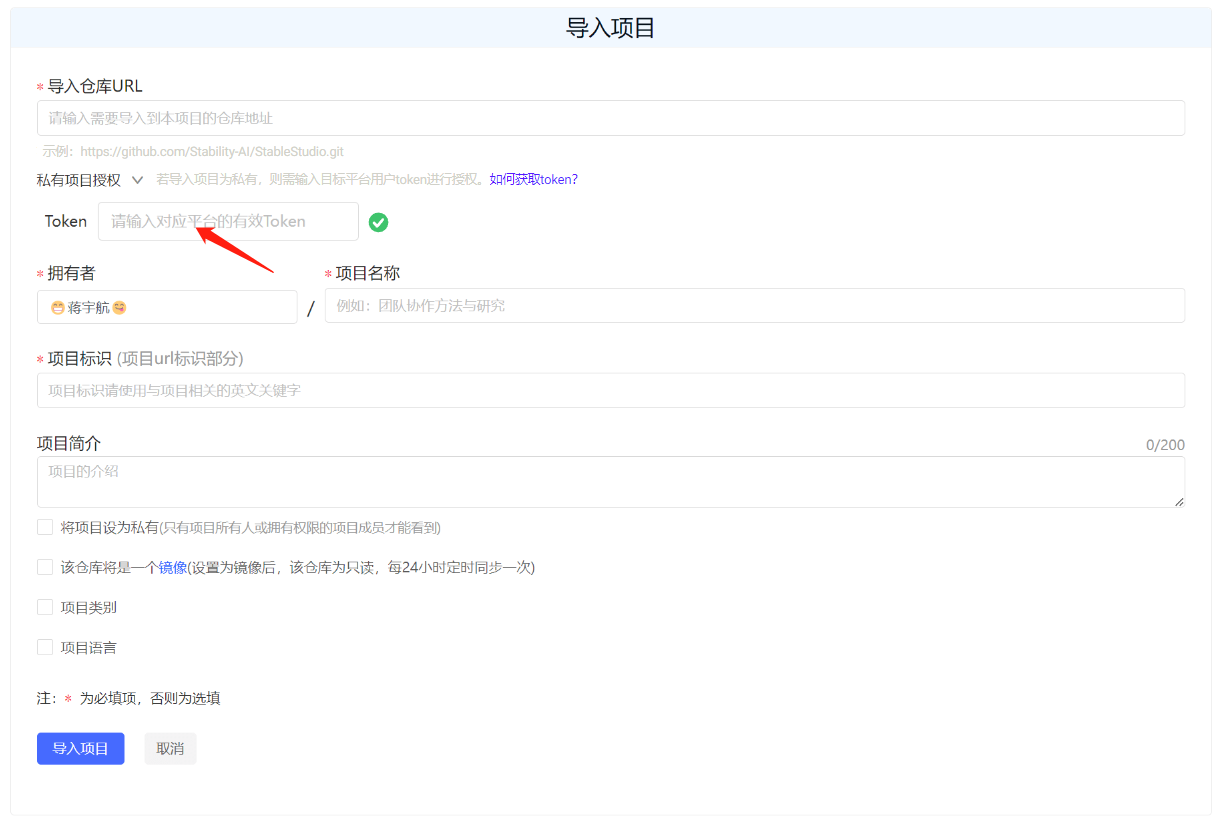
填写需要导入的第三方Git项目地址和项目信息,如果导入项目为私有仓库,则需输入目标平台用户token进行授权。
|
||||
|
||||

|
||||
|
||||
## 3. 授权验证
|
||||
### 3. 授权验证
|
||||
|
||||
在使用GitLink平台导入其他平台(如GitHub、Gitee)的开源项目时,如果项目为私有,则无法通过正常途径导入,需要输入对应平台有权限的token值进行校验。
|
||||
|
||||
|
|
@ -25,7 +25,7 @@ sidebar_position: 5
|
|||
|
||||
下面将列举一些典型开源平台的token获取方式。
|
||||
|
||||
### GitHub token获取方式
|
||||
#### GitHub token获取方式
|
||||
|
||||
1. 登录GitHub账号
|
||||
|
||||
|
|
@ -57,7 +57,7 @@ sidebar_position: 5
|
|||
|
||||

|
||||
|
||||
### Gitee token获取方式
|
||||
#### Gitee token获取方式
|
||||
|
||||
1. 登录Gitee账号
|
||||
|
||||
|
|
@ -81,7 +81,7 @@ sidebar_position: 5
|
|||
|
||||
|
||||
|
||||
## 4. 导入成功
|
||||
### 4. 导入成功
|
||||
|
||||
提示正在从第三方Git项目地址迁移
|
||||
|
||||
|
|
|
|||
|
|
@ -5,18 +5,18 @@ sidebar_position: 3
|
|||
|
||||
# 提交第一行代码
|
||||
|
||||
# 1. 编辑代码
|
||||
### 1. 编辑代码
|
||||
|
||||
点击编辑按钮,开始编辑代码。
|
||||
|
||||

|
||||
|
||||
# 2. 提交代码
|
||||
### 2. 提交代码
|
||||
|
||||
在编辑框中编写代码,编写完成后填写变更信息后提交变更。
|
||||
|
||||

|
||||
|
||||
## 3. 代码更新成功
|
||||
### 3. 代码更新成功
|
||||
|
||||
提交成功后代码代码更新成功。
|
||||
|
|
@ -5,7 +5,7 @@ sidebar_position: 4
|
|||
|
||||
# 搜索开源项目
|
||||
|
||||
## 1. 开源项目页面介绍
|
||||
### 1. 开源项目页面介绍
|
||||
|
||||
项目”模块汇聚和管理了所有 GitLink 平台上的托管项目和镜像项目,用户可以输入项目名称关键字进行搜索,也可以根据项目类别对项目进行筛选。
|
||||
|
||||
|
|
@ -19,11 +19,11 @@ sidebar_position: 4
|
|||
|
||||
用户点击项目名称,即可进入到项目详情,查看和参与开源项目开发。
|
||||
|
||||
## 2. 搜索开源项目
|
||||
### 2. 搜索开源项目
|
||||
|
||||
有两处搜索框可以搜索
|
||||
|
||||
### 开源项目搜索框
|
||||
#### 开源项目搜索框
|
||||
|
||||
搜索项目:
|
||||
|
||||
|
|
@ -33,7 +33,7 @@ sidebar_position: 4
|
|||
|
||||

|
||||
|
||||
### 菜单栏搜索框
|
||||
#### 菜单栏搜索框
|
||||
|
||||
搜索项目:
|
||||
|
||||
|
|
|
|||
|
|
@ -5,11 +5,11 @@ sidebar_position: 1
|
|||
|
||||
# 注册GitLink账号
|
||||
|
||||
## 1. 点击**立即注册**按钮
|
||||
### 1. 点击**立即注册**按钮
|
||||
|
||||

|
||||
|
||||
## 2. 填写注册信息
|
||||
### 2. 填写注册信息
|
||||
|
||||
- 手机号注册
|
||||
|
||||
|
|
@ -19,7 +19,7 @@ sidebar_position: 1
|
|||
|
||||

|
||||
|
||||
## 3. 注册完成
|
||||
### 3. 注册完成
|
||||
|
||||
填写完所需信息后点击注册,注册成功后则进入个人主页
|
||||
|
||||
|
|
|
|||
|
|
@ -8,12 +8,12 @@ sidebar_position: 1
|
|||
欢迎使用GitLink平台,在您使用GitLink平台前,请您认真阅读并遵守《GitLink服务协议》(以下简称”本协议”),请您务必审慎阅读、充分理解协议的各条款内容。
|
||||
当您在注册过程中点击查看”看过并同意本服务协议”,按照注册流程成功注册为GitLink平台的用户即表示您已充分阅读、理解并完全接受本协议中的全部条款。您承诺接受并遵守本协议的约定,届时您不应以未阅读本协议的内容等理由,主张本协议无效或本协议中的某些条款无效,或要求撤销本协议。
|
||||
|
||||
## 一、GitLink平台权利和义务
|
||||
### 一、GitLink平台权利和义务
|
||||
1. 尊重用户隐私:尊重用户隐私,保障用户隐私安全是GitLink平台的一项基本政策;
|
||||
2. 管理平台用户:GitLink平台依据国家法律、地方法律和国际法律等的标准以及本行业的规则来管理平台注册用户;
|
||||
3. 处理用户反馈:GitLink平台的相关人员会及时处理用户反馈的问题并给予及时回复。
|
||||
|
||||
## 二、用户权利和义务
|
||||
### 二、用户权利和义务
|
||||
用户在使用GitLink平台的过程中,必须遵守如下原则:
|
||||
|
||||
1. 遵守中国的有关法律和法规;
|
||||
|
|
@ -24,10 +24,10 @@ sidebar_position: 1
|
|||
6. 不传输任何教唆他人构成犯罪行为的资料;
|
||||
7. 用户不得故意或者过失损害GitLink平台合法权利和利益。
|
||||
|
||||
## 三、关于责任
|
||||
### 三、关于责任
|
||||
鉴于网络服务的特殊性,用户同意GitLink团队有权在事先通知的情况下,变更、中断、升级部分网络服务。GitLink团队不担保网络服务不会中断,但承诺在用户可承受的时间内快速恢复服务,同时确保用户数据的安全性和可靠性。
|
||||
|
||||
## 四、服务条款的修改
|
||||
### 四、服务条款的修改
|
||||
GitLink团队保留在必要时对本协议修改的权利,一旦发生变动,这些条款可由GitLink团队及时更新,且毋须另行通知,修改后的条款一旦在网页上公布即有效代替原来的服务条款。您可随时查阅最新版服务条款。
|
||||
|
||||
|
||||
|
|
|
|||
|
|
@ -3,10 +3,10 @@ sidebar_label: 'WebIDE'
|
|||
sidebar_position: 9
|
||||
|
||||
---
|
||||
## WebIDE背景
|
||||
### WebIDE背景
|
||||
传统的代码托管平台提供了代码仓库的 Git/SVN 的管理,可以在平台上做代码浏览、代码评审、缺陷管理、CI 流水线等和代码相关的活动。其中代码浏览、代码评审所用的编辑器组件一般为 CodeMirror,代码高亮使用 highlight.js,常常只提供了读代码的场景。蚂蚁研发效能部门云研发团队通过自研的 OpenSumi 框架及基于 OpenSumi 框架做的专门针对于 Web IDE(无远程容器)场景的极速版 Web IDE 框架,与内部代码托管平台碰撞出了创新型的、只依赖浏览器的、IDE 风格的代码阅读、代码编写、代码提交、代码运行、代码评审等场景,极大的提高了用户在代码托管平台阅读代码、代码评审、轻研发等场景的效率。本次蚂蚁研发效能云研发团队和 CCF(中国计算机学会)GitLink 代码托管平台合作,将内部极速版 Web IDE 应用到了 Gitlink 代码托管平台上,解决了长久以来的用户反馈的很多体验问题。
|
||||
|
||||
## Web IDE 核心能力
|
||||
### Web IDE 核心能力
|
||||
对标有容器的标准版,极速版 IDE 主要在读、写、运行、提交等方面进行了探索:
|
||||
|
||||
**1. 读:**
|
||||
|
|
@ -38,7 +38,7 @@ Gitlink 通过实现 Blame 插件,完成了编辑器 Blame 查看的能力:
|
|||
<center>当前代码行作者、修改日期查看</center>
|
||||
|
||||
|
||||
## 代码评审
|
||||
### 代码评审
|
||||
代码评审功能用户长久以来一直反馈以下几个问题:
|
||||
|
||||
- 1.语言服务缺失,阅读效率低:缺少代码高亮、提示、跳转、查看引用及大纲功能
|
||||
|
|
@ -55,7 +55,7 @@ Gitlink 通过实现 Blame 插件,完成了编辑器 Blame 查看的能力:
|
|||

|
||||
<center>代码评审时可修改代码</center>
|
||||
|
||||
## Gitlink Web IDE
|
||||
### Gitlink Web IDE
|
||||
Gitlink 代码阅读场景虽然接入极速版 IDE 编辑器,但文件树、代码搜索、快捷键、IDE 皮肤、等均和平时开发时使用习惯的 IDE 差异较大,更有大部分用户仅仅是为了代码阅读将代码克隆到本地,尽管保证了一致的体验,但整个链路繁琐费时。
|
||||
基于这个洞察,蚂蚁云研发团队和 Gitlink 推出 Gitlink Web IDE,可以一键快速打开 Web IDE 访问阅读项目仓库代码,实现项目与 IDE 的无缝衔接,保持研发同学的日常偏好习惯,同时完美兼容 Gitlink 代码托管平台。更重要的是,通过无容器在浏览器上直接运行一个极速版 IDE,确保「秒开」的即时体验。
|
||||
|
||||
|
|
|
|||
|
|
@ -3,7 +3,7 @@ sidebar_label: "重睛鸟代码溯源"
|
|||
sidebar_position: 1
|
||||
---
|
||||
|
||||
## 代码分析入口
|
||||
### 代码分析入口
|
||||
|
||||
<br/>
|
||||
|
||||
|
|
@ -16,7 +16,7 @@ sidebar_position: 1
|
|||
|
||||
<center>项目导航</center><br/>
|
||||
|
||||
## 代码分析检测
|
||||
### 代码分析检测
|
||||
|
||||
<br/>
|
||||
|
||||
|
|
@ -30,7 +30,7 @@ sidebar_position: 1
|
|||
2、"新建分析"按钮仅对仓库管理员可见。仓库开发者、观察者、游客访问此页面时,"新建分析"按钮不可见。<br/>
|
||||
3、点击"新建分析"按钮,需判断是否开启代码分析功能。<br/>
|
||||
|
||||
## 分支选择
|
||||
### 分支选择
|
||||
|
||||
<br/>
|
||||
|
||||
|
|
@ -40,7 +40,7 @@ sidebar_position: 1
|
|||
2、图中检测类型、检测参数均为默认值,不允许用户修改,此处展示在界面上,仅起到提示用户,让用户知晓作用。<br/>
|
||||
3、点击此处“开始检测”即开启基于选中分支的检测,新建一个检测列表。<br/>
|
||||
|
||||
## 列表展示
|
||||
### 列表展示
|
||||
|
||||
<br/>
|
||||
|
||||
|
|
@ -50,7 +50,7 @@ sidebar_position: 1
|
|||
2、当新建分析任务正在检测中时,检测状态处有百分比进度条展示现有进度。<br/>
|
||||
3、点击“重新扫描”按钮,将弹出一条新建分析的弹窗,此弹窗保存所有上次已配置的分支信息,检测分支不可修改(分支下拉选中框置灰)。确认新建后,将新增一条检测数据。<br/>
|
||||
|
||||
## 结果展示
|
||||
### 结果展示
|
||||
|
||||
<br/>
|
||||
|
||||
|
|
@ -60,7 +60,7 @@ sidebar_position: 1
|
|||
2、当检测状态为"失败"状态,或当前处于"正在检测"状态时,"查看"按钮将置灰,处于无法点击状态;<br/>
|
||||
3、结果展示页取代码溯源已有页面,嵌入至 GitLink 即可,无需再次设计。<br/>
|
||||
|
||||
## 用户操作流程
|
||||
### 用户操作流程
|
||||
|
||||
<br/>
|
||||
|
||||
|
|
|
|||
|
|
@ -12,19 +12,19 @@ sidebar_position: 2
|
|||
|
||||

|
||||
|
||||
## 组织账号
|
||||
### 组织账号
|
||||
|
||||

|
||||
|
||||
**注**:只能使用以字母、数字开头,包含字母、数字、下划线、横杠等,长度4到20个字符
|
||||
|
||||
## 组织名称与组织描述
|
||||
### 组织名称与组织描述
|
||||
|
||||

|
||||
|
||||
**注**:此处为必填项,不得为空
|
||||
|
||||
## 可见性
|
||||
### 可见性
|
||||
|
||||

|
||||
|
||||
|
|
|
|||
|
|
@ -4,20 +4,20 @@ sidebar_position: 3
|
|||
---
|
||||
# 组织团队管理
|
||||
|
||||
## 创建组织团队
|
||||
### 创建组织团队
|
||||
点击组织信息页面中的“新建团队”按钮可以创建属于该组织的团队(平台默认创建“Owners”团队,成员为组织的创建者)。
|
||||
|
||||
在团队新建页面,输入团队标识、团队名称、团队描述、项目权限以及版本库权限等信息后,点击“新建团队”完成团队的创建。
|
||||
|
||||

|
||||
|
||||
## 查看组织团队
|
||||
### 查看组织团队
|
||||
|
||||
点击组织信息页面中的某个团队名称可以查看该团队的详细信息,该页面包括团队的名称、描述等信息,此外还会列出该团队关联的成员以及项目。
|
||||
|
||||

|
||||
|
||||
## 管理组织团队
|
||||
### 管理组织团队
|
||||
|
||||
点击团队信息页面中的“团队设置”按钮可以对团队进行管理
|
||||
|
||||
|
|
|
|||
|
|
@ -1,4 +1,21 @@
|
|||
---
|
||||
sidebar_label: '组织成员管理'
|
||||
sidebar_position: 4
|
||||
---
|
||||
---
|
||||
# 成员管理(Members Management)
|
||||
|
||||
在 个人所管理的项目当中的**仓库设置**当中的**成员管理**可以进入成员管理界面
|
||||
|
||||

|
||||
|
||||
## 成员查询和添加
|
||||
在成员管理界面当中,可以进行组织成员的查询和添加
|
||||
|
||||

|
||||
|
||||
## 成员邀请权限设置
|
||||
管理员可以对邀请成员的权限进行设置
|
||||

|
||||
此外,也可以复制邀请链接的方式来更方便地邀请成员加入到项目当中来
|
||||
|
||||
**注**:此项功能仅对管理员可见
|
||||
|
|
@ -11,7 +11,7 @@ sidebar_position: 1
|
|||
|
||||

|
||||
|
||||
## 作为组织拥有者
|
||||
### 作为组织拥有者
|
||||
|
||||
有效管理组织,是您的使命。
|
||||
|
||||
|
|
@ -23,6 +23,6 @@ sidebar_position: 1
|
|||
|
||||
平台同时支持组织拥有者管理对数据访问的自定义设置。
|
||||
|
||||
## 作为组织成员
|
||||
### 作为组织成员
|
||||
|
||||
您可以通过组织与无限数量的人在多个项目中协作,与志同道合的人一起,通过分工和写作,参与开发流程,发布或处理问题。
|
||||
|
|
|
|||
|
|
@ -2,7 +2,7 @@
|
|||
sidebar_label: '组织项目管理'
|
||||
sidebar_position: 5
|
||||
---
|
||||
## 创建组织项目
|
||||
### 创建组织项目
|
||||
|
||||
点击组织信息页面中的“新建项目”按钮可以创建属于该组织的托管项目或者镜像项目。
|
||||
|
||||
|
|
|
|||
|
|
@ -1,4 +1,15 @@
|
|||
---
|
||||
sidebar_label: '模板导入及导出'
|
||||
sidebar_position: 2
|
||||
---
|
||||
---
|
||||
|
||||
# 确实开源帮助中心
|
||||
|
||||
## 模板的导入及导出管理
|
||||
#### 1.模板导入
|
||||
通过点击wiki界面的**导入模板**按钮即可导入本地的txt,markdown等格式文件进行Wiki文档的创建,当前平台此项功能尚在开发测试环节
|
||||
[](/img/wiki/img4.png)
|
||||
#### 2.模板导出
|
||||
当前平台此项功能尚在开发测试环节
|
||||
<br/>
|
||||
|
||||
|
|
|
|||
|
|
@ -1,4 +1,23 @@
|
|||
---
|
||||
sidebar_label: '维基页面管理'
|
||||
sidebar_position: 1
|
||||
---
|
||||
---
|
||||
|
||||
|
||||
# 确实开源帮助中心
|
||||
|
||||
## 维基界面管理
|
||||
#### 1.维基界面
|
||||
GitLink项目安排了专门的**维基(Wiki)界面**来展示项目的一些情况
|
||||
[](/img/wiki/img1.png)
|
||||
|
||||
#### 2.创建维基内容
|
||||
在初始化的维基界面当中点击**创建Wiki文档**或者**导入模板**即可进行Wiki文档的编辑
|
||||
<br/>
|
||||
|
||||
#### 3.进行Wiki文档的编辑
|
||||
点击**创建Wiki文档**后即跳转到编辑界面,初始内容为空白的文档
|
||||
[](/img/wiki/img3.png)
|
||||
也可以通过勾选*添加模板*来进行模板的导入,平台提供的模板包括*周报*和*月报*的格式
|
||||
[](/img/wiki/img2.png)
|
||||
完成编辑后点击左下角的的保存即可
|
||||
|
|
@ -5,7 +5,7 @@ sidebar_position: 1
|
|||
|
||||
# 确实开源帮助中心
|
||||
|
||||
## 通知简介
|
||||
### 通知简介
|
||||
#### 1.通知类型
|
||||
GitLink将通知分为“系统通知”和“@我”的两种类型:
|
||||
* 系统通知包括“我的状态”、“我创建的或负责的”、“我管理的仓库”三种类型的通知:
|
||||
|
|
|
|||
|
|
@ -6,7 +6,7 @@ sidebar_position: 2
|
|||
|
||||
# 确实开源帮助中心
|
||||
|
||||
## 通知设置
|
||||
### 通知设置
|
||||
#### 1.进入通知设置界面
|
||||
通过点击首页的通知按钮进入通知设置界面;
|
||||

|
||||
|
|
|
|||
Loading…
Reference in New Issue