Compare commits
2 Commits
| Author | SHA1 | Date |
|---|---|---|
 chaol chaol
|
c9c6b48668 | |
|
chaol
|
b16d464b63 |
|
|
@ -0,0 +1,84 @@
|
|||
version: 2
|
||||
name: 新功能特性发布
|
||||
description: "自动构建和部署帮助中心新功能特性"
|
||||
global:
|
||||
concurrent: 1
|
||||
workflow:
|
||||
- ref: start
|
||||
name: 开始
|
||||
task: start
|
||||
- ref: dingtalk_notice_text_0
|
||||
name: 钉钉通知-开始更新
|
||||
task: dingtalk_notice_text@1.0.2
|
||||
input:
|
||||
boot_webhook_url: ((dingdingtalk.url))
|
||||
msg_text: '"GitLink帮助中心-新功能特性开始更新..."'
|
||||
at_user_ids: '"[]"'
|
||||
at_mobiles: '"[]"'
|
||||
needs:
|
||||
- start
|
||||
- ref: git_clone_0
|
||||
name: git clone
|
||||
task: git_clone@1.2.9
|
||||
input:
|
||||
remote_url: '"https://www.gitlink.org.cn/gitlink/gitlink_help_center.git"'
|
||||
ref: '"refs/heads/master"'
|
||||
commit_id: '""'
|
||||
depth: 1
|
||||
needs:
|
||||
- dingtalk_notice_text_0
|
||||
- ref: nodejs_build_0
|
||||
name: nodejs构建
|
||||
task: nodejs_build@1.7.0-node18
|
||||
input:
|
||||
workspace: ((git_clone_0.git_path))
|
||||
build_action: '"build"'
|
||||
build_args: '""'
|
||||
install_args: '""'
|
||||
registry_url: '"https://registry.npmmirror.com/"'
|
||||
disturl_url: '""'
|
||||
sass_binary_site_url: '""'
|
||||
package_management_type: '"yarn"'
|
||||
vc_package_dir: '"."'
|
||||
cache_path: '"/cache"'
|
||||
needs:
|
||||
- git_clone_0
|
||||
- ref: scp_resource_0
|
||||
name: scp替换打包文件到服务器
|
||||
task: scp_resource@1.4.3
|
||||
input:
|
||||
ssh_pass: ((help_pro_server.password))
|
||||
ssh_ip: '"106.75.45.236"'
|
||||
ssh_port: '"22"'
|
||||
ssh_user: '"root"'
|
||||
remote_file: '"/root/gitlink_help_center"'
|
||||
local_file: ((git_clone_0.git_path))+"/build"
|
||||
file_content: '""'
|
||||
needs:
|
||||
- nodejs_build_0
|
||||
- ref: ssh_cmd_0
|
||||
name: 重启nginx
|
||||
task: ssh_cmd@1.1.1
|
||||
input:
|
||||
ssh_pass: ((help_pro_server.password))
|
||||
ssh_ip: '"106.75.45.236"'
|
||||
ssh_port: '"22"'
|
||||
ssh_user: '"root"'
|
||||
ssh_cmd: '"service nginx restart"'
|
||||
needs:
|
||||
- scp_resource_0
|
||||
- ref: dingtalk_notice_text_1
|
||||
name: 钉钉通知-更新完成
|
||||
task: dingtalk_notice_text@1.0.2
|
||||
input:
|
||||
boot_webhook_url: ((dingdingtalk.url))
|
||||
msg_text: '"GitLink帮助中心-新功能特性更新完成"'
|
||||
at_user_ids: '"[]"'
|
||||
at_mobiles: '"[]"'
|
||||
needs:
|
||||
- ssh_cmd_0
|
||||
- ref: end
|
||||
name: 结束
|
||||
task: end
|
||||
needs:
|
||||
- dingtalk_notice_text_1
|
||||
|
|
@ -6,24 +6,37 @@ global:
|
|||
trigger:
|
||||
webhook: gitlink@1.0.0
|
||||
event:
|
||||
<<<<<<< HEAD
|
||||
- ref: pr
|
||||
=======
|
||||
- ref: push
|
||||
>>>>>>> e71054291333eb7aba4da5374b52b277ae0146b5
|
||||
ruleset-operator: AND
|
||||
workflow:
|
||||
- ref: start
|
||||
name: 开始
|
||||
task: start
|
||||
<<<<<<< HEAD
|
||||
- ref: end
|
||||
name: 结束
|
||||
task: end
|
||||
needs:
|
||||
- ssh_cmd_0
|
||||
=======
|
||||
>>>>>>> e71054291333eb7aba4da5374b52b277ae0146b5
|
||||
- ref: git_clone_0
|
||||
name: git clone
|
||||
task: git_clone@1.2.9
|
||||
input:
|
||||
<<<<<<< HEAD
|
||||
username: ((wen.gitlink_username))
|
||||
password: ((wen.gitlink_passwd))
|
||||
remote_url: '"https://gitlink.org.cn/wenjiankun/gitlink_help_center.git"'
|
||||
remote_url: '""'
|
||||
=======
|
||||
username: ((ganshihao21.ganshihao21_user))
|
||||
password: ((ganshihao21.ganshihao21))
|
||||
remote_url: '"https://gitlink.org.cn/ganshihao21/reposync.git"'
|
||||
>>>>>>> e71054291333eb7aba4da5374b52b277ae0146b5
|
||||
ref: '"refs/heads/master"'
|
||||
commit_id: '""'
|
||||
depth: 1
|
||||
|
|
@ -33,11 +46,19 @@ workflow:
|
|||
name: docker镜像构建
|
||||
task: docker_image_build@1.6.0
|
||||
input:
|
||||
<<<<<<< HEAD
|
||||
docker_username: ((wen.aliyun_name))
|
||||
docker_password: ((wen.aliyun_passwd))
|
||||
image_name: '"crpi-b9yruhd9zitzsf2p.cn-hangzhou.personal.cr.aliyuncs.com/wenjiankun/group_02"'
|
||||
image_name: '""'
|
||||
image_tag: '"latest"'
|
||||
registry_address: '"crpi-b9yruhd9zitzsf2p.cn-hangzhou.personal.cr.aliyuncs.com"'
|
||||
registry_address: '""'
|
||||
=======
|
||||
docker_username: ((nudt_devops.nudt_devops))
|
||||
docker_password: ((nudt_devops.nudt_devops))
|
||||
image_name: '"registry.cn-guangzhou.aliyuncs.com/nudt_devops/reposync_group5"'
|
||||
image_tag: '"latest"'
|
||||
registry_address: '"registry.cn-guangzhou.aliyuncs.com"'
|
||||
>>>>>>> e71054291333eb7aba4da5374b52b277ae0146b5
|
||||
docker_file: '"Dockerfile"'
|
||||
docker_build_path: '"."'
|
||||
workspace: git_clone_0.git_path
|
||||
|
|
@ -49,6 +70,7 @@ workflow:
|
|||
name: ssh执行命令
|
||||
task: ssh_cmd@1.1.1
|
||||
input:
|
||||
<<<<<<< HEAD
|
||||
ssh_pass: ((wen.ssh_passwd))
|
||||
ssh_ip: '"120.27.244.74"'
|
||||
ssh_port: '"22"'
|
||||
|
|
@ -60,4 +82,21 @@ workflow:
|
|||
crpi-b9yruhd9zitzsf2p.cn-hangzhou.personal.cr.aliyuncs.com/wenjiankun/group_02:latest"'
|
||||
needs:
|
||||
- docker_image_build_0
|
||||
=======
|
||||
ssh_pass: ((ssh_key.ssh_key))
|
||||
ssh_ip: '"47.96.164.145"'
|
||||
ssh_port: '"22"'
|
||||
ssh_user: '"root"'
|
||||
ssh_cmd: '"docker stop abc_group5 && docker rm abc_group5 && docker pull
|
||||
registry.cn-guangzhou.aliyuncs.com/nudt_devops/reposync_group5:latest &&
|
||||
docker run -d -p 3000:3000 --name abc_group5
|
||||
registry.cn-guangzhou.aliyuncs.com/nudt_devops/reposync_group5:latest"'
|
||||
needs:
|
||||
- docker_image_build_0
|
||||
- ref: end
|
||||
name: 结束
|
||||
task: end
|
||||
needs:
|
||||
- ssh_cmd_0
|
||||
>>>>>>> e71054291333eb7aba4da5374b52b277ae0146b5
|
||||
|
||||
|
|
|
|||
|
|
@ -21,6 +21,3 @@ deploy.sh
|
|||
npm-debug.log*
|
||||
yarn-debug.log*
|
||||
yarn-error.log*
|
||||
gitee私人令牌.txt
|
||||
wen
|
||||
jiankun
|
||||
|
|
@ -5,12 +5,6 @@ WORKDIR /gitlink_help_center
|
|||
|
||||
COPY ./ /gitlink_help_center/
|
||||
|
||||
# 注释掉不存在的图片引用
|
||||
RUN sed -i 's/!\[vis_workflow_serial\](\/img\/engine\/vis_workflow_serial.png)/<!--  -->/g' docs/DevOps引擎/图形流水线.md && \
|
||||
sed -i 's/!\[vis_workflow_parallel\](\/img\/engine\/vis_workflow_parallel.png)/<!--  -->/g' docs/DevOps引擎/图形流水线.md && \
|
||||
sed -i 's/!\[vis_workflow_mixed\](\/img\/engine\/vis_workflow_mixed.png)/<!--  -->/g' docs/DevOps引擎/图形流水线.md
|
||||
|
||||
RUN yarn install
|
||||
RUN npm run build -- --locale zh-cn
|
||||
CMD ["npm", "run", "serve"]
|
||||
# 这是在GitLink上添加的测试注释"
|
||||
194
LICENSE
|
|
@ -1,194 +0,0 @@
|
|||
木兰宽松许可证,第2版
|
||||
|
||||
木兰宽松许可证,第2版
|
||||
|
||||
2020年1月 http://license.coscl.org.cn/MulanPSL2
|
||||
|
||||
您对“软件”的复制、使用、修改及分发受木兰宽松许可证,第2版(“本许可证”)的如下条款的约束:
|
||||
|
||||
0. 定义
|
||||
|
||||
“软件” 是指由“贡献”构成的许可在“本许可证”下的程序和相关文档的集合。
|
||||
|
||||
“贡献” 是指由任一“贡献者”许可在“本许可证”下的受版权法保护的作品。
|
||||
|
||||
“贡献者” 是指将受版权法保护的作品许可在“本许可证”下的自然人或“法人实体”。
|
||||
|
||||
“法人实体” 是指提交贡献的机构及其“关联实体”。
|
||||
|
||||
“关联实体” 是指,对“本许可证”下的行为方而言,控制、受控制或与其共同受控制的机构,此处的控制是
|
||||
指有受控方或共同受控方至少50%直接或间接的投票权、资金或其他有价证券。
|
||||
|
||||
1. 授予版权许可
|
||||
|
||||
每个“贡献者”根据“本许可证”授予您永久性的、全球性的、免费的、非独占的、不可撤销的版权许可,您可
|
||||
以复制、使用、修改、分发其“贡献”,不论修改与否。
|
||||
|
||||
2. 授予专利许可
|
||||
|
||||
每个“贡献者”根据“本许可证”授予您永久性的、全球性的、免费的、非独占的、不可撤销的(根据本条规定
|
||||
撤销除外)专利许可,供您制造、委托制造、使用、许诺销售、销售、进口其“贡献”或以其他方式转移其“贡
|
||||
献”。前述专利许可仅限于“贡献者”现在或将来拥有或控制的其“贡献”本身或其“贡献”与许可“贡献”时的“软
|
||||
件”结合而将必然会侵犯的专利权利要求,不包括对“贡献”的修改或包含“贡献”的其他结合。如果您或您的“
|
||||
关联实体”直接或间接地,就“软件”或其中的“贡献”对任何人发起专利侵权诉讼(包括反诉或交叉诉讼)或
|
||||
其他专利维权行动,指控其侵犯专利权,则“本许可证”授予您对“软件”的专利许可自您提起诉讼或发起维权
|
||||
行动之日终止。
|
||||
|
||||
3. 无商标许可
|
||||
|
||||
“本许可证”不提供对“贡献者”的商品名称、商标、服务标志或产品名称的商标许可,但您为满足第4条规定
|
||||
的声明义务而必须使用除外。
|
||||
|
||||
4. 分发限制
|
||||
|
||||
您可以在任何媒介中将“软件”以源程序形式或可执行形式重新分发,不论修改与否,但您必须向接收者提供“
|
||||
本许可证”的副本,并保留“软件”中的版权、商标、专利及免责声明。
|
||||
|
||||
5. 免责声明与责任限制
|
||||
|
||||
“软件”及其中的“贡献”在提供时不带任何明示或默示的担保。在任何情况下,“贡献者”或版权所有者不对
|
||||
任何人因使用“软件”或其中的“贡献”而引发的任何直接或间接损失承担责任,不论因何种原因导致或者基于
|
||||
何种法律理论,即使其曾被建议有此种损失的可能性。
|
||||
|
||||
6. 语言
|
||||
|
||||
“本许可证”以中英文双语表述,中英文版本具有同等法律效力。如果中英文版本存在任何冲突不一致,以中文
|
||||
版为准。
|
||||
|
||||
条款结束
|
||||
|
||||
如何将木兰宽松许可证,第2版,应用到您的软件
|
||||
|
||||
如果您希望将木兰宽松许可证,第2版,应用到您的新软件,为了方便接收者查阅,建议您完成如下三步:
|
||||
|
||||
1, 请您补充如下声明中的空白,包括软件名、软件的首次发表年份以及您作为版权人的名字;
|
||||
|
||||
2, 请您在软件包的一级目录下创建以“LICENSE”为名的文件,将整个许可证文本放入该文件中;
|
||||
|
||||
3, 请将如下声明文本放入每个源文件的头部注释中。
|
||||
|
||||
Copyright (c) [Year] [name of copyright holder]
|
||||
[Software Name] is licensed under Mulan PSL v2.
|
||||
You can use this software according to the terms and conditions of the Mulan
|
||||
PSL v2.
|
||||
You may obtain a copy of Mulan PSL v2 at:
|
||||
http://license.coscl.org.cn/MulanPSL2
|
||||
THIS SOFTWARE IS PROVIDED ON AN "AS IS" BASIS, WITHOUT WARRANTIES OF ANY
|
||||
KIND, EITHER EXPRESS OR IMPLIED, INCLUDING BUT NOT LIMITED TO
|
||||
NON-INFRINGEMENT, MERCHANTABILITY OR FIT FOR A PARTICULAR PURPOSE.
|
||||
See the Mulan PSL v2 for more details.
|
||||
|
||||
Mulan Permissive Software License,Version 2
|
||||
|
||||
Mulan Permissive Software License,Version 2 (Mulan PSL v2)
|
||||
|
||||
January 2020 http://license.coscl.org.cn/MulanPSL2
|
||||
|
||||
Your reproduction, use, modification and distribution of the Software shall
|
||||
be subject to Mulan PSL v2 (this License) with the following terms and
|
||||
conditions:
|
||||
|
||||
0. Definition
|
||||
|
||||
Software means the program and related documents which are licensed under
|
||||
this License and comprise all Contribution(s).
|
||||
|
||||
Contribution means the copyrightable work licensed by a particular
|
||||
Contributor under this License.
|
||||
|
||||
Contributor means the Individual or Legal Entity who licenses its
|
||||
copyrightable work under this License.
|
||||
|
||||
Legal Entity means the entity making a Contribution and all its
|
||||
Affiliates.
|
||||
|
||||
Affiliates means entities that control, are controlled by, or are under
|
||||
common control with the acting entity under this License, ‘control’ means
|
||||
direct or indirect ownership of at least fifty percent (50%) of the voting
|
||||
power, capital or other securities of controlled or commonly controlled
|
||||
entity.
|
||||
|
||||
1. Grant of Copyright License
|
||||
|
||||
Subject to the terms and conditions of this License, each Contributor hereby
|
||||
grants to you a perpetual, worldwide, royalty-free, non-exclusive,
|
||||
irrevocable copyright license to reproduce, use, modify, or distribute its
|
||||
Contribution, with modification or not.
|
||||
|
||||
2. Grant of Patent License
|
||||
|
||||
Subject to the terms and conditions of this License, each Contributor hereby
|
||||
grants to you a perpetual, worldwide, royalty-free, non-exclusive,
|
||||
irrevocable (except for revocation under this Section) patent license to
|
||||
make, have made, use, offer for sale, sell, import or otherwise transfer its
|
||||
Contribution, where such patent license is only limited to the patent claims
|
||||
owned or controlled by such Contributor now or in future which will be
|
||||
necessarily infringed by its Contribution alone, or by combination of the
|
||||
Contribution with the Software to which the Contribution was contributed.
|
||||
The patent license shall not apply to any modification of the Contribution,
|
||||
and any other combination which includes the Contribution. If you or your
|
||||
Affiliates directly or indirectly institute patent litigation (including a
|
||||
cross claim or counterclaim in a litigation) or other patent enforcement
|
||||
activities against any individual or entity by alleging that the Software or
|
||||
any Contribution in it infringes patents, then any patent license granted to
|
||||
you under this License for the Software shall terminate as of the date such
|
||||
litigation or activity is filed or taken.
|
||||
|
||||
3. No Trademark License
|
||||
|
||||
No trademark license is granted to use the trade names, trademarks, service
|
||||
marks, or product names of Contributor, except as required to fulfill notice
|
||||
requirements in section 4.
|
||||
|
||||
4. Distribution Restriction
|
||||
|
||||
You may distribute the Software in any medium with or without modification,
|
||||
whether in source or executable forms, provided that you provide recipients
|
||||
with a copy of this License and retain copyright, patent, trademark and
|
||||
disclaimer statements in the Software.
|
||||
|
||||
5. Disclaimer of Warranty and Limitation of Liability
|
||||
|
||||
THE SOFTWARE AND CONTRIBUTION IN IT ARE PROVIDED WITHOUT WARRANTIES OF ANY
|
||||
KIND, EITHER EXPRESS OR IMPLIED. IN NO EVENT SHALL ANY CONTRIBUTOR OR
|
||||
COPYRIGHT HOLDER BE LIABLE TO YOU FOR ANY DAMAGES, INCLUDING, BUT NOT
|
||||
LIMITED TO ANY DIRECT, OR INDIRECT, SPECIAL OR CONSEQUENTIAL DAMAGES ARISING
|
||||
FROM YOUR USE OR INABILITY TO USE THE SOFTWARE OR THE CONTRIBUTION IN IT, NO
|
||||
MATTER HOW IT’S CAUSED OR BASED ON WHICH LEGAL THEORY, EVEN IF ADVISED OF
|
||||
THE POSSIBILITY OF SUCH DAMAGES.
|
||||
|
||||
6. Language
|
||||
|
||||
THIS LICENSE IS WRITTEN IN BOTH CHINESE AND ENGLISH, AND THE CHINESE VERSION
|
||||
AND ENGLISH VERSION SHALL HAVE THE SAME LEGAL EFFECT. IN THE CASE OF
|
||||
DIVERGENCE BETWEEN THE CHINESE AND ENGLISH VERSIONS, THE CHINESE VERSION
|
||||
SHALL PREVAIL.
|
||||
|
||||
END OF THE TERMS AND CONDITIONS
|
||||
|
||||
How to Apply the Mulan Permissive Software License,Version 2
|
||||
(Mulan PSL v2) to Your Software
|
||||
|
||||
To apply the Mulan PSL v2 to your work, for easy identification by
|
||||
recipients, you are suggested to complete following three steps:
|
||||
|
||||
i. Fill in the blanks in following statement, including insert your software
|
||||
name, the year of the first publication of your software, and your name
|
||||
identified as the copyright owner;
|
||||
|
||||
ii. Create a file named "LICENSE" which contains the whole context of this
|
||||
License in the first directory of your software package;
|
||||
|
||||
iii. Attach the statement to the appropriate annotated syntax at the
|
||||
beginning of each source file.
|
||||
|
||||
Copyright (c) [Year] [name of copyright holder]
|
||||
[Software Name] is licensed under Mulan PSL v2.
|
||||
You can use this software according to the terms and conditions of the Mulan
|
||||
PSL v2.
|
||||
You may obtain a copy of Mulan PSL v2 at:
|
||||
http://license.coscl.org.cn/MulanPSL2
|
||||
THIS SOFTWARE IS PROVIDED ON AN "AS IS" BASIS, WITHOUT WARRANTIES OF ANY
|
||||
KIND, EITHER EXPRESS OR IMPLIED, INCLUDING BUT NOT LIMITED TO
|
||||
NON-INFRINGEMENT, MERCHANTABILITY OR FIT FOR A PARTICULAR PURPOSE.
|
||||
See the Mulan PSL v2 for more details.
|
||||
28
README.md
|
|
@ -1,4 +1,4 @@
|
|||
# 确实开源帮助中心lc
|
||||
# 确实开源帮助中心
|
||||
|
||||
## 贡献文档方式
|
||||
#### 1.复刻主仓库
|
||||
|
|
@ -17,7 +17,11 @@
|
|||
git commit <新增文件> -m "提交信息"
|
||||
git push
|
||||
```
|
||||
<<<<<<< HEAD
|
||||
* 在gitlink代码仓库页面进行编辑,然后点击"提交变更"
|
||||
=======
|
||||
* 在gitlink代码仓库页面进行编辑,然后点击“提交变更”
|
||||
>>>>>>> e71054291333eb7aba4da5374b52b277ae0146b5
|
||||
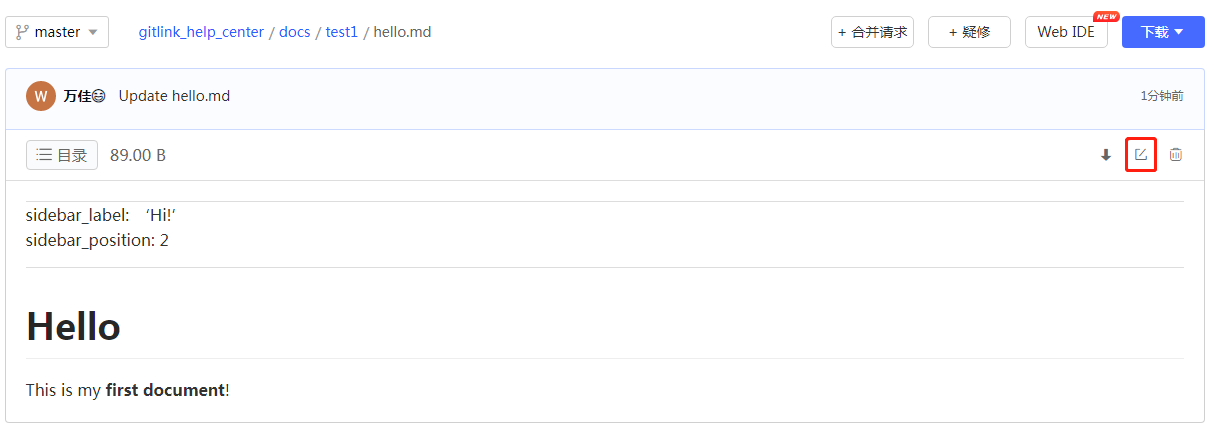
|
||||
|
||||
<br/>
|
||||
|
|
@ -36,7 +40,11 @@
|
|||
|
||||
<br/>
|
||||
|
||||
<<<<<<< HEAD
|
||||
2.如下图左边为帮助中心侧边栏点击一级目录"Test1"后展开效果,右边为点击代码仓库文件夹"test1"后md文件目录:
|
||||
=======
|
||||
2.如下图左边为帮助中心侧边栏点击一级目录“Test1”后展开效果,右边为点击代码仓库文件夹“test1”后md文件目录:
|
||||
>>>>>>> e71054291333eb7aba4da5374b52b277ae0146b5
|
||||
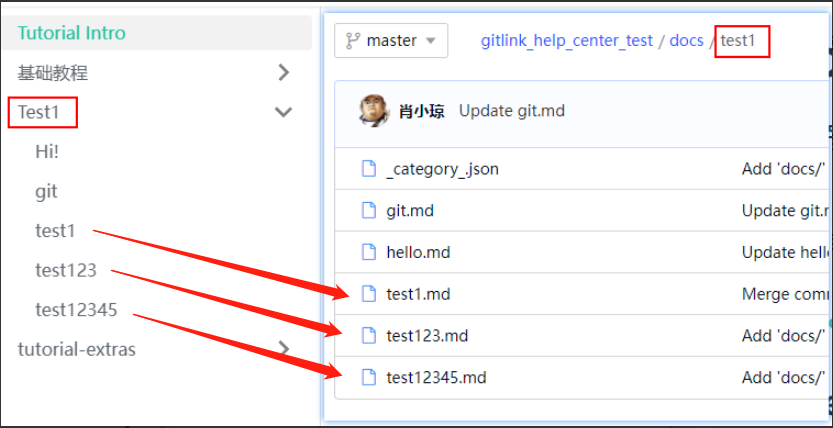
|
||||
|
||||
## 创建markdown文档
|
||||
|
|
@ -101,7 +109,21 @@
|
|||
npm run dev
|
||||
```
|
||||
|
||||
这是在Gitee上添加的测试内容
|
||||
|
||||
<<<<<<< HEAD
|
||||
## 新增功能特性
|
||||
|
||||
### 1. 文档目录导航功能
|
||||
在每个文档页面右侧添加了目录导航组件,显示当前文档的所有标题,方便用户快速跳转到需要的部分。目录会根据滚动位置自动高亮当前阅读的章节。
|
||||
|
||||
### 2. 返回顶部按钮
|
||||
添加了固定的返回顶部按钮,当页面滚动超过一定距离时会显示在右下角,点击可以平滑滚动回页面顶部,提升长文档的阅读体验。
|
||||
|
||||
### 如何使用新功能
|
||||
这些功能会在页面加载时自动启用,无需额外配置。目录导航在桌面设备上显示,在移动设备上会自动隐藏以节省空间。
|
||||
|
||||
=======
|
||||
>>>>>>> e71054291333eb7aba4da5374b52b277ae0146b5
|
||||
|
||||
|
||||
|
||||

|
||||
|
|
|
|||
|
|
@ -5,6 +5,7 @@ sidebar_position: 5
|
|||
# 代码流水线
|
||||
可以通过代码的形式(YAML格式)来配置流水线,首先选择代码流水线和对应的分支:
|
||||
|
||||
<<<<<<< HEAD
|
||||

|
||||
|
||||
编辑流水线代码,其流水线名称描述、触发器、全局参数、执行串行/并发和流水线编排等概念同图形流水线,具体描述如下:
|
||||
|
|
@ -324,4 +325,11 @@ jobs:
|
|||
4. **密钥管理**:敏感信息使用密钥管理,避免硬编码
|
||||
5. **注释**:添加适当注释,提高可读性
|
||||
6. **错误处理**:添加适当的错误处理和重试机制
|
||||
7. **通知机制**:配置通知,及时了解流水线执行状态
|
||||
7. **通知机制**:配置通知,及时了解流水线执行状态
|
||||
=======
|
||||

|
||||
|
||||
编辑流水线代码,其流水线名称描述、触发器、全局参数、执行串行/并发和流水线编排等概念同图形流水线,具体描述如下:
|
||||
|
||||

|
||||
>>>>>>> e71054291333eb7aba4da5374b52b277ae0146b5
|
||||
|
|
|
|||
|
|
@ -3,15 +3,24 @@ sidebar_label: '参数配置'
|
|||
sidebar_position: 2
|
||||
---
|
||||
|
||||
<<<<<<< HEAD
|
||||
# 参数配置
|
||||
|
||||
可在流水线中使用,实现动态参数配置;有字符串、数字、布尔三种类型。
|
||||
|
||||

|
||||
=======
|
||||
# 参数配置
|
||||
|
||||
可在流水线中使用,实现动态参数配置;有字符串、数字、布尔三种类型。
|
||||
|
||||

|
||||
>>>>>>> e71054291333eb7aba4da5374b52b277ae0146b5
|
||||
|
||||
|
||||
在流水线的配置中通过如下方式获取参数:
|
||||
|
||||
<<<<<<< HEAD
|
||||

|
||||
|
||||
## 参数类型详解
|
||||
|
|
@ -178,4 +187,7 @@ jobs:
|
|||
### 敏感信息处理
|
||||
|
||||
- 不要在参数中存储敏感信息(如密码、令牌)
|
||||
- 敏感信息应使用密钥管理功能
|
||||
- 敏感信息应使用密钥管理功能
|
||||
=======
|
||||

|
||||
>>>>>>> e71054291333eb7aba4da5374b52b277ae0146b5
|
||||
|
|
|
|||
|
|
@ -9,21 +9,33 @@ sidebar_position: 4
|
|||
|
||||
同一仓库下的流水线名称不能重复
|
||||
|
||||
<<<<<<< HEAD
|
||||

|
||||
=======
|
||||

|
||||
>>>>>>> e71054291333eb7aba4da5374b52b277ae0146b5
|
||||
|
||||
## 触发器
|
||||
注:流水线编排时,触发器要放在开始节点之前;目前一条流水线仅添加支持一个触发器
|
||||
|
||||
* 定时触发器cron:可通过填写cron表达式设置触发的具体时间
|
||||
<<<<<<< HEAD
|
||||

|
||||
|
||||
* 事件触发器GitLink_Webhook:给出了常见的代码变更事件触发,包括推送代码、合并请求、创建标签
|
||||

|
||||
=======
|
||||

|
||||
|
||||
* 事件触发器GitLink_Webhook:给出了常见的代码变更事件触发,包括推送代码、合并请求、创建标签
|
||||

|
||||
>>>>>>> e71054291333eb7aba4da5374b52b277ae0146b5
|
||||
|
||||
## 全局参数
|
||||
|
||||
添加后可在当前流水线中使用
|
||||
|
||||
<<<<<<< HEAD
|
||||

|
||||
|
||||
使用实例
|
||||
|
|
@ -41,17 +53,37 @@ sidebar_position: 4
|
|||
若未开启,则当前流水线实例执行中,后面的实例处于排队状态(最多可排队5个实例)。当前实例执行完成,下一个实例开始执行。
|
||||
|
||||

|
||||
=======
|
||||

|
||||
|
||||
使用实例
|
||||
|
||||

|
||||
|
||||
## 并发执行
|
||||
|
||||

|
||||
|
||||
开启后,同一流水线可同时并发执行n个流水线实例(每触发一次我们得到一个流水线实例);
|
||||
|
||||

|
||||
|
||||
若未开启,则当前流水线实例执行中,后面的实例处于排队状态(最多可排队5个实例)。当前实例执行完成,下一个实例开始执行。
|
||||
|
||||

|
||||
>>>>>>> e71054291333eb7aba4da5374b52b277ae0146b5
|
||||
|
||||
|
||||
## 流水线编排
|
||||
|
||||
每条流水线必须要有一个开始节点、结束节点,至少一个任务节点。支持串行编排和并行编排。
|
||||
|
||||
<<<<<<< HEAD
|
||||
### 串行编排
|
||||
|
||||
串行编排是指流水线中的任务按顺序一个接一个执行,当前任务完成后,下一个任务才会开始。这是最基本的流水线执行方式,适合有明确依赖关系的任务。
|
||||
|
||||
<!--  -->
|
||||

|
||||
|
||||
**如何创建串行流水线**:
|
||||
1. 在流水线编辑界面,点击左侧工具栏中的"开始"节点,拖拽到画布上
|
||||
|
|
@ -72,7 +104,7 @@ sidebar_position: 4
|
|||
|
||||
并行编排允许多个任务同时执行,适用于相互独立的任务,可以显著提高流水线的执行效率。
|
||||
|
||||
<!--  -->
|
||||

|
||||
|
||||
**如何创建并行流水线**:
|
||||
1. 在流水线编辑界面创建开始节点
|
||||
|
|
@ -94,7 +126,7 @@ sidebar_position: 4
|
|||
|
||||
在实际应用中,通常会结合使用串行和并行编排,根据任务的依赖关系灵活设计流水线结构。
|
||||
|
||||
<!--  -->
|
||||

|
||||
|
||||
**混合编排示例**:
|
||||
1. 代码检出(串行)
|
||||
|
|
@ -131,4 +163,6 @@ GitLink DevOps引擎提供多种预定义节点类型,满足不同场景需求
|
|||
4. **资源限制**:根据任务需求合理设置CPU和内存限制
|
||||
5. **日志管理**:配置重要日志的保存策略
|
||||
|
||||
=======
|
||||
>>>>>>> e71054291333eb7aba4da5374b52b277ae0146b5
|
||||
|
||||
|
|
|
|||
|
|
@ -3,16 +3,25 @@ sidebar_label: '密钥设置'
|
|||
sidebar_position: 3
|
||||
---
|
||||
|
||||
<<<<<<< HEAD
|
||||
# 密钥设置
|
||||
|
||||
将账号密码、密钥、证书等存放到密钥管理里,配置后可直接在流水线中使用,避免因直接填写引起的泄露风险。
|
||||
|
||||

|
||||
=======
|
||||
# 密钥设置
|
||||
|
||||
将账号密码、密钥、证书等存放到密钥管理里,配置后可直接在流水线中使用,避免因直接填写引起的泄露风险。
|
||||
|
||||

|
||||
>>>>>>> e71054291333eb7aba4da5374b52b277ae0146b5
|
||||
|
||||
使用示例
|
||||
|
||||
注:节点输入参数中,下拉选项为密钥类型,需要提前配置好密钥在流水线中选择使用
|
||||
|
||||
<<<<<<< HEAD
|
||||

|
||||
|
||||
## 密钥类型
|
||||
|
|
@ -199,4 +208,7 @@ GitLink DevOps引擎提供细粒度的密钥权限管理,确保敏感信息的
|
|||
**解决方法**:
|
||||
- 重新生成并配置密钥
|
||||
- 确保使用正确的格式和编码
|
||||
- 使用密钥测试功能验证
|
||||
- 使用密钥测试功能验证
|
||||
=======
|
||||

|
||||
>>>>>>> e71054291333eb7aba4da5374b52b277ae0146b5
|
||||
|
|
|
|||
|
|
@ -8,6 +8,10 @@ sidebar_position: 1
|
|||
引擎(Engine)是GitLink提供的一款DevOps工具,通过简单的节点编排来构建开发、测试、部署流水线,从而创建自动化的软件交付流程。
|
||||
它可以实现持续的代码集成,让开发者能尽早发现质量问题,快速定位修复,提升软件开发效率和质量;自动化的代码扫描、编译打包、单元测试,把研发团队从重复的工作中解放出来,聚焦到更有价值的事情上。
|
||||
|
||||
<<<<<<< HEAD
|
||||

|
||||
=======
|
||||

|
||||
>>>>>>> e71054291333eb7aba4da5374b52b277ae0146b5
|
||||
|
||||
在引擎页面中,用户可以创建和编辑图形流水线或代码流水线、设置外部参数、管理密钥等操作。
|
||||
|
|
@ -3,6 +3,7 @@ sidebar_label: '执行记录查询'
|
|||
sidebar_position: 6
|
||||
---
|
||||
|
||||
<<<<<<< HEAD
|
||||
# 执行记录查询
|
||||
|
||||
用户可以查看流水线的运行状态
|
||||
|
|
@ -158,4 +159,11 @@ sidebar_position: 6
|
|||
- 从执行日志中查找错误信息
|
||||
- 比较成功和失败的执行记录
|
||||
- 检查环境和参数差异
|
||||
- 分析节点执行时间异常的原因
|
||||
- 分析节点执行时间异常的原因
|
||||
=======
|
||||
# 执行记录查询
|
||||
|
||||
用户可以查看流水线的运行状态
|
||||
|
||||

|
||||
>>>>>>> e71054291333eb7aba4da5374b52b277ae0146b5
|
||||
|
|
|
|||
|
|
@ -1,7 +1,5 @@
|
|||
const lightCodeTheme = require('prism-react-renderer/themes/github');
|
||||
const darkCodeTheme = require('prism-react-renderer/themes/dracula');
|
||||
const path = require('path');
|
||||
const fs = require('fs');
|
||||
import("@easyops-cn/docusaurus-search-local").PluginOptions;
|
||||
|
||||
/** @type {import('@docusaurus/types').DocusaurusConfig} */
|
||||
|
|
@ -17,42 +15,8 @@ module.exports = {
|
|||
projectName: 'docusaurus-luffyzh-website', // Usually your repo name.
|
||||
scripts: [],
|
||||
// stylesheets: ['styles/dark-mode.css'],
|
||||
plugins: [
|
||||
// 添加API路由
|
||||
function apiRoutes(context, options) {
|
||||
return {
|
||||
name: 'api-routes-plugin',
|
||||
configureWebpack(config, isServer, utils) {
|
||||
return {
|
||||
resolve: {
|
||||
alias: {
|
||||
// 添加API路径别名
|
||||
'@api': path.resolve(__dirname, 'api'),
|
||||
},
|
||||
},
|
||||
};
|
||||
},
|
||||
|
||||
// 添加API路由处理
|
||||
async postBuild({ routesPaths = [], outDir }) {
|
||||
// 创建API目录
|
||||
const apiOutDir = path.join(outDir, 'api');
|
||||
if (!fs.existsSync(apiOutDir)) {
|
||||
fs.mkdirSync(apiOutDir);
|
||||
}
|
||||
|
||||
// 复制反馈数据文件到构建目录
|
||||
const dataFilePath = path.join(process.cwd(), 'feedback-data.json');
|
||||
if (fs.existsSync(dataFilePath)) {
|
||||
fs.copyFileSync(dataFilePath, path.join(outDir, 'feedback-data.json'));
|
||||
} else {
|
||||
fs.writeFileSync(path.join(outDir, 'feedback-data.json'), '[]', 'utf8');
|
||||
}
|
||||
},
|
||||
};
|
||||
},
|
||||
],
|
||||
themeConfig: {
|
||||
|
||||
docs:{
|
||||
sidebar:{
|
||||
hideable:true,
|
||||
|
|
@ -106,11 +70,6 @@ module.exports = {
|
|||
position: 'left',
|
||||
dropdownActiveClassDisabled: true
|
||||
},
|
||||
{
|
||||
to: '/feedback-management',
|
||||
label: '反馈管理',
|
||||
position: 'right',
|
||||
},
|
||||
// {
|
||||
// href: 'https://github.com/boxyhq',
|
||||
// position: 'right',
|
||||
|
|
@ -225,4 +184,4 @@ module.exports = {
|
|||
defaultLocale: 'zh-cn',
|
||||
locales: ['zh-cn'],
|
||||
},
|
||||
};
|
||||
};
|
||||
|
|
|
|||
|
|
@ -0,0 +1 @@
|
|||
23e041136cc43bcfa244f806799f5640
|
||||
|
|
@ -1 +0,0 @@
|
|||
测试同步详细日志增强功能
|
||||
|
|
@ -1,7 +0,0 @@
|
|||
@echo off
|
||||
echo 正在下载Node.js安装程序...
|
||||
powershell -Command "Invoke-WebRequest -Uri https://nodejs.org/dist/v20.11.1/node-v20.11.1-x64.msi -OutFile node-installer.msi"
|
||||
echo 下载完成,正在安装Node.js...
|
||||
start /wait msiexec /i node-installer.msi /quiet /norestart
|
||||
echo 安装完成,请重新打开命令提示符或PowerShell以使用Node.js和npm。
|
||||
pause
|
||||
|
|
@ -1,4 +0,0 @@
|
|||
@echo off
|
||||
set PATH=%PATH%;C:\nodejs
|
||||
cd /d %~dp0
|
||||
npm install
|
||||
BIN
nvm-setup.exe
88
package.json
|
|
@ -1,42 +1,46 @@
|
|||
{
|
||||
"name": "docusaurus",
|
||||
"version": "0.0.0",
|
||||
"private": true,
|
||||
"scripts": {
|
||||
"docusaurus": "docusaurus",
|
||||
"start": "docusaurus start",
|
||||
"build": "docusaurus build",
|
||||
"swizzle": "docusaurus swizzle",
|
||||
"deploy": "docusaurus deploy",
|
||||
"clear": "docusaurus clear",
|
||||
"serve": "docusaurus serve",
|
||||
"write-translations": "docusaurus write-translations",
|
||||
"write-heading-ids": "docusaurus write-heading-ids",
|
||||
"dev": "docusaurus start --port 3000"
|
||||
},
|
||||
"dependencies": {
|
||||
"@docusaurus/core": "2.4.1",
|
||||
"@docusaurus/preset-classic": "2.4.1",
|
||||
"@easyops-cn/docusaurus-search-local": "^0.35.0",
|
||||
"@mdx-js/react": "^1.6.22",
|
||||
"body-parser": "^1.20.2",
|
||||
"clsx": "^1.2.1",
|
||||
"docusaurus-plugin-image-zoom": "^1.0.1",
|
||||
"express": "^4.18.2",
|
||||
"prism-react-renderer": "^1.3.5",
|
||||
"react": "^17.0.2",
|
||||
"react-dom": "^17.0.2"
|
||||
},
|
||||
"browserslist": {
|
||||
"production": [
|
||||
">0.5%",
|
||||
"not dead",
|
||||
"not op_mini all"
|
||||
],
|
||||
"development": [
|
||||
"last 1 chrome version",
|
||||
"last 1 firefox version",
|
||||
"last 1 safari version"
|
||||
]
|
||||
}
|
||||
}
|
||||
{
|
||||
"name": "docusaurus",
|
||||
"version": "0.0.0",
|
||||
"private": true,
|
||||
"scripts": {
|
||||
"docusaurus": "docusaurus",
|
||||
"dev": "docusaurus start --port 3000",
|
||||
"build": "docusaurus build",
|
||||
"swizzle": "docusaurus swizzle",
|
||||
"deploy": "docusaurus deploy",
|
||||
"clear": "docusaurus clear",
|
||||
"serve": "docusaurus serve",
|
||||
"write-translations": "docusaurus write-translations",
|
||||
"write-heading-ids": "docusaurus write-heading-ids"
|
||||
},
|
||||
"dependencies": {
|
||||
"@cmfcmf/docusaurus-search-local": "1.1.0",
|
||||
"@docusaurus/core": "2.4.1",
|
||||
"@docusaurus/plugin-client-redirects": "2.4.1",
|
||||
"@docusaurus/preset-classic": "2.4.1",
|
||||
"@easyops-cn/docusaurus-search-local": "^0.35.0",
|
||||
"@mdx-js/react": "1.6.22",
|
||||
"@node-rs/jieba": "^1.7.0",
|
||||
"clsx": "1.2.1",
|
||||
"docusaurus-gtm-plugin": "0.0.2",
|
||||
"docusaurus-plugin-image-zoom": "1.0.1",
|
||||
"react": "17.0.2",
|
||||
"react-dom": "17.0.2",
|
||||
"react-modal": "3.16.1"
|
||||
},
|
||||
"browserslist": {
|
||||
"production": [
|
||||
">0.5%",
|
||||
"not dead",
|
||||
"not op_mini all"
|
||||
],
|
||||
"development": [
|
||||
"last 1 chrome version",
|
||||
"last 1 firefox version",
|
||||
"last 1 safari version"
|
||||
]
|
||||
},
|
||||
"engines": {
|
||||
"node": ">=14.18.1 <=18.x"
|
||||
}
|
||||
}
|
||||
|
|
|
|||
|
|
@ -1,43 +0,0 @@
|
|||
{
|
||||
"name": "docusaurus",
|
||||
"version": "0.0.0",
|
||||
"private": true,
|
||||
"scripts": {
|
||||
"docusaurus": "docusaurus",
|
||||
"start": "docusaurus start",
|
||||
"build": "docusaurus build",
|
||||
"swizzle": "docusaurus swizzle",
|
||||
"deploy": "docusaurus deploy",
|
||||
"clear": "docusaurus clear",
|
||||
"serve": "docusaurus serve",
|
||||
"write-translations": "docusaurus write-translations",
|
||||
"write-heading-ids": "docusaurus write-heading-ids",
|
||||
"dev": "docusaurus start --port 3000",
|
||||
|
||||
},
|
||||
"dependencies": {
|
||||
"@docusaurus/core": "2.4.1",
|
||||
"@docusaurus/preset-classic": "2.4.1",
|
||||
"@easyops-cn/docusaurus-search-local": "^0.35.0",
|
||||
"@mdx-js/react": "^1.6.22",
|
||||
"body-parser": "^1.20.2",
|
||||
"clsx": "^1.2.1",
|
||||
"docusaurus-plugin-image-zoom": "^1.0.1",
|
||||
"express": "^4.18.2",
|
||||
"prism-react-renderer": "^1.3.5",
|
||||
"react": "^17.0.2",
|
||||
"react-dom": "^17.0.2"
|
||||
},
|
||||
"browserslist": {
|
||||
"production": [
|
||||
">0.5%",
|
||||
"not dead",
|
||||
"not op_mini all"
|
||||
],
|
||||
"development": [
|
||||
"last 1 chrome version",
|
||||
"last 1 firefox version",
|
||||
"last 1 safari version"
|
||||
]
|
||||
}
|
||||
}
|
||||
|
|
@ -1,4 +0,0 @@
|
|||
@echo off
|
||||
set PATH=%PATH%;C:\nodejs
|
||||
cd /d %~dp0
|
||||
npm run dev
|
||||
|
|
@ -1,5 +0,0 @@
|
|||
@echo off
|
||||
echo 正在设置Node.js环境变量...
|
||||
setx PATH "%PATH%;C:\nodejs" /M
|
||||
echo 环境变量设置完成!请重新打开命令提示符或PowerShell以使更改生效。
|
||||
pause
|
||||
|
|
@ -1,178 +0,0 @@
|
|||
import React, { useState } from 'react';
|
||||
import styles from './styles.module.css';
|
||||
|
||||
export default function DocFeedback() {
|
||||
const [voted, setVoted] = useState(false);
|
||||
const [feedback, setFeedback] = useState('');
|
||||
const [showForm, setShowForm] = useState(false);
|
||||
const [submitted, setSubmitted] = useState(false);
|
||||
const [isSubmitting, setIsSubmitting] = useState(false);
|
||||
|
||||
// 获取当前页面URL作为文档标识
|
||||
const documentUrl = typeof window !== 'undefined' ? window.location.pathname : '';
|
||||
|
||||
const handleVote = (isHelpful) => {
|
||||
setVoted(true);
|
||||
setShowForm(!isHelpful);
|
||||
|
||||
// 发送投票结果到服务器
|
||||
if (typeof window !== 'undefined') {
|
||||
try {
|
||||
const feedbackData = {
|
||||
documentUrl: documentUrl,
|
||||
isHelpful: isHelpful,
|
||||
timestamp: new Date().toISOString(),
|
||||
feedbackType: 'vote'
|
||||
};
|
||||
|
||||
// 将反馈保存到localStorage以便在客户端保留记录
|
||||
const storedFeedbacks = JSON.parse(localStorage.getItem('docFeedbacks') || '[]');
|
||||
storedFeedbacks.push(feedbackData);
|
||||
localStorage.setItem('docFeedbacks', JSON.stringify(storedFeedbacks));
|
||||
|
||||
console.log(isHelpful ? '用户认为有帮助' : '用户认为没有帮助', feedbackData);
|
||||
|
||||
// 这里应该添加发送到服务器的代码
|
||||
// fetch('/api/feedback', {
|
||||
// method: 'POST',
|
||||
// headers: { 'Content-Type': 'application/json' },
|
||||
// body: JSON.stringify(feedbackData)
|
||||
// });
|
||||
} catch (error) {
|
||||
console.error('提交反馈时出错:', error);
|
||||
}
|
||||
}
|
||||
|
||||
if (isHelpful) {
|
||||
setTimeout(() => setVoted(false), 3000);
|
||||
}
|
||||
};
|
||||
|
||||
const handleSubmit = (e) => {
|
||||
e.preventDefault();
|
||||
setIsSubmitting(true);
|
||||
|
||||
// 发送详细反馈到服务器
|
||||
if (typeof window !== 'undefined') {
|
||||
try {
|
||||
const feedbackData = {
|
||||
documentUrl: documentUrl,
|
||||
feedback: feedback,
|
||||
timestamp: new Date().toISOString(),
|
||||
feedbackType: 'detailed'
|
||||
};
|
||||
|
||||
// 将反馈保存到localStorage以便在客户端保留记录
|
||||
const storedFeedbacks = JSON.parse(localStorage.getItem('docFeedbacks') || '[]');
|
||||
storedFeedbacks.push(feedbackData);
|
||||
localStorage.setItem('docFeedbacks', JSON.stringify(storedFeedbacks));
|
||||
|
||||
console.log('用户反馈:', feedbackData);
|
||||
|
||||
// 这里应该添加发送到服务器的代码
|
||||
// fetch('/api/feedback', {
|
||||
// method: 'POST',
|
||||
// headers: { 'Content-Type': 'application/json' },
|
||||
// body: JSON.stringify(feedbackData)
|
||||
// })
|
||||
// .then(response => response.json())
|
||||
// .then(data => {
|
||||
// setSubmitted(true);
|
||||
// setShowForm(false);
|
||||
// setIsSubmitting(false);
|
||||
// })
|
||||
// .catch(error => {
|
||||
// console.error('提交反馈时出错:', error);
|
||||
// setIsSubmitting(false);
|
||||
// });
|
||||
|
||||
// 模拟提交成功
|
||||
setTimeout(() => {
|
||||
setSubmitted(true);
|
||||
setShowForm(false);
|
||||
setIsSubmitting(false);
|
||||
|
||||
setTimeout(() => {
|
||||
setVoted(false);
|
||||
setFeedback('');
|
||||
setSubmitted(false);
|
||||
}, 3000);
|
||||
}, 500);
|
||||
} catch (error) {
|
||||
console.error('提交反馈时出错:', error);
|
||||
setIsSubmitting(false);
|
||||
}
|
||||
}
|
||||
};
|
||||
|
||||
return (
|
||||
<div className={styles.feedbackContainer}>
|
||||
{!voted && !submitted && (
|
||||
<div className={styles.feedbackQuestion}>
|
||||
<p>这篇文档对您有帮助吗?</p>
|
||||
<div className={styles.feedbackButtons}>
|
||||
<button
|
||||
onClick={() => handleVote(true)}
|
||||
className={styles.feedbackButton}
|
||||
>
|
||||
👍 有帮助
|
||||
</button>
|
||||
<button
|
||||
onClick={() => handleVote(false)}
|
||||
className={styles.feedbackButton}
|
||||
>
|
||||
👎 没有帮助
|
||||
</button>
|
||||
</div>
|
||||
</div>
|
||||
)}
|
||||
|
||||
{voted && !showForm && !submitted && (
|
||||
<div className={styles.feedbackThanks}>
|
||||
感谢您的反馈!
|
||||
</div>
|
||||
)}
|
||||
|
||||
{showForm && (
|
||||
<form onSubmit={handleSubmit} className={styles.feedbackForm}>
|
||||
<p>您希望如何改进这篇文档?</p>
|
||||
<textarea
|
||||
value={feedback}
|
||||
onChange={(e) => setFeedback(e.target.value)}
|
||||
placeholder="请告诉我们如何改进这篇文档..."
|
||||
rows={4}
|
||||
className={styles.feedbackTextarea}
|
||||
required
|
||||
/>
|
||||
<div className={styles.feedbackFormButtons}>
|
||||
<button
|
||||
type="submit"
|
||||
className={styles.submitButton}
|
||||
disabled={isSubmitting}
|
||||
>
|
||||
{isSubmitting ? '提交中...' : '提交反馈'}
|
||||
</button>
|
||||
<button
|
||||
type="button"
|
||||
onClick={() => {
|
||||
setShowForm(false);
|
||||
setVoted(false);
|
||||
}}
|
||||
className={styles.cancelButton}
|
||||
disabled={isSubmitting}
|
||||
>
|
||||
取消
|
||||
</button>
|
||||
</div>
|
||||
</form>
|
||||
)}
|
||||
|
||||
{submitted && (
|
||||
<div className={styles.feedbackThanks}>
|
||||
感谢您的宝贵反馈!我们会认真考虑您的建议。
|
||||
</div>
|
||||
)}
|
||||
</div>
|
||||
);
|
||||
}
|
||||
|
||||
|
|
@ -1,79 +0,0 @@
|
|||
.feedbackContainer {
|
||||
margin-top: 3rem;
|
||||
padding: 1.5rem;
|
||||
border-top: 1px solid var(--ifm-color-emphasis-200);
|
||||
}
|
||||
|
||||
.feedbackQuestion {
|
||||
display: flex;
|
||||
flex-direction: column;
|
||||
align-items: center;
|
||||
}
|
||||
|
||||
.feedbackButtons {
|
||||
display: flex;
|
||||
gap: 1rem;
|
||||
margin-top: 0.5rem;
|
||||
}
|
||||
|
||||
.feedbackButton {
|
||||
padding: 0.5rem 1rem;
|
||||
border: 1px solid var(--ifm-color-emphasis-300);
|
||||
border-radius: 4px;
|
||||
background: var(--ifm-color-emphasis-100);
|
||||
cursor: pointer;
|
||||
transition: all 0.2s ease;
|
||||
}
|
||||
|
||||
.feedbackButton:hover {
|
||||
background: var(--ifm-color-emphasis-200);
|
||||
}
|
||||
|
||||
.feedbackThanks {
|
||||
text-align: center;
|
||||
padding: 1rem;
|
||||
color: var(--ifm-color-success-dark);
|
||||
}
|
||||
|
||||
.feedbackForm {
|
||||
margin-top: 1rem;
|
||||
}
|
||||
|
||||
.feedbackTextarea {
|
||||
width: 100%;
|
||||
padding: 0.5rem;
|
||||
border: 1px solid var(--ifm-color-emphasis-300);
|
||||
border-radius: 4px;
|
||||
margin-bottom: 1rem;
|
||||
}
|
||||
|
||||
.feedbackFormButtons {
|
||||
display: flex;
|
||||
gap: 1rem;
|
||||
justify-content: flex-end;
|
||||
}
|
||||
|
||||
.submitButton {
|
||||
padding: 0.5rem 1rem;
|
||||
background: var(--ifm-color-primary);
|
||||
color: white;
|
||||
border: none;
|
||||
border-radius: 4px;
|
||||
cursor: pointer;
|
||||
}
|
||||
|
||||
.submitButton:hover {
|
||||
background: var(--ifm-color-primary-dark);
|
||||
}
|
||||
|
||||
.cancelButton {
|
||||
padding: 0.5rem 1rem;
|
||||
background: var(--ifm-color-emphasis-200);
|
||||
border: none;
|
||||
border-radius: 4px;
|
||||
cursor: pointer;
|
||||
}
|
||||
|
||||
.cancelButton:hover {
|
||||
background: var(--ifm-color-emphasis-300);
|
||||
}
|
||||
|
|
@ -1,78 +0,0 @@
|
|||
import React, { useState, useEffect } from 'react';
|
||||
import Layout from '@theme/Layout';
|
||||
|
||||
export default function FeedbackDashboard() {
|
||||
const [feedbacks, setFeedbacks] = useState([]);
|
||||
|
||||
useEffect(() => {
|
||||
// 从localStorage加载反馈
|
||||
const storedFeedbacks = JSON.parse(localStorage.getItem('docFeedbacks') || '[]');
|
||||
setFeedbacks(storedFeedbacks);
|
||||
}, []);
|
||||
|
||||
// 清除所有反馈
|
||||
const clearFeedbacks = () => {
|
||||
if (confirm('确定要清除所有反馈吗?')) {
|
||||
localStorage.setItem('docFeedbacks', '[]');
|
||||
setFeedbacks([]);
|
||||
}
|
||||
};
|
||||
|
||||
return (
|
||||
<Layout title="反馈管理">
|
||||
<div className="container margin-vert--lg">
|
||||
<h1>反馈管理</h1>
|
||||
|
||||
<div className="margin-bottom--lg">
|
||||
<h2>总计: {feedbacks.length} 条反馈</h2>
|
||||
{feedbacks.length > 0 && (
|
||||
<button
|
||||
onClick={clearFeedbacks}
|
||||
className="button button--danger"
|
||||
>
|
||||
清除所有反馈
|
||||
</button>
|
||||
)}
|
||||
</div>
|
||||
|
||||
<div className="card-demo margin-bottom--lg">
|
||||
<div className="card">
|
||||
<div className="card__header">
|
||||
<h3>反馈列表</h3>
|
||||
</div>
|
||||
<div className="card__body">
|
||||
{feedbacks.length === 0 ? (
|
||||
<p>暂无反馈数据</p>
|
||||
) : (
|
||||
<table className="table">
|
||||
<thead>
|
||||
<tr>
|
||||
<th>类型</th>
|
||||
<th>页面</th>
|
||||
<th>内容</th>
|
||||
<th>时间</th>
|
||||
</tr>
|
||||
</thead>
|
||||
<tbody>
|
||||
{feedbacks.map((feedback, index) => (
|
||||
<tr key={index}>
|
||||
<td>{feedback.type === 'vote' ? '投票' : '评论'}</td>
|
||||
<td>{feedback.page}</td>
|
||||
<td>
|
||||
{feedback.type === 'vote'
|
||||
? (feedback.isHelpful ? '👍 有帮助' : '👎 没有帮助')
|
||||
: feedback.content}
|
||||
</td>
|
||||
<td>{new Date(feedback.timestamp).toLocaleString('zh-CN')}</td>
|
||||
</tr>
|
||||
))}
|
||||
</tbody>
|
||||
</table>
|
||||
)}
|
||||
</div>
|
||||
</div>
|
||||
</div>
|
||||
</div>
|
||||
</Layout>
|
||||
);
|
||||
}
|
||||
|
|
@ -1,7 +0,0 @@
|
|||
---
|
||||
title: 反馈管理
|
||||
---
|
||||
|
||||
import FeedbackDashboard from '@site/src/pages/feedback-dashboard';
|
||||
|
||||
<FeedbackDashboard />
|
||||
|
|
@ -1,92 +0,0 @@
|
|||
import React, { useState, useEffect } from 'react';
|
||||
import Layout from '@theme/Layout';
|
||||
|
||||
export default function FeedbackManagement() {
|
||||
const [feedbacks, setFeedbacks] = useState([]);
|
||||
const [loading, setLoading] = useState(true);
|
||||
|
||||
useEffect(() => {
|
||||
// 从localStorage加载反馈数据
|
||||
if (typeof window !== 'undefined') {
|
||||
try {
|
||||
const storedFeedbacks = JSON.parse(localStorage.getItem('docFeedbacks') || '[]');
|
||||
setFeedbacks(storedFeedbacks);
|
||||
} catch (error) {
|
||||
console.error('加载反馈数据时出错:', error);
|
||||
} finally {
|
||||
setLoading(false);
|
||||
}
|
||||
}
|
||||
}, []);
|
||||
|
||||
// 清除所有反馈
|
||||
const handleClearFeedbacks = () => {
|
||||
if (typeof window !== 'undefined') {
|
||||
localStorage.removeItem('docFeedbacks');
|
||||
setFeedbacks([]);
|
||||
}
|
||||
};
|
||||
|
||||
// 解码URL
|
||||
const decodeDocumentUrl = (url) => {
|
||||
try {
|
||||
return decodeURIComponent(url);
|
||||
} catch (error) {
|
||||
console.error('URL解码失败:', error);
|
||||
return url;
|
||||
}
|
||||
};
|
||||
|
||||
return (
|
||||
<Layout title="反馈管理" description="查看文档反馈">
|
||||
<div className="container margin-vert--lg">
|
||||
<h1>反馈管理</h1>
|
||||
<p>总计: {feedbacks.length} 条反馈</p>
|
||||
|
||||
{loading ? (
|
||||
<p>加载中...</p>
|
||||
) : feedbacks.length > 0 ? (
|
||||
<>
|
||||
<button
|
||||
onClick={handleClearFeedbacks}
|
||||
className="button button--danger button--sm margin-bottom--md"
|
||||
>
|
||||
清除所有反馈
|
||||
</button>
|
||||
|
||||
<table className="table">
|
||||
<thead>
|
||||
<tr>
|
||||
<th>文档URL</th>
|
||||
<th>类型</th>
|
||||
<th>内容</th>
|
||||
<th>时间</th>
|
||||
</tr>
|
||||
</thead>
|
||||
<tbody>
|
||||
{feedbacks.map((feedback, index) => (
|
||||
<tr key={index}>
|
||||
<td>{decodeDocumentUrl(feedback.documentUrl)}</td>
|
||||
<td>
|
||||
{feedback.feedbackType === 'vote'
|
||||
? (feedback.isHelpful ? '[+] 有帮助' : '[-] 没有帮助')
|
||||
: '详细反馈'}
|
||||
</td>
|
||||
<td>
|
||||
{feedback.feedbackType === 'vote'
|
||||
? (feedback.isHelpful ? '有帮助' : '没有帮助')
|
||||
: feedback.feedback}
|
||||
</td>
|
||||
<td>{new Date(feedback.timestamp).toLocaleString()}</td>
|
||||
</tr>
|
||||
))}
|
||||
</tbody>
|
||||
</table>
|
||||
</>
|
||||
) : (
|
||||
<p>暂无反馈数据</p>
|
||||
)}
|
||||
</div>
|
||||
</Layout>
|
||||
);
|
||||
}
|
||||
|
|
@ -1,11 +0,0 @@
|
|||
|
||||
import React from 'react';
|
||||
import DocFeedback from '@site/src/components/DocFeedback';
|
||||
|
||||
export default function DocItemFooter() {
|
||||
return (
|
||||
<footer className="docusaurus-mt-lg">
|
||||
<DocFeedback />
|
||||
</footer>
|
||||
);
|
||||
}
|
||||
|
|
@ -1,11 +0,0 @@
|
|||
.lastUpdated {
|
||||
margin-top: 0.2rem;
|
||||
font-style: italic;
|
||||
font-size: smaller;
|
||||
}
|
||||
|
||||
@media (min-width: 997px) {
|
||||
.lastUpdated {
|
||||
text-align: right;
|
||||
}
|
||||
}
|
||||

|
Before Width: | Height: | Size: 5.5 KiB After Width: | Height: | Size: 5.5 KiB |

|
Before Width: | Height: | Size: 24 KiB After Width: | Height: | Size: 24 KiB |

|
Before Width: | Height: | Size: 62 KiB After Width: | Height: | Size: 62 KiB |

|
Before Width: | Height: | Size: 5.6 KiB After Width: | Height: | Size: 5.6 KiB |

|
Before Width: | Height: | Size: 151 KiB |

|
Before Width: | Height: | Size: 178 KiB |

|
Before Width: | Height: | Size: 233 KiB |

|
Before Width: | Height: | Size: 252 KiB |